 Mortise Apps
Issue Dependency chain panel
Last updated 2026-09-28
The Dependency chain panel on the issue view shows the graph centred on the issue you are looking at.
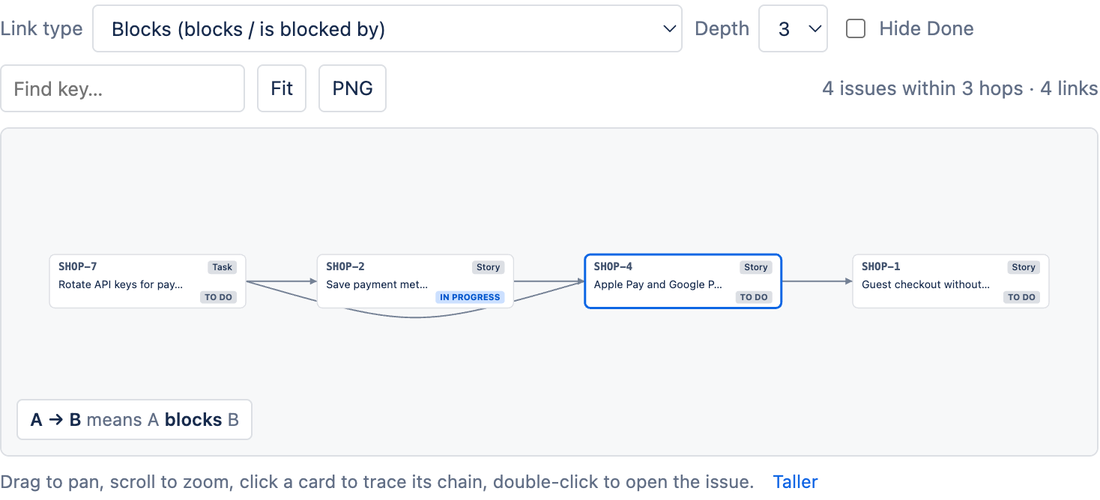
Controls
- Link type: same list as the project page; the project's remembered choice is used by default.
- Depth: how many hops to follow in each direction, 1 to 5 (default 3). Depth 1 shows only direct links; depth 5 usually shows the entire chain.
- Hide Done: drop finished issues and their links.
- Open full project view: jumps to the project's Dependencies page.
Reading it
- The current issue has a highlighted border. Everything to its left blocks it (directly or through other issues); everything to its right waits on it.
- Hover any card to trace that card's own chain; click to open it.
- The stats line shows how many issues are within the chosen depth and how many links connect them.
Empty state
"No Blocks links on ABC-123" means the issue has no link of the chosen type. Pick another type from the menu or add a link with Jira's Link work item action; the panel refreshes when you reload the issue.
Limits
- Up to 300 issues and 5 hops per panel. Deep webs of links stop expanding at that point; use the project page for the full picture.
- Cross-project links are followed (the panel is not limited to one project), subject to your permissions.
Was this page helpful? Email support@mortiseapps.com.