 Mortise Apps
 JiraIn review
TeamLens for Jira
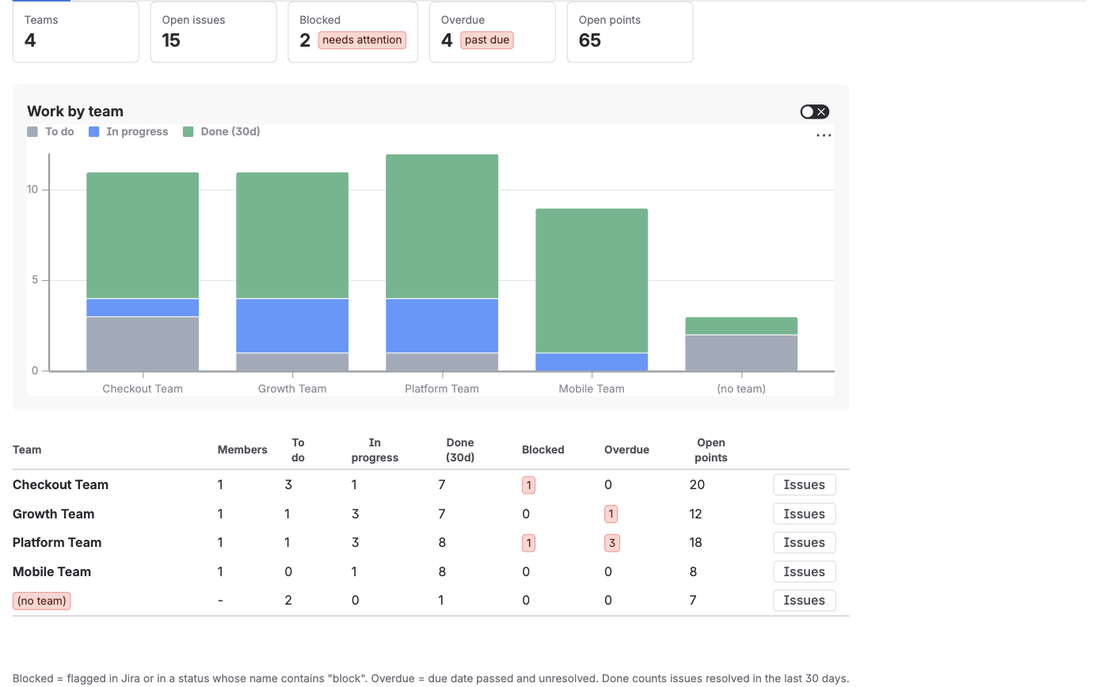
Makes the native Atlassian Team field reportable and searchable: team reports across projects, a dashboard gadget grouped by team, JQL by team name and a team panel on every issue.
Jira · 2 apps
Two apps for Jira Cloud, each closing one gap that teams hit every day. TeamLens makes the native Team field reportable and searchable; LinkLens draws issue links as a dependency graph. Both are built on Atlassian Forge, read data as the person using them and need no configuration to start.
The badge shows where each Atlassian Marketplace listing stands.
JiraIn review
Makes the native Atlassian Team field reportable and searchable: team reports across projects, a dashboard gadget grouped by team, JQL by team name and a team panel on every issue.
JiraIn review
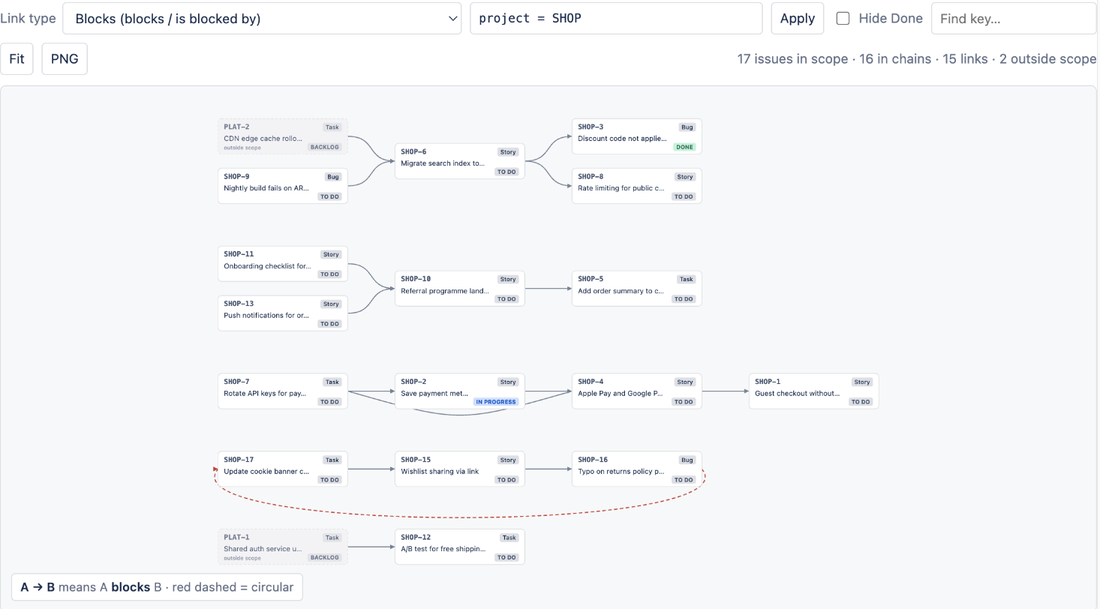
Draws issue links as a dependency graph: every blocker chain in a project on one canvas, circular dependencies in red, and the same chain on each issue.
Built on Atlassian Forge with no external servers and no outbound network access. Data is read as the viewing user, so Jira permissions always apply. TeamLens stores a team directory (ids and names) and LinkLens stores per-project display settings, both inside Atlassian's Forge storage on your site.
About the apps on Jira.
Jira Cloud only: Jira Software, Jira Work Management and Jira Service Management, in team-managed and company-managed projects. Jira Data Center is not supported because the apps are built on Forge.
No. Both run on Atlassian Forge inside Atlassian's infrastructure with no external servers and no outbound network access, and they read issues as the person using them. TeamLens stores only team ids and names, and LinkLens only per-project display settings, in Forge storage on your own site.
No. They are independent. TeamLens is for the Atlassian Team field (reports, a dashboard gadget, teamIn() and noTeam() in JQL); LinkLens is for issue links (a dependency graph of whole blocker chains). Install either one or both.
Free for sites with up to 10 users. Above that, TeamLens is USD 1 per user per month and LinkLens about USD 0.20 per user per month, with volume discounts, billed by Atlassian. Each has a 30-day free trial.
Questions teams asked, answered with sources: what Jira does natively, what it does not, and where an app fits.
JiraLinkLens for Jira
Jira draws dependencies one issue at a time unless you pay for Premium's Plans. What Free and Standard can do, what Plans adds, and where an app fits.
JiraTeamLens for Jira
Jira Cloud's Workload Pie Chart, Issue Statistics and board reports never group by the Atlassian Team field. Here is what a per-team workload view needs, how far native Jira gets, and how TeamLens reports it across projects.
JiraTeamLens for Jira
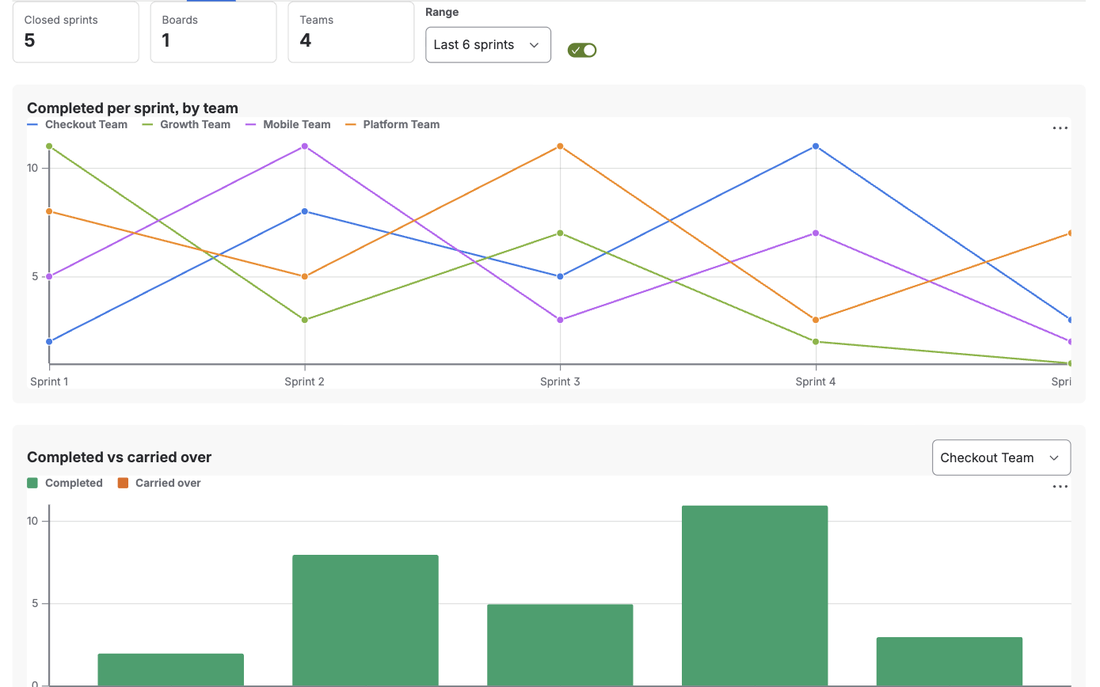
Jira's Velocity Chart belongs to one board, so a team that works across boards, or a board shared by teams, never gets a true velocity. Here is what velocity per team needs and how TeamLens computes it from the Sprint field.
JiraLinkLens for Jira
issueLinkType = "is blocked by" also returns work whose blocker is done. What JQL cannot do, the Automation fix, and how to see live blocker chains.
JiraTeamLens for Jira
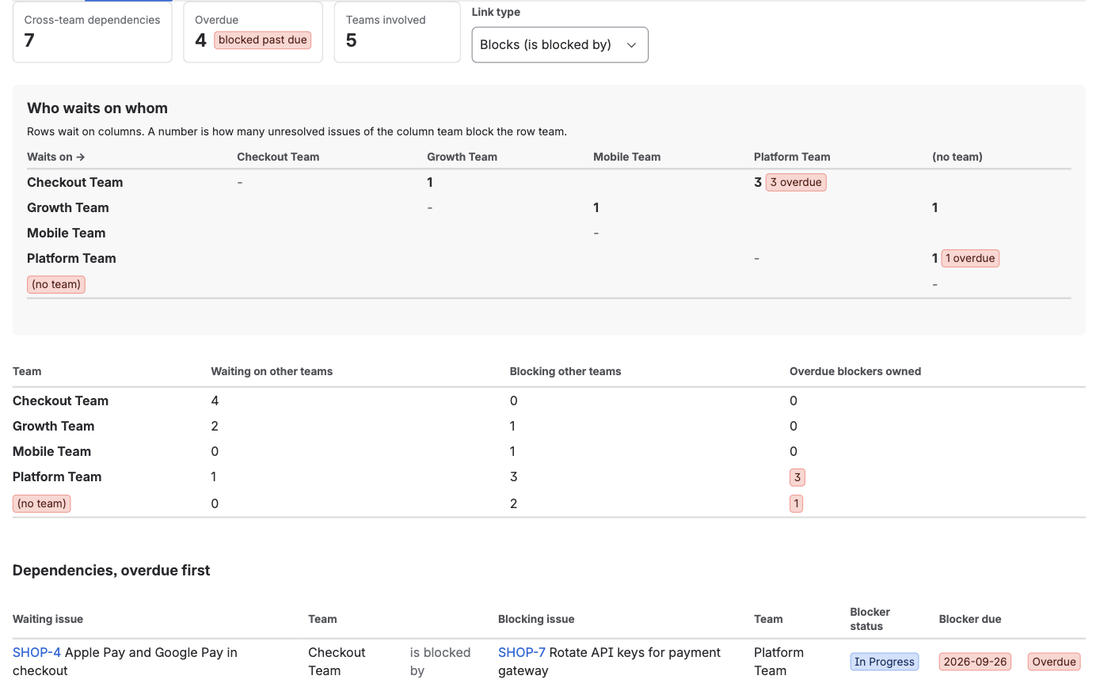
Jira records every "is blocked by" link but shows them one issue at a time. Here is how to turn issue links plus the Team field into a cross-team dependency report, what native Jira offers, and how TeamLens builds the matrix.
JiraLinkLens for Jira
Jira shows issue links one issue at a time. A blocker three hops away stays invisible until it is late. Here is how to see the whole chain.
The same approach, where else your team works.

Live Jira team reports and dependency maps in Confluence pages.

Every dependency chain on a board as one graph.

Next platform, in development.
Coming
Questions about the Jira apps: support@mortiseapps.com, reply within one business day. All products →