 Mortise Apps
 JiraIn review
TeamLens for Jira
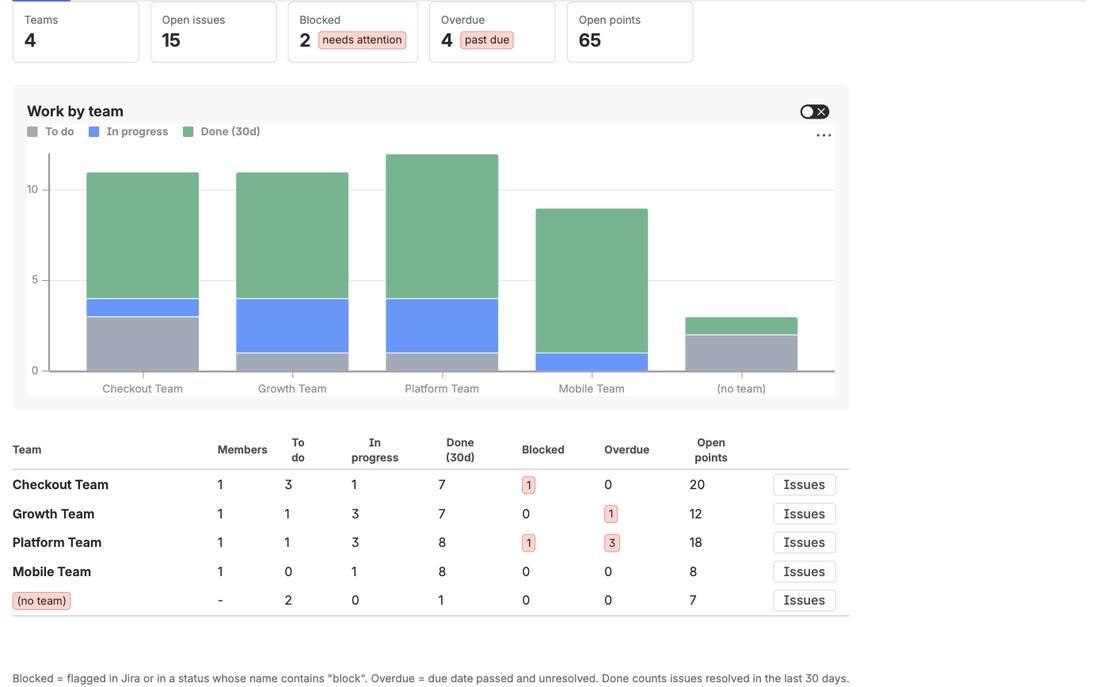
Makes the native Atlassian Team field reportable and searchable: team reports across projects, a dashboard gadget grouped by team, JQL by team name and a team panel on every issue.
Mortise Apps is an independent software studio. We build small apps that each close one gap in a work platform: today in Jira, Confluence and monday.com, next as a Chrome extension. Every app reads your data where it lives, as the person using it, and sends nothing to us.
Where the apps run today, and what is next.
Team reports and dependency graphs inside Jira Cloud.

Live Jira team reports and dependency maps in Confluence pages.

Every dependency chain on a board as one graph.

Next platform, in development.
Coming
Each app does one thing completely. The badge shows where its marketplace listing stands.
JiraAll Jira apps →JiraIn review
Makes the native Atlassian Team field reportable and searchable: team reports across projects, a dashboard gadget grouped by team, JQL by team name and a team panel on every issue.
JiraLive
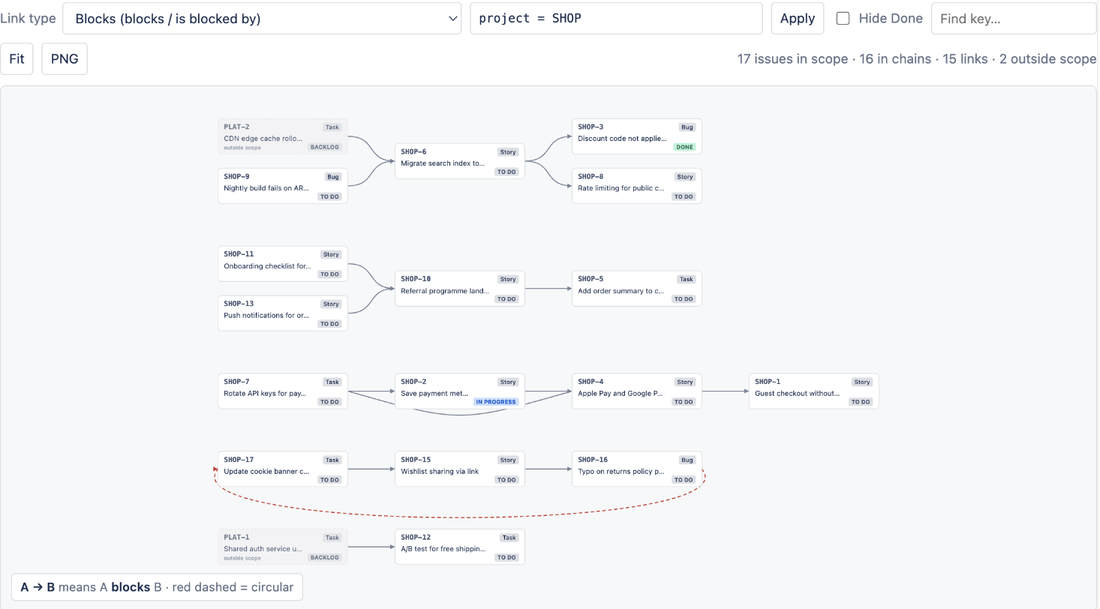
Draws issue links as a dependency graph: every blocker chain in a project on one canvas, circular dependencies in red, and the same chain on each issue.
JiraComing
AI agent guardrails, approvals and audit for Jira: Claude, ChatGPT, Cursor and Rovo agents get governed Jira tools, risky changes wait for a person, sensitive values are masked and every agent call is logged.
ConfluenceAll Confluence apps →ConfluenceLive
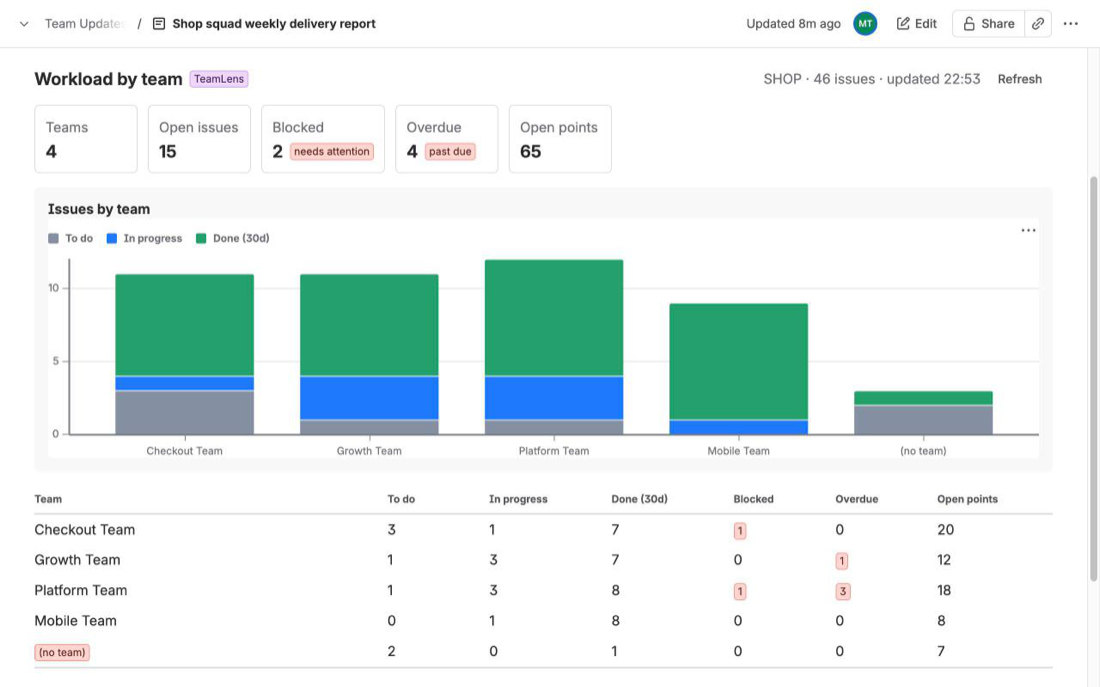
A macro that puts live Jira team reports into any Confluence page: workload, aging, hygiene, velocity and cross-team dependencies, grouped by the Atlassian Team field.
ConfluenceLive
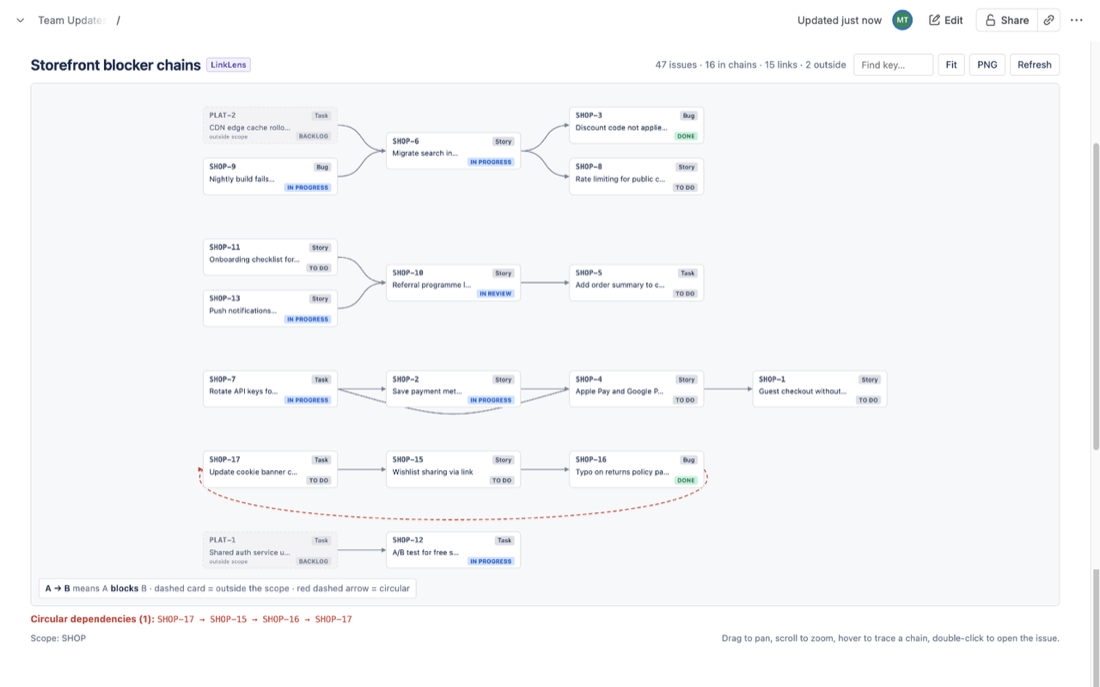
A macro that embeds the live Jira dependency graph in a Confluence page: blocker chains of one link type, loops in red, cross-project ends, PNG export.
 monday.comAll monday.com apps →
monday.comIn review
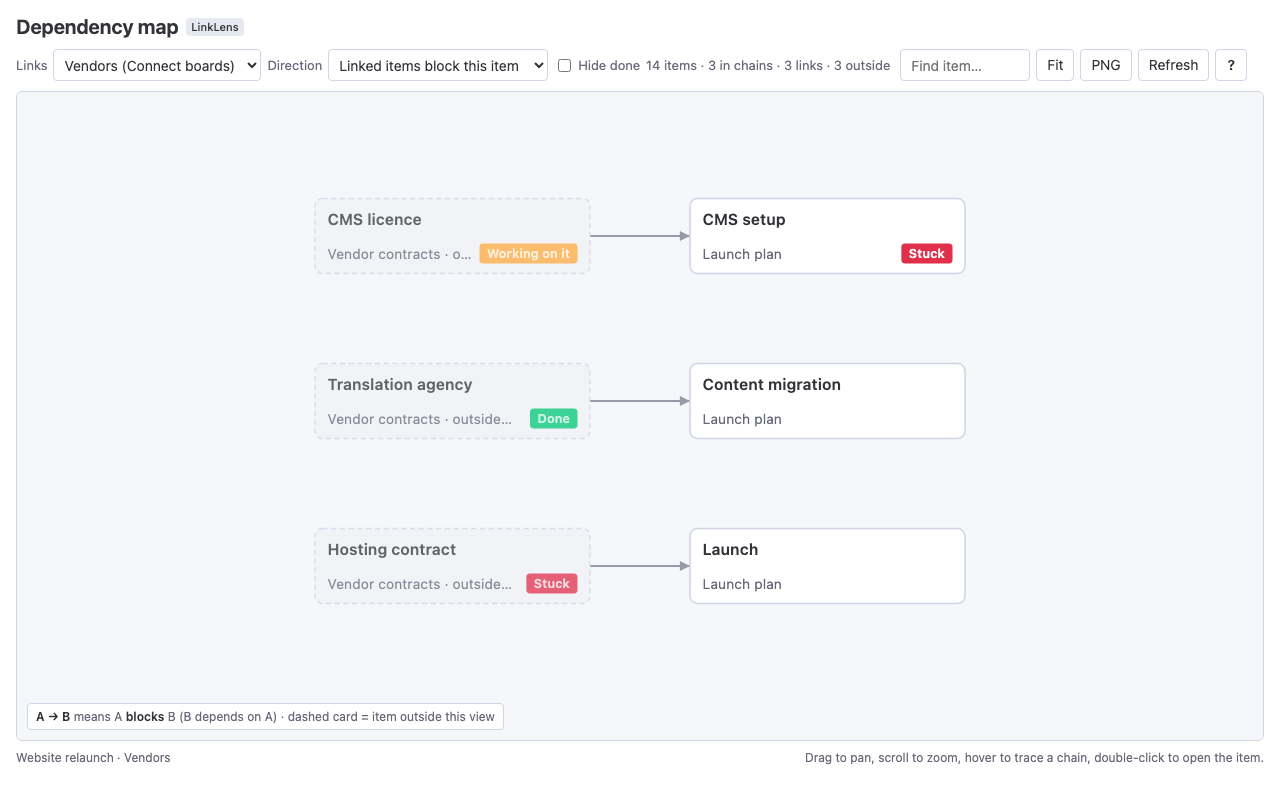
A monday.com board view that draws Dependency and Connect boards links as one graph: whole chains, loops in red, items on other boards, and a downloadable dependency health report.
A mortise is the slot that lets two pieces of wood join cleanly. We build the small pieces, the same way on every platform.
Each app solves one problem that platform users have asked about for years, and does it completely rather than half-way.
Our apps work on your data where it lives, as the person using them, so the platform's permissions always hold. The Atlassian apps run on Forge with no external servers; the monday.com view is calculated in your browser.
Every product page and docs site lists what the app cannot do. If a platform blocks a feature, we say so rather than hint at it.
Small teams pay nothing on the Atlassian apps, and paid tiers are a dollar or less per user. Our apps should never be the first thing cut from a budget.
Real questions from teams, worked through with sources.
ConfluenceTeamLens for Confluence
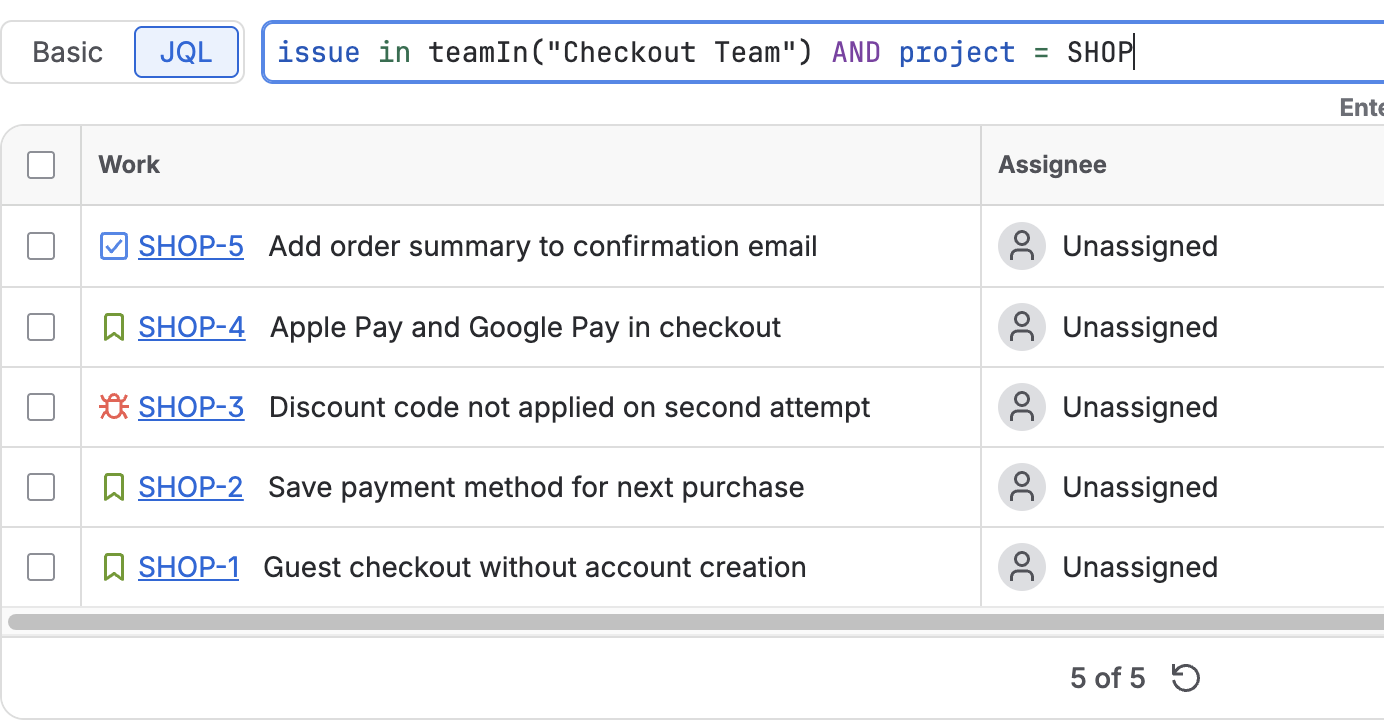
A JQL due-date filter in the Jira work items macro lists overdue work for one team at a time; the Jira chart macro's listed fields do not include Team. What works natively, the exact JQL, and a live overdue count per team. Checked 9 Nov 2026.
JiraTeamLens for Jira
Jira has swimlanes per assignee, epic or space, but none per team. Query swimlanes fill the gap: one JQL lane per Atlassian team. The menu path, the clauses, who can do it and the limits. Checked 8 Nov 2026.
monday.comLinkLens Dependency Map
monday.com cross-project dependencies link tasks across project boards on the Enterprise plan: the Dependent On column, FS/SS/FF/SF types, red conflicts in the Gantt view and a widget. Limits and the alternative for other plans. Checked 7 Nov 2026.
About the company, the platforms and the apps.
Mortise Apps is an independent software studio that builds small, focused apps for work platforms. Today that means TeamLens and LinkLens for Jira, their Confluence versions, and LinkLens Dependency Map for monday.com. A Chrome extension is the next platform, in development.
Nowhere outside your workspace. The Atlassian apps run on Atlassian Forge inside Atlassian's own infrastructure with no external servers and no outbound network access, which qualifies them for Atlassian's Runs on Atlassian programme. The monday.com view is calculated in your browser, and its Sidekick tool runs on monday code, monday.com's own hosting. Every app reads data as the person using it, so the platform's permissions always apply, and nothing is sent to Mortise Apps.
The Atlassian apps are free for sites with up to 10 users. Above that, TeamLens for Jira is USD 1 per user per month and LinkLens for Jira about USD 0.20 per user per month, with volume discounts, billed by Atlassian; each has a 30-day free trial. Prices for the Confluence apps and for the monday.com app are published on their marketplace listings once those are approved.
Jira Cloud (Jira Software, Jira Work Management and Jira Service Management, team-managed and company-managed projects), Confluence Cloud, and monday.com on any plan that has Dependency or Connect boards columns. Jira Data Center is not supported because the Atlassian apps are built on Forge.
TeamLens is used to report on and search by the native Atlassian Team field, which Jira's own dashboard gadgets and JQL do not support well. In Jira it adds team reports, a Team Statistics gadget, the teamIn() and noTeam() JQL functions and a team details panel; in Confluence it puts the same team reports into pages as a live macro.
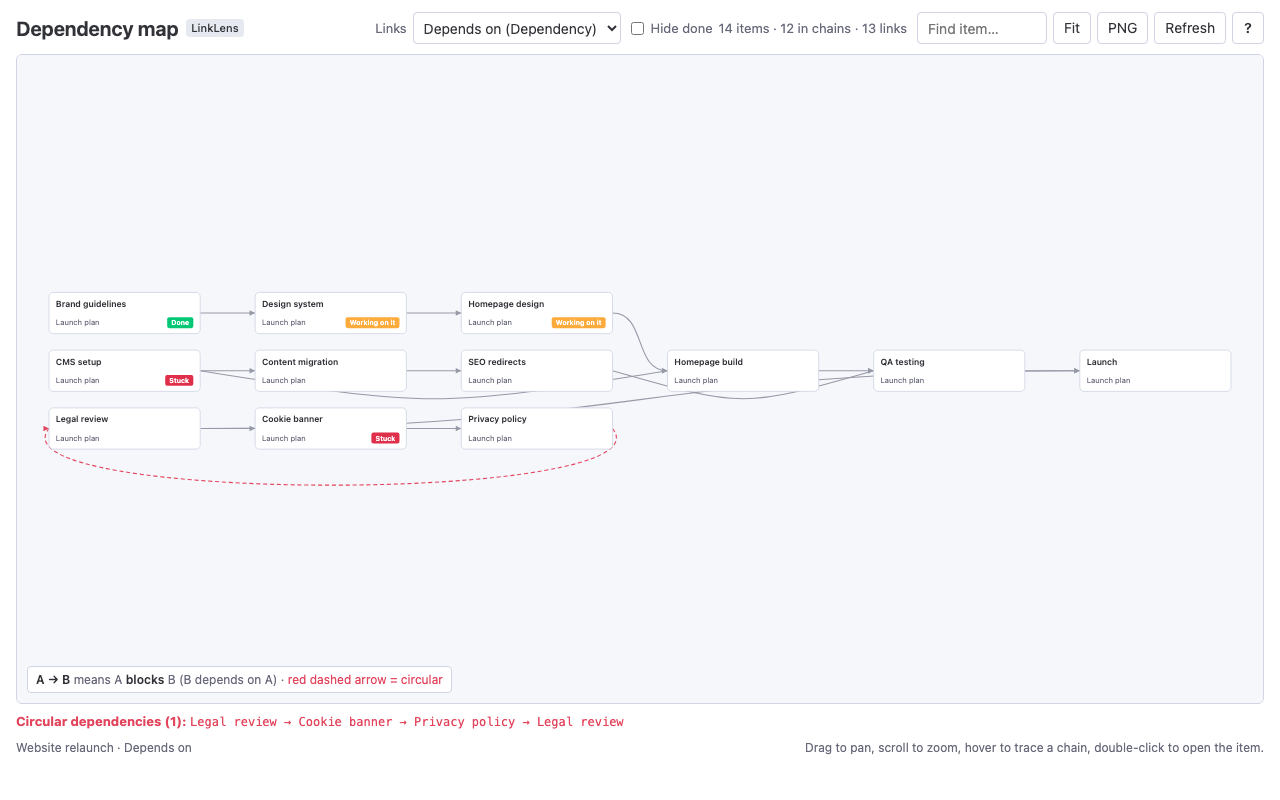
LinkLens is used to see dependency chains. In Jira, pick a link type such as blocks / is blocked by and it draws every chain in a project on one canvas, flags circular dependencies in red and shows the same chain on each issue; in Confluence the same graph is a live macro; on monday.com it is a board view over Dependency and Connect boards columns.
A Chrome extension is in development. It will be described here when it can be installed; we do not announce features before they exist.