 Mortise Apps
 TeamLens for Confluence
How to show Jira work by team in a Confluence status page
Confluence's Jira Issues and Jira Chart macros cannot group work by the Atlassian Team field. What they can do, the workarounds, and a live team report macro.
TeamLens for Confluence
TeamLens for Confluence is a Confluence Cloud app that puts Jira reports grouped by the native Atlassian Team field into any Confluence page. It is built for engineering managers, RTEs and delivery leads who write status pages in Confluence and need team numbers that are current every time someone opens the page.
One macro, five reports: Workload, Aging, Hygiene, Velocity and Dependencies, read live from Jira on the same site as the person viewing the page. An explicit (no team) row makes sure unowned work never disappears.
The short version for admins and procurement.
Confluence is where delivery gets discussed. Jira is where the Team field lives. Nothing joins the two.
The Jira Issues macro renders a list. Turning that into work per team means counting by hand, every week, for every status page.
Organisations record ownership in the Atlassian Team field, yet no built-in Confluence macro groups Jira work by it.
Screenshots and copied tables are out of date by the next stand-up, and nobody can tell which figure is current.
A copied table shows every reader the same issues. TeamLens reads Jira as each viewer, so nobody sees more than Jira would show them.
Five reports in one macro. Nothing is written to Jira or to your pages.
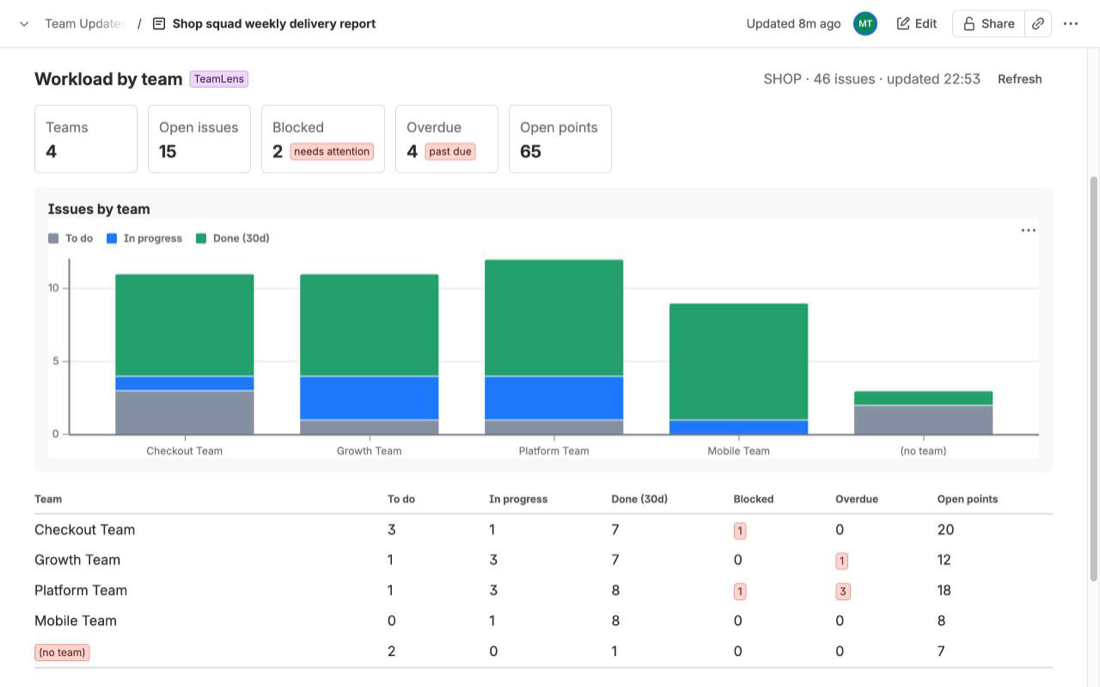
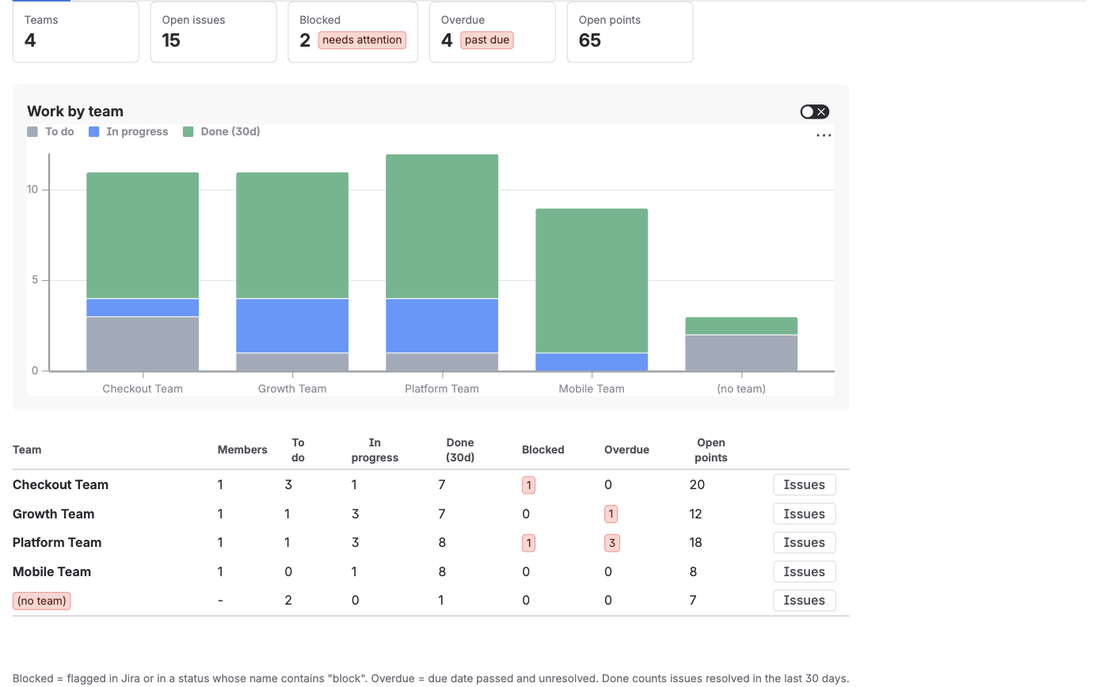
Drop the macro into a status page and see To do, In progress, recently done, blocked and overdue work for every Atlassian Team, plus open story points. It reads Jira live as the viewer, so the page never goes stale and never shows more than Jira would.
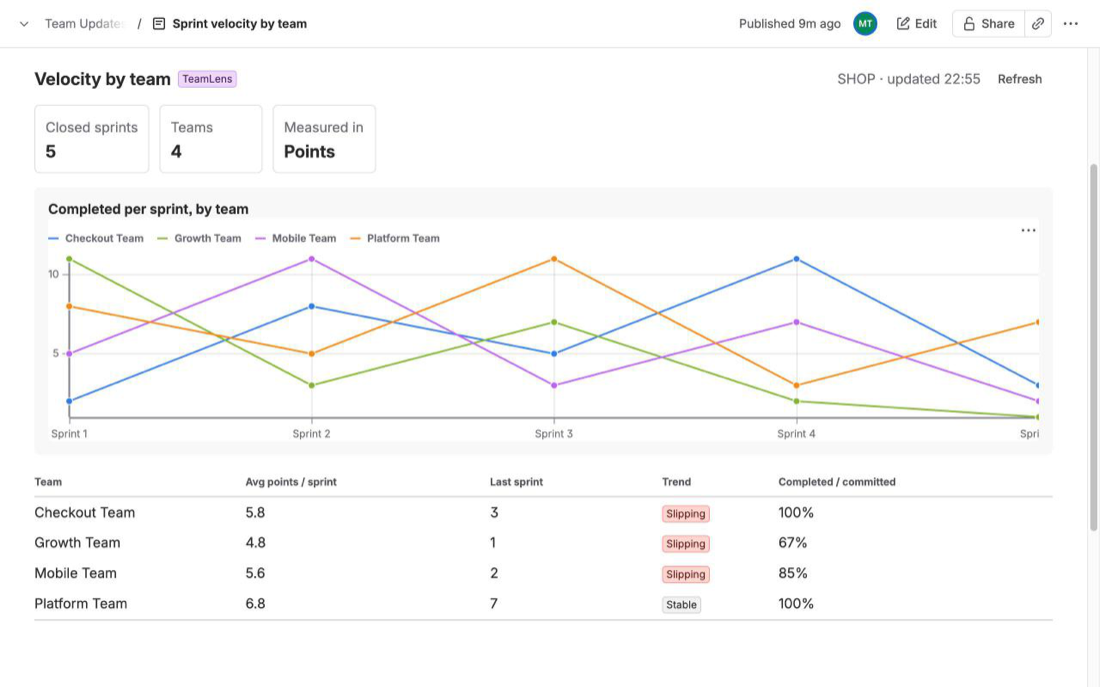
Completed versus committed work per team over the last 4 to 12 closed sprints, across every board in the scope, with the average, the last sprint and a trend (Improving, Stable, Slipping) per team.
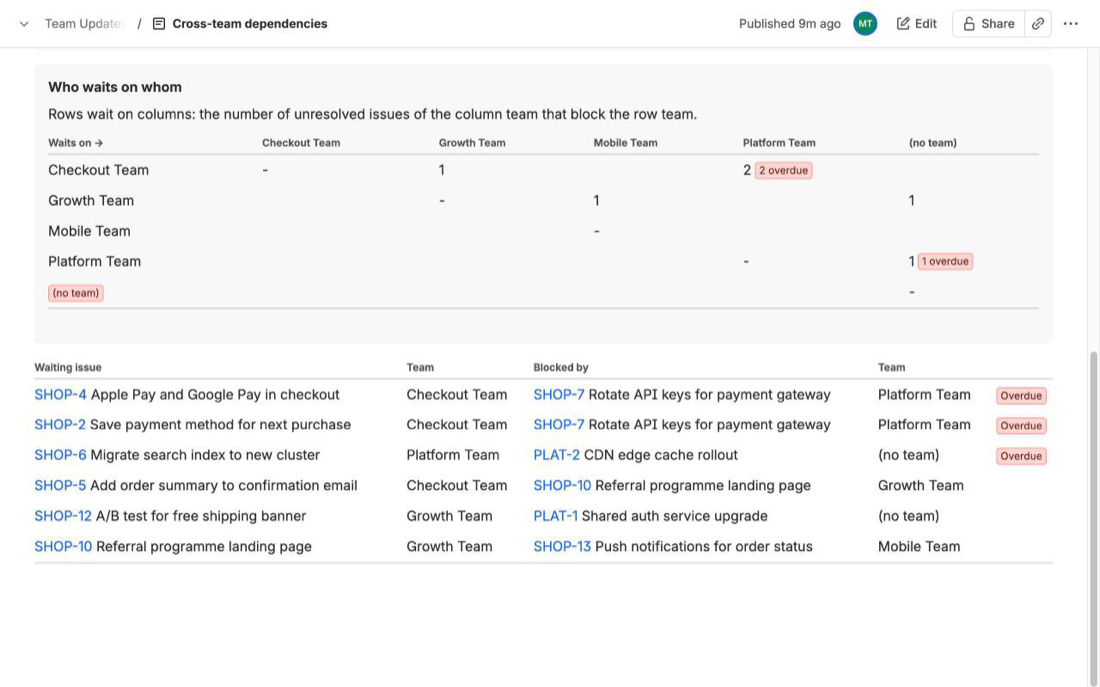
The Dependencies report keeps only unresolved links between issues owned by different teams. Rows wait on columns, overdue blockers are flagged, and the list below puts overdue pairs first. Pick the link type; Blocks is the default.
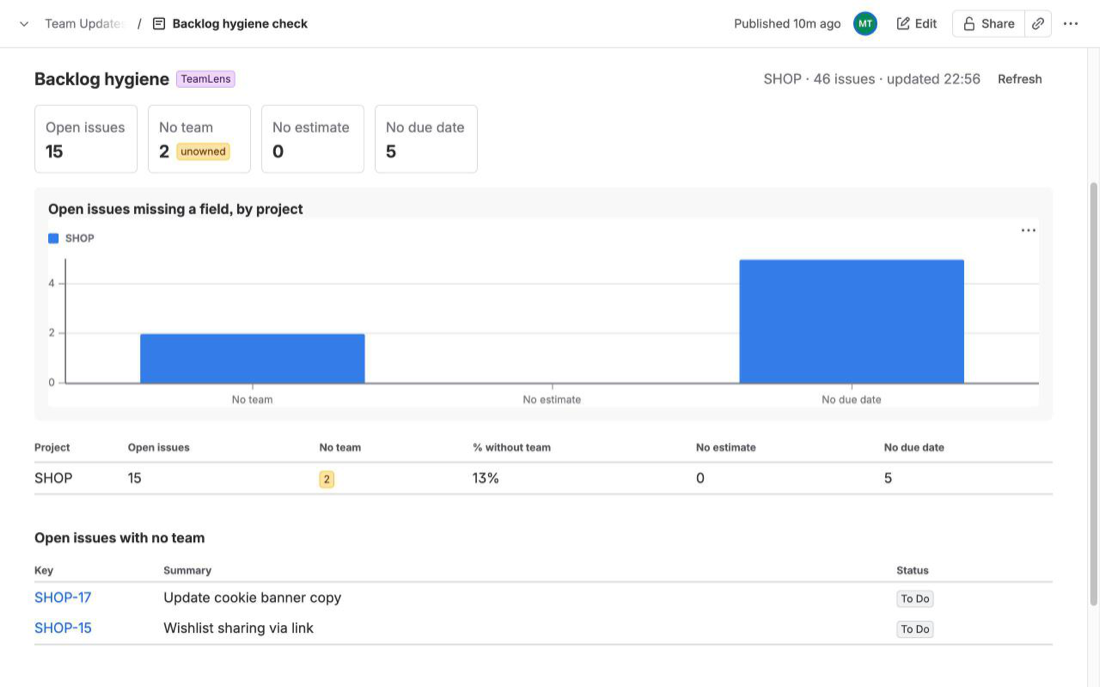
Hygiene lists open work with no team, no estimate or no due date per project. Aging shows how long in-progress work has sat in its status, with a stale list oldest first (7 to 30 days, 14 by default).
Pick a report, a scope (Jira projects with optional extra JQL, or any JQL query such as a saved filter), optionally a few teams, and chart and table or table only. Save is enabled as soon as the scope is valid.
project = SHOP AND issuetype in (Story, Bug)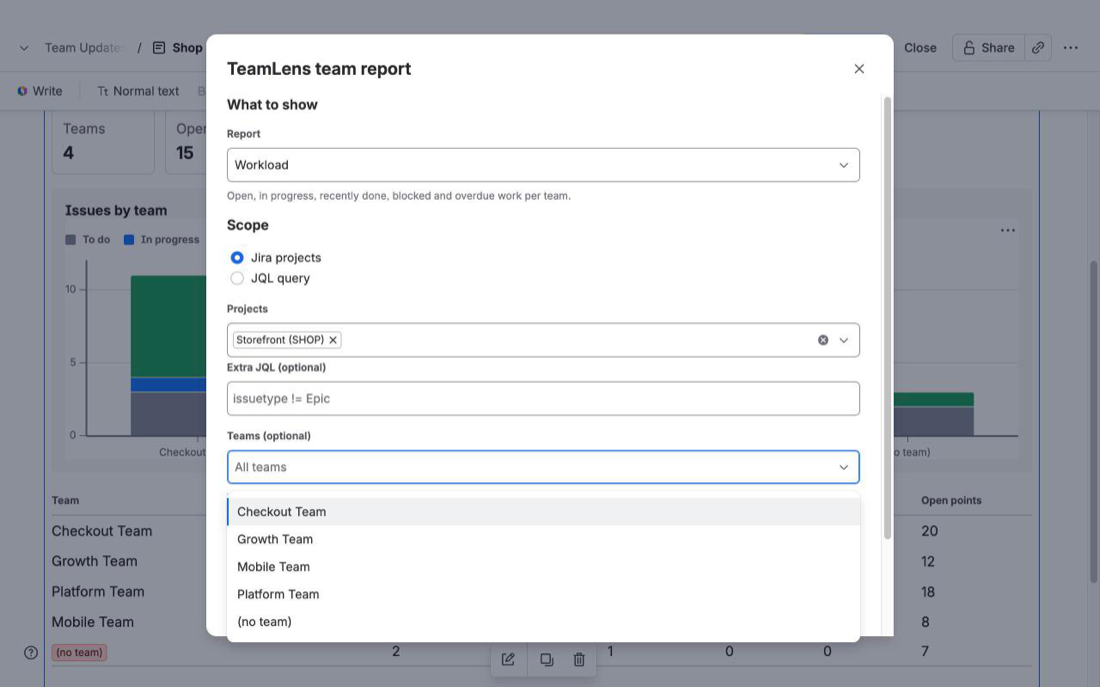
Each macro has its own title, scope and team filter, a Refresh button and issue keys that link to Jira. Put Workload for the whole project next to a table-only view for two squads and a hygiene check on the same page.
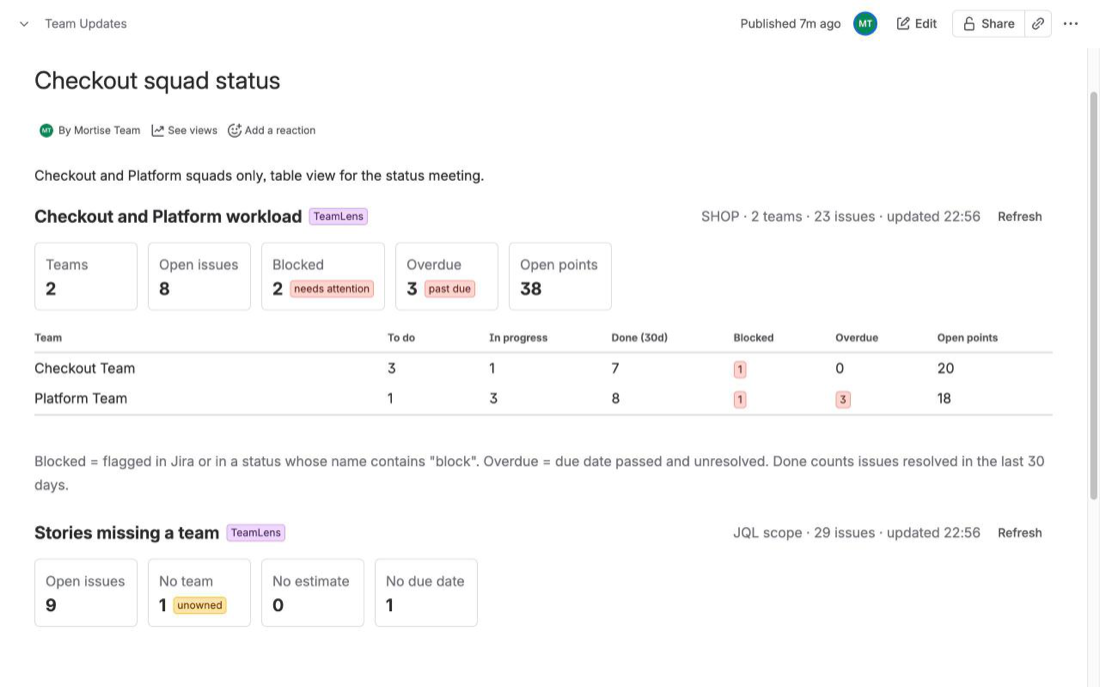
Three steps and one short configuration panel.
Install the app on your Confluence Cloud site. Confluence admin rights are required.
A site admin connects the app to Jira once, from Manage apps. There is nothing extra to buy and no separate Jira app to install; until then the macro shows Connect TeamLens to Jira.
Edit a page, type /TeamLens and pick TeamLens team report. Choose a report, a scope (Jira projects or JQL) and optionally some teams, select Save, then publish. The report loads live whenever someone opens the page.
What changes once TeamLens is on your Confluence site.
| Capability | Native Confluence | With TeamLens |
|---|---|---|
| Jira work in a page | Jira Issues macro: an issue list | Reports grouped by team |
| Group Jira work by the Atlassian Team field | Not a built-in option | Yes, with a (no team) row |
| Workload per team across projects | Count by hand | Workload report |
| Velocity per team across boards | Per board, in Jira only | Velocity report |
| Cross-team dependencies in one view | Open each issue | Who-waits-on-whom matrix |
| Stale in-progress work by team | No | Aging report |
| Unowned work | No | Hygiene report |
| Live, with the viewer's Jira permissions | Yes for Jira macros; no for pasted tables | Yes |
| Included in PDF and Word exports | Varies | Not yet (placeholder) |
Free for up to 10 users; paid tiers billed by Atlassian on your subscription invoice.
Sites with up to 10 users. Every feature included.
Paid tiers above 10 users, billed by Atlassian. Final rates will be published on the Atlassian Marketplace listing, priced in line with TeamLens for Jira.
Runs on Atlassian keeps our costs low, and every limitation is published before you install. Questions about pricing: support@mortiseapps.com.
Straight answers, including what the app cannot do.
TeamLens for Confluence is a Confluence Cloud app that adds a macro with five Jira reports grouped by the Atlassian Team field: Workload, Aging, Hygiene, Velocity and Dependencies. Reports are read live from Jira on the same site as the person viewing the page.
No. TeamLens for Confluence connects to Jira itself. TeamLens for Jira is a separate app with Jira dashboards, JQL functions and an issue panel; the two work independently and can be used together.
Edit the page, type /TeamLens and pick TeamLens team report. Choose a report, a scope (Jira projects or a JQL query) and optionally some teams, select Save and publish. The app must be connected to Jira on the same site once by a site admin.
The app is installed on Confluence but has not been connected to Jira on this site yet. A site admin connects it from Manage apps; there is nothing extra to buy.
Live. The report loads when the page is opened and Refresh reloads it. Nothing is cached or stored.
Every viewer loads the report as themselves, so two people can see different counts if their Jira permissions differ. People without Jira access see a No access to Jira message instead of data.
Edit the macro and pick the team under Teams (optional); pick several to compare them. For a saved filter choose the JQL scope and enter filter = 12345 or the filter name in quotes.
No. The app runs on Atlassian Forge with one read-only scope (read:jira-work), no storage, no backend functions and no external network access. Macro settings are saved by Confluence inside the page.
Free for sites with up to 10 users. Larger sites pay a per-user price in paid tiers, billed by Atlassian; the exact rates will be published on the Atlassian Marketplace listing.
Not yet. Exports show a placeholder; view the page in Confluence for the live report.
Known limitations. Same-site Jira only, up to 3,000 issues per macro, no team member counts, and PDF or Word exports show a placeholder. Everything else is on the limitations page.
Also for Jira
Team reports, a Team Statistics dashboard gadget, teamIn() and noTeam() JQL functions and a team panel on every issue, inside Jira. A separate app on the Atlassian Marketplace; it works on its own or alongside TeamLens for Confluence.
Real problems from Jira teams, worked through with sources.
TeamLens for ConfluenceConfluence's Jira Issues and Jira Chart macros cannot group work by the Atlassian Team field. What they can do, the workarounds, and a live team report macro.
Free for 10 users. Runs on Atlassian. Nothing to store, nothing leaves your site.