LinkLens for Confluence

Live Jira dependency graphs in any Confluence page

LinkLens for Confluence is a Confluence Cloud app that draws Jira issue links as a live dependency graph inside a Confluence page. It is built for release managers, delivery leads and product managers whose release pages and cross-team plans live in Confluence while the dependencies live in Jira.

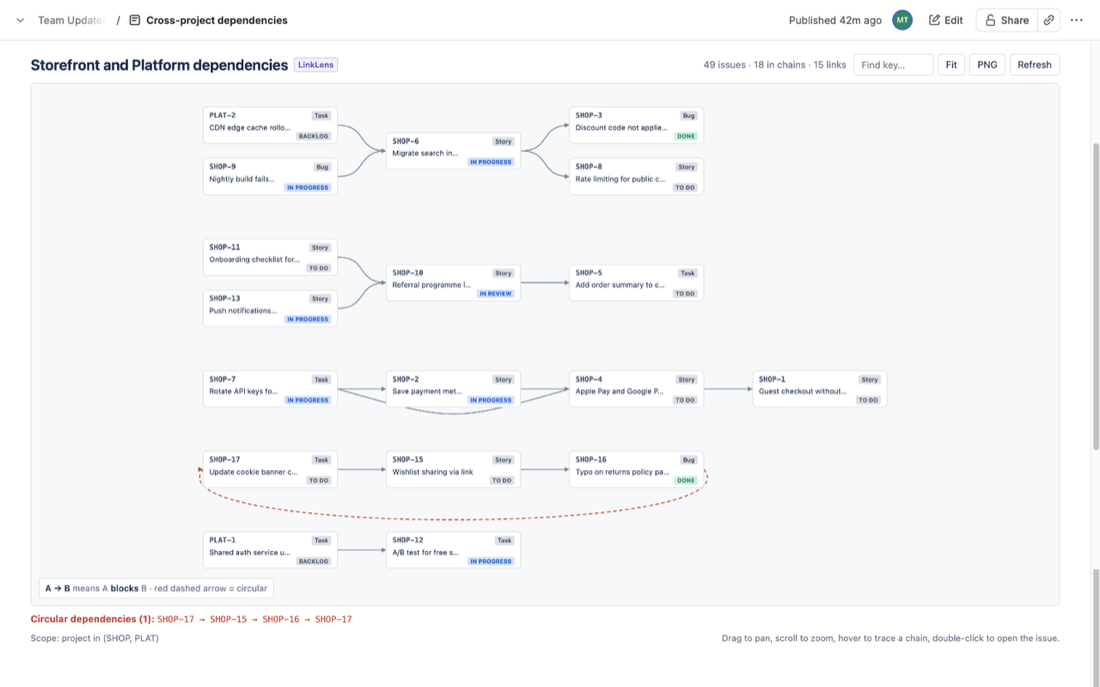
Pick a link type such as blocks / is blocked by and a project or JQL scope. Every chain is drawn left to right, blockers first, read live from Jira as the viewer. Loops are drawn in red, other projects stay in view as dimmed cards, and the whole graph exports as a PNG.

✓ Free for up to 10 users✓ Runs on Atlassian, no data leaves your site✓ Any link type, both directions✓ Live every time the page opensMarketplace listing coming soon
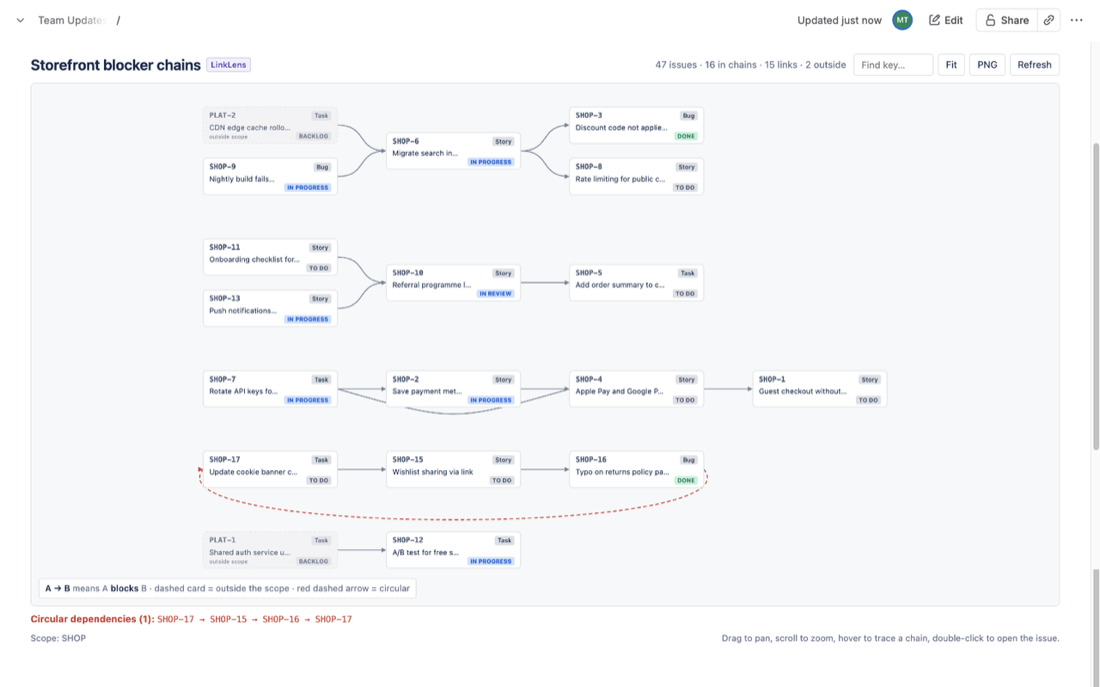
LinkLens for Confluence graph in a page: blocker chains left to right, an outside-scope card and a circular dependency in red

Key facts

The short version for admins and procurement.

Type
Confluence Cloud app (Atlassian Forge, Runs on Atlassian) that reads Jira on the same site
What it does
A Confluence macro that draws Jira issue links of one type as a live dependency graph, with circular dependency detection and PNG export
Works with
Confluence Cloud plus Jira Software, Jira Work Management or Jira Service Management on the same site; any issue link type
Price
Free for up to 10 users; paid tiers billed by Atlassian
Data handling
One read-only scope (read:jira-work); stores nothing; no backend functions or external calls; reads as the viewing user
Needs LinkLens for Jira?
No. The two apps are independent
Support
support@mortiseapps.com, reply within one business day

The problem

Dependencies live in Jira as a flat list of links on each issue. The pages where releases are planned live in Confluence.

Links are a list on one issue

Jira shows "blocks SHOP-4" on one issue at a time. What SHOP-4 blocks next, and what blocks the blocker, takes a trail of open tabs.

Release pages go stale

A dependency diagram pasted into a release page is wrong the moment someone adds or resolves a link.

Drawing it by hand does not scale

Diagramming tools need every box and arrow redrawn whenever Jira changes. Nobody keeps that up past the second week.

Loops go unnoticed

A blocks B, B blocks C, C blocks A: nothing can start and Jira does not warn when the loop is created.

What LinkLens adds to Confluence

One macro, one link type at a time. Nothing is written to Jira or to your pages.

Every blocker chain on one page

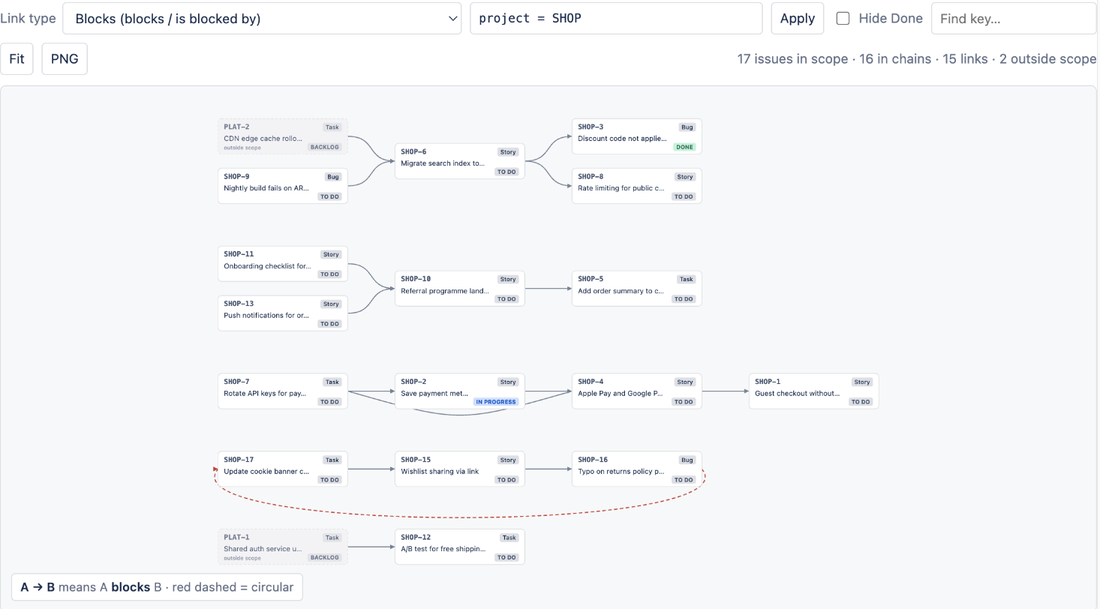
Pick a link type and a project or JQL scope. Every chain is drawn left to right, blockers first, separate chains stacked largest first. Issues without a link of that type are counted, not drawn, so the picture stays readable.

project = SHOP AND fixVersion = 2.4
LinkLens for Confluence graph in a page: blocker chains left to right, an outside-scope card and a circular dependency in red

Cycles in red, other projects kept in view

Circular dependencies get a red dashed closing arrow and are listed by key under the graph. Issues linked from outside the scope, such as another team's project, appear as dimmed cards so an external blocker never hides. Widen the scope to follow their links too.

LinkLens for Confluence graph scoped to two Jira projects with a circular dependency listed under the canvas

Configure in seconds

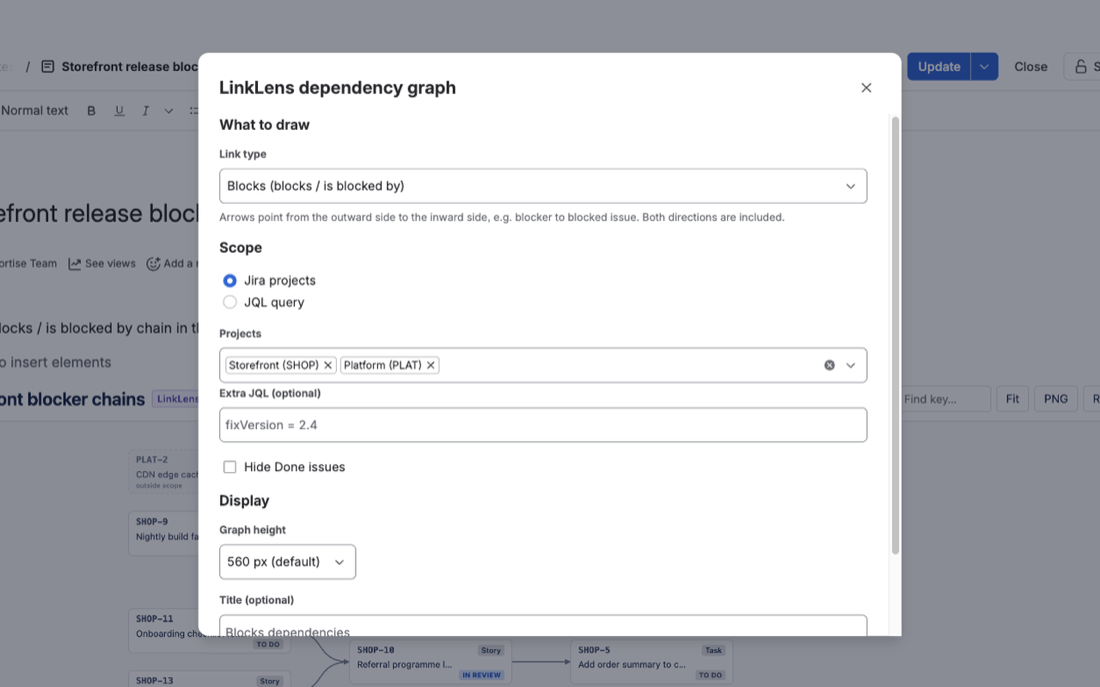
Choose a link type (Blocks is the default, any custom type works), Jira projects with optional extra JQL or any JQL query, Hide Done issues, a graph height and an optional title. Several graphs can sit on one page, one per release or per link type.

LinkLens for Confluence macro configuration panel: link type, projects, extra JQL, Hide Done and graph height

Trace and open

Hover a card and its full upstream and downstream chain lights up while the rest fades. Click to pin its details, double-click to open the issue in Jira, Find key to centre on any issue.

PNG export

The whole graph, not only the visible part, at double resolution on white with a legend. The image is generated in the browser and never uploaded.

Built for pages people read

Hide Done to focus on live blockers, four graph heights, a custom title, dark mode, and a header with issue, chain, link and outside-scope counts.

How to embed a live Jira dependency graph in Confluence with LinkLens

Three steps and one short configuration panel.

  1. Install LinkLens for Confluence

    Install the app on your Confluence Cloud site. Confluence admin rights are required.

  2. Connect it to Jira on the same site

    A site admin connects the app to Jira once, from Manage apps. There is nothing extra to buy and no separate Jira app to install; until then the macro shows Connect LinkLens to Jira.

  3. Insert the macro and publish

    Edit a page, type /LinkLens and pick LinkLens dependency graph. Choose a link type, a scope (Jira projects or JQL) and optionally Hide Done issues, select Save, then publish. The graph loads live whenever someone opens the page.

Native Confluence vs LinkLens for Confluence

What changes once LinkLens is on your Confluence site.

CapabilityNative ConfluenceWith LinkLens
Jira dependencies in a pageJira Issues macro: an issue listA graph with direction
Whole chain, first blocker to last blockedNoYes, left to right
One link type, both directionsNoYes, in one pick
Circular dependenciesNoRed arrow plus a list
Blockers in other projectsNoDimmed outside-scope cards
Stays current when links changePasted diagrams do notLive on every page view
Export an imageScreenshotPNG with legend
Create or edit linksIn JiraIn Jira (the app is read-only)

Pricing

Free for up to 10 users; paid tiers billed by Atlassian on your subscription invoice.

Small teams

Free

Sites with up to 10 users. Every feature included.

Everyone else

Per user

Paid tiers above 10 users, billed by Atlassian. Final rates will be published on the Atlassian Marketplace listing, priced in line with LinkLens for Jira.

No surprises

Runs on Atlassian keeps our costs low, and every limitation is published before you install. Questions about pricing: support@mortiseapps.com.

Frequently asked questions

Straight answers, including what the app cannot do.

What is LinkLens for Confluence?

LinkLens for Confluence is a Confluence Cloud app that draws Jira issue links as a live dependency graph inside a Confluence page: every chain of one link type across a project or JQL scope, with circular dependencies in red and PNG export.

Do I also need LinkLens for Jira installed?

No. LinkLens for Confluence connects to Jira itself. LinkLens for Jira is a separate app that adds a Dependencies page and an issue panel inside Jira; the two work independently.

How do I add a Jira dependency graph to a Confluence page?

Edit the page, type /LinkLens and pick LinkLens dependency graph. Choose a link type (Blocks is the default), a scope (Jira projects or a JQL query) and optionally Hide Done issues, then Save and publish. A site admin connects the app to Jira on the same site once.

Is the graph live or a snapshot?

Live. It loads when the page opens and Refresh reloads it. Use PNG export for a point-in-time image.

Which link type should I pick?

The one whose outward label means must happen first. Blocks is the usual choice. For a custom type such as Depends on, check which label is outward; if arrows look reversed, the type is defined the other way round.

Can I see dependencies in other projects?

Yes. Issues outside the scope that are linked to issues in it appear as dimmed, dashed cards. Their own links are not followed; widen the scope, for example project in (SHOP, PLAT), to include them.

Does any data leave my Atlassian site?

No. The app runs on Atlassian Forge with one read-only scope (read:jira-work), no storage, no backend functions and no external network access. PNG export is generated in the browser and never uploaded.

How much does LinkLens for Confluence cost?

Free for sites with up to 10 users. Larger sites pay a per-user price in paid tiers, billed by Atlassian; the exact rates will be published on the Atlassian Marketplace listing.

Does the graph appear in PDF or Word exports?

Not yet. Use PNG export and paste the image where a static copy is needed.

Known limitations. Read-only, same-site Jira only, one link type per macro, up to 2,000 issues per graph, and outside-scope issues are followed one hop. Everything else is on the limitations page.

Also for Jira

LinkLens for Jira

A Dependencies page in every project and a Dependency chain panel on every issue, inside Jira. A separate app on the Atlassian Marketplace; it works on its own or alongside LinkLens for Confluence.

LinkLens Dependencies page: chains of blocked issues drawn left to right as cards and arrows

Related reading

Real problems from Jira teams, worked through with sources.

LinkLens for Confluence

How to put a Jira dependency map in a Confluence page

· 7 min read

Confluence can list Jira issues and embed timelines, but not draw blocker chains from issue links. The native options, why hand-drawn diagrams go stale, and a live graph macro.

All articles →

Put the real blocker chain in your release page

Free for 10 users. Runs on Atlassian. Nothing to store, nothing leaves your site.