 Mortise Apps
 LinkLens for Jira
See the whole blocker chain in Jira: from a flat list of issue links to a dependency graph
Jira shows issue links one issue at a time. A blocker three hops away stays invisible until it is late. Here is how to see the whole chain.
LinkLens for Jira
LinkLens is a Jira Cloud app that draws issue links as a dependency graph, one link type at a time. It is built for delivery leads, scrum masters and product managers who need to know what is really blocking a feature without opening issue after issue.
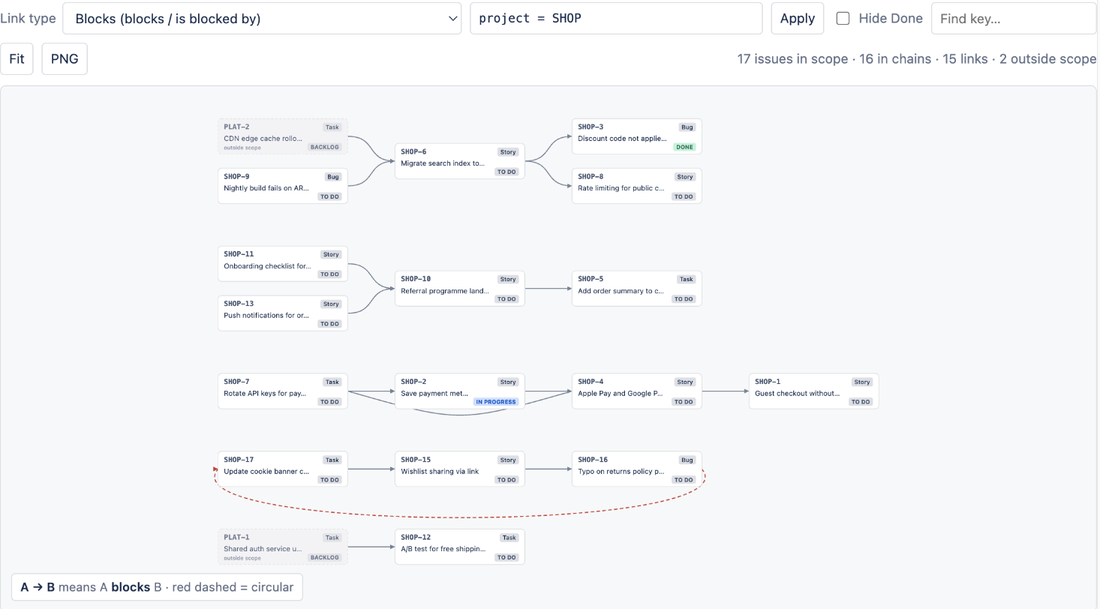
LinkLens is a dependency graph for Jira issue links. Pick a link type such as blocks / is blocked by and the whole chain appears: F1 blocks F2, F2 blocks F3, F3 blocks F4, laid out left to right with the direction always obvious. The same chain shows on every issue.
The short version for admins and procurement.
Jira records every link faithfully and then shows you exactly one issue's worth at a time.
The issue view shows "blocks SHOP-4" and "is blocked by SHOP-7". Where SHOP-7 comes from, or what SHOP-4 blocks next, means opening issue after issue.
The feature that is really stuck is three links away, in another team's backlog. Nobody finds it until the sprint review.
Tools that draw blocks, relates, clones and duplicates at once turn a real project into a hairball. The dependency you care about disappears in it.
Roadmap and portfolio suites do include a dependency view, at several dollars per user for the whole site, to answer one question.
One page, one panel, one link type at a time. Nothing is written to your issues.
Every chain of the chosen link type across the project, or any JQL scope you type. Issues without that link are counted, not drawn, so the picture stays readable. Blockers on the left, blocked work on the right, separate chains stacked.
project = SHOP AND fixVersion = "Spring release"The Dependency chain panel shows what blocks this issue and what it blocks, one to five hops out. Change the depth, hide Done work, jump to the full project view.
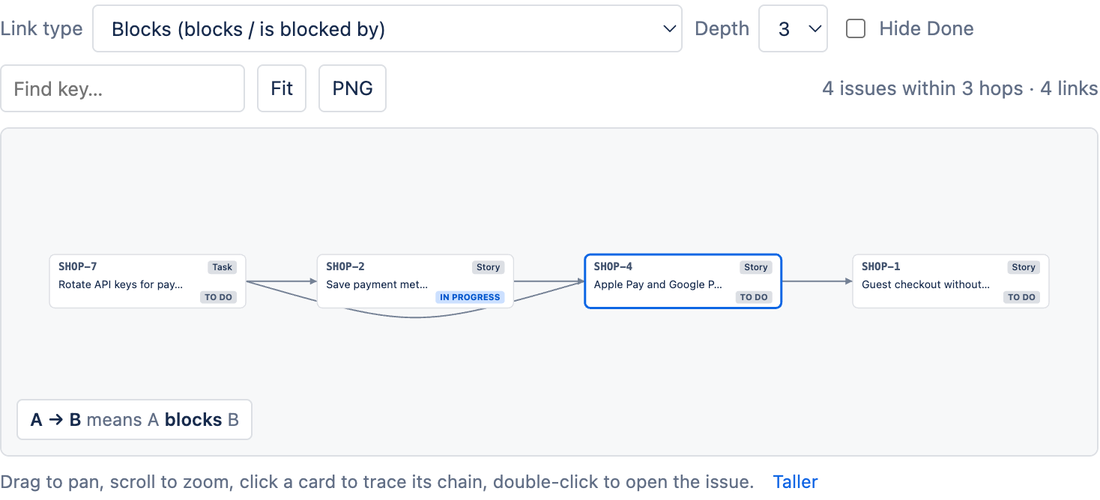
Pick Blocks (blocks / is blocked by) once. LinkLens uses both sides of the link automatically and draws the arrow from the issue that must finish first to the issue that waits. Works with Depends on or any custom type your admin created.
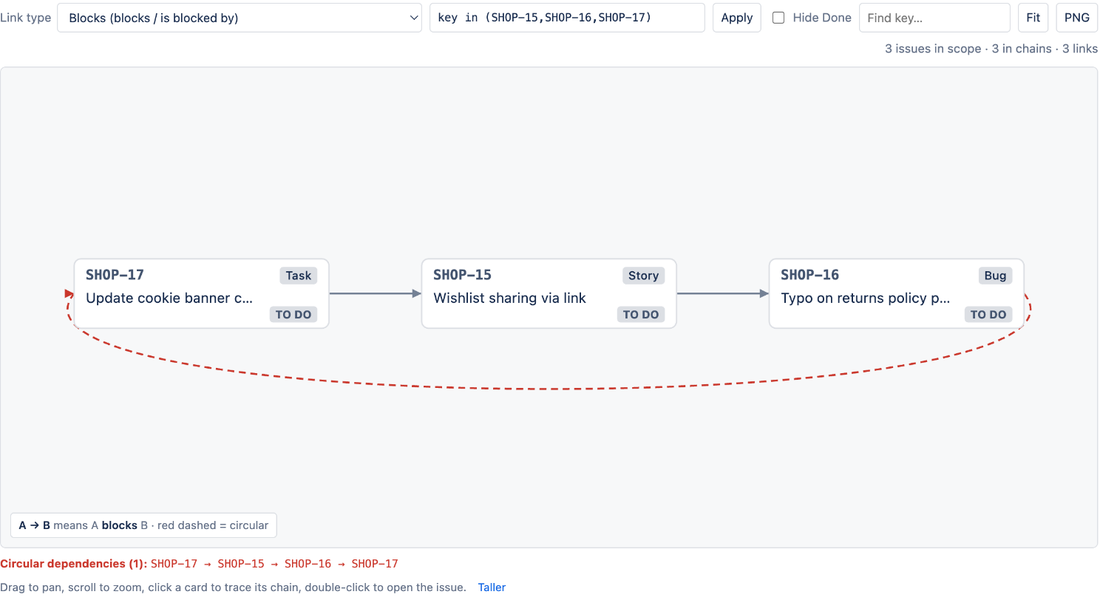
A blocks B, B blocks C, C blocks A: nothing can start and Jira never warns you. LinkLens draws the closing link in red and lists every loop as keys.
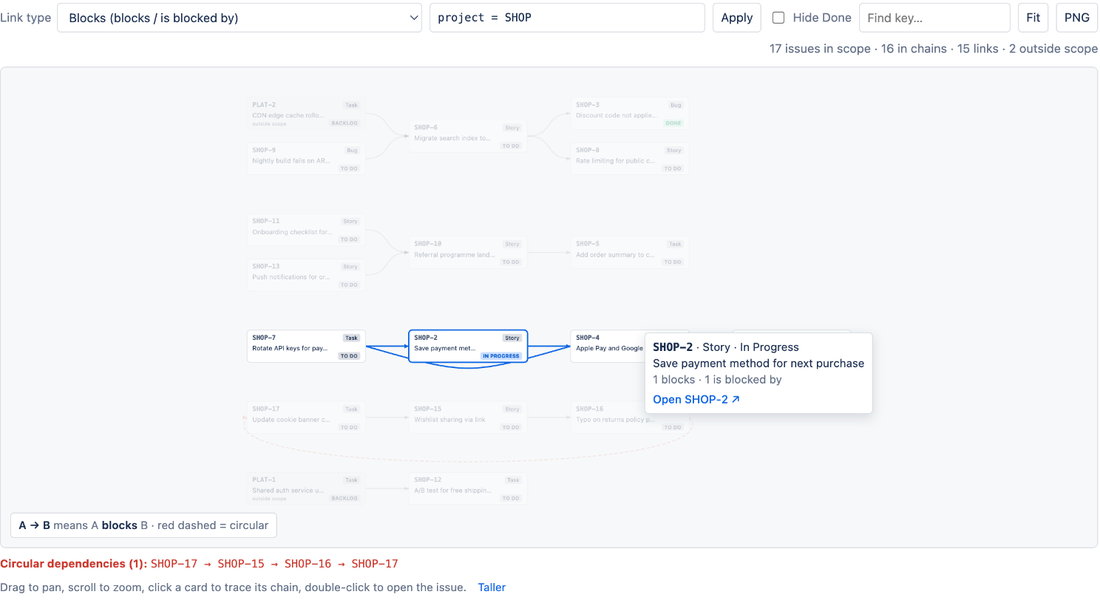
Hover or click any card and its full upstream and downstream chain stays bright while the rest fades, with a pinned card showing counts and an Open link. Double-click to open the issue. Find any key, fit to view, pan and zoom.
Issues outside your scope that are linked in appear as dimmed cards, so an external blocker never hides. Widen the JQL to expand them.
The whole graph at double resolution with a legend, ready for a Confluence page or a slide.
Three steps, no configuration screens.
Select Get it now on the LinkLens listing and choose your Jira Cloud site. Jira admin rights are required; nothing needs configuring.
Choose Blocks (blocks / is blocked by) or any other link type. Every chain of that type in the project is drawn left to right; use the JQL box to widen or narrow the scope.
Click a card to highlight its whole upstream and downstream chain, double-click to open the issue, and select PNG to export the graph with a legend.
What changes once LinkLens is installed.
| Capability | Native Jira Cloud | With LinkLens |
|---|---|---|
| See links on one issue | Yes, as a list | Yes, as a graph with direction |
| See the whole chain (F1 to F4) | No | Yes, left to right |
| All dependencies in a project on one screen | No | Dependencies page |
| Filter the picture to one link type | No | Yes, both directions in one pick |
| Detect circular dependencies | No | Red edges plus a list |
| Cross-project blockers visible | Only by opening each issue | Dimmed cards in the graph |
| Export the picture | No | PNG with legend |
| Create or edit links | Yes | Use Jira's editor (canvas editing on the roadmap) |
Reviews come from the Atlassian Marketplace listing. We never write our own.
Billed by Atlassian on your Jira invoice. Cancel any time from Jira administration.
Sites with up to 10 Jira users. Every feature included.
Roughly $10 a month for a 50-user site, $20 for 100 users, and $25-100 for larger sites as volume rates step down. 30-day free trial.
A dependency graph should not cost as much as a portfolio suite. Runs on Atlassian keeps our costs low, so a whole company can see its blockers for the price of a couple of coffees.
Straight answers, including what the app cannot do.
Install LinkLens, open a project and select Dependencies in the sidebar. Pick a link type such as Blocks and every chain of that type in the project is drawn as cards and arrows, blockers on the left, blocked work on the right. Native Jira only lists links on one issue at a time.
The whole chain. If F1 blocks F2, F2 blocks F3 and F3 blocks F4, you see all four in a row. The issue panel follows up to 5 hops in each direction; the project page shows every chain in the scope.
From the outward end to the inward end of the link. For Blocks, A → B means A blocks B. The legend under the canvas restates this for whichever type you picked, and one pick covers both directions automatically.
Yes. Issues in other projects that are linked to issues in your scope appear as dimmed outside-scope cards. To expand their chains too, widen the JQL scope, for example project in (ABC, XYZ).
Yes. Loops such as A blocks B, B blocks C, C blocks A are drawn with a red dashed closing arrow and listed under the canvas as keys.
Not in this version; LinkLens is read-only, which keeps it simple to approve. Editing links from the canvas is on the roadmap. Use Jira's Link work item action for now.
No. LinkLens runs entirely on Atlassian's Forge platform with no external servers. It stores only each project's chosen link type, JQL scope and Hide Done setting inside your Atlassian site. Issue data is read as the person viewing it, so Jira permissions are always respected.
Free for sites with up to 10 users. Above that, about USD 0.20 per user per month (roughly USD 10 for a 50-user site, USD 20 for 100 users, and USD 25-100 for larger sites) billed by Atlassian with your Jira subscription. A 30-day free trial starts automatically.
Known limitations. Read-only in this version, issue links only (no parent/child edges yet), 2,000 issues per project graph. Everything else is on the limitations page.
Real problems from Jira teams, worked through with sources.
LinkLens for JiraJira shows issue links one issue at a time. A blocker three hops away stays invisible until it is late. Here is how to see the whole chain.
LinkLens for JiraJira lets A block B, B block C and C block A without a warning. How the loops form, why Atlassian's own detection needs database access, and a faster way.
Free for 10 users. Installs in under a minute. Runs on Atlassian.
Get LinkLens on the Atlassian Marketplace