 Mortise Apps
Configure the macro
Last updated 2026-09-30
Open the configuration panel when you insert the macro, or later by selecting the macro in the editor and choosing the pencil (Edit) icon.
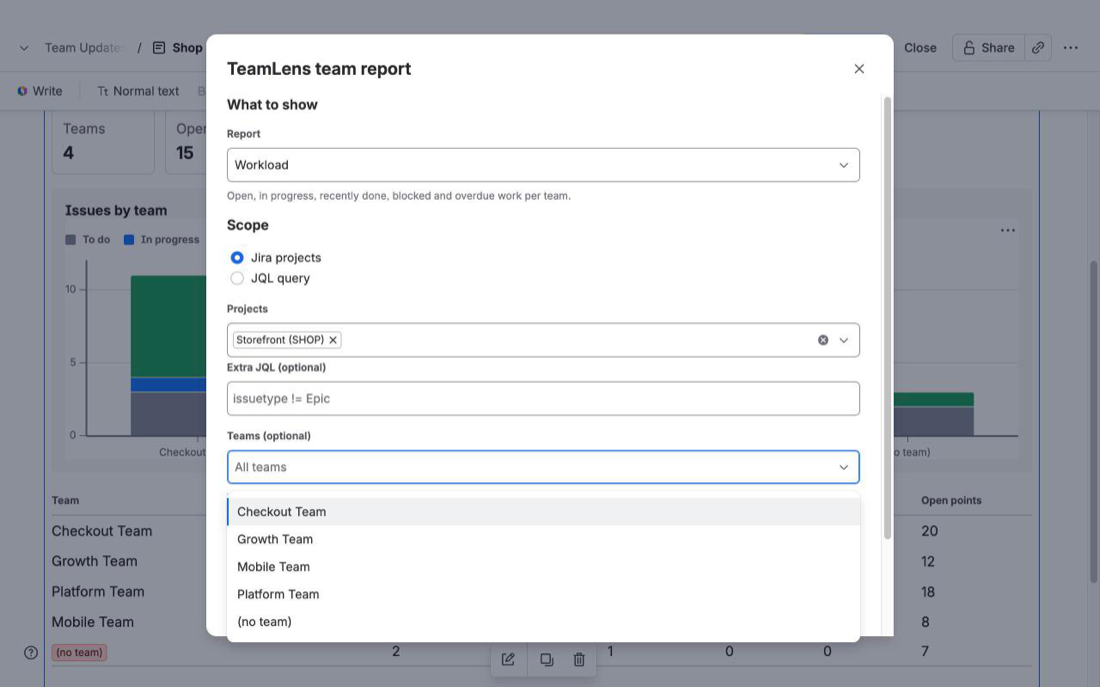
| Setting | What it does |
|---|---|
| Report | Workload, Aging, Hygiene, Velocity or Dependencies. The panel shows a one-line description of each. |
| Scope: Jira projects | One or more projects you can browse. Optional Extra JQL is ANDed with the projects, e.g. issuetype != Epic. |
| Scope: JQL query | Any JQL, e.g. project = SHOP AND issuetype in (Story, Bug). ORDER BY is ignored. |
| Teams (optional) | Limit the report to some teams. The list is built from the teams found on issues in the scope, plus (no team). Leave empty for every team. |
| Layout | Chart and table or Table only (compact, good for long pages). |
| Chart metric (Workload) | Issue count or story points. |
| Stale after (Aging) | 7, 14, 21 or 30 days in the current status. |
| Range (Velocity) | Last 4, 6, 8, 10 or 12 closed sprints. |
| Link type (Dependencies) | Which issue link type counts. Blocks is the default when it exists. |
| Title (optional) | Heading shown above the report. Defaults to the report name. |
Save is enabled once the scope has at least one project or a JQL query.
In the page
Each macro shows its title, the scope, the team filter, the number of issues and the time it was loaded, plus a Refresh button. Issue keys link to Jira. You can put several macros on one page, for example Workload for the whole project and Aging for one team.
Scope rules shared by all reports
- Done work is limited to issues resolved in the last 30 days (Velocity uses closed sprints instead).
- A scope is capped at 3,000 issues. The issue count shows
+when the cap is reached; narrow the scope with JQL.
Was this page helpful? Email support@mortiseapps.com.