Mortise Apps
LinkLens for Jira
How do you see a dependency map in Jira without Premium?
Jira Cloud on the Free and Standard plans records every dependency as an issue link but never draws them together: you see the links of the issue in front of you, and that is all. A whole-project dependency map comes from one of three places: Plans (the cross-project planning tool in Jira Premium and Enterprise), an app from the Atlassian Marketplace, or JQL plus Automation stitched together by hand. This article walks through what each gives you, what each costs, and which one fits a given team, with the Atlassian documentation linked for every claim.
What "dependency map" means in Jira terms
Jira has no dependency object. A dependency is an issue link of a type whose two labels mean "must happen first": the default type is Blocks, read as blocks from the blocker and is blocked by from the blocked issue. Atlassian's own documentation says linked work items exist to "surface, understand, and manage dependencies". A dependency map, then, is any view that takes those links for many issues at once and draws them as a graph or a timeline, so that a chain A blocks B blocks C is visible without opening A, B and C in turn.
That whole-project view is what people are searching for when they type "jira dependency map" or "jira dependencies report". It has been requested since 2003: JRASERVER-2544, "Graph link dependency map", was closed as won't fix, and the gap is filled today by Premium and by apps.
What you get on Free and Standard
Everything in this section is included in every Jira Cloud plan.
The linked work items panel. Every issue lists its links under Linked work items, grouped by label (blocks, is blocked by, relates to). It shows one hop. If SHOP-12 is blocked by SHOP-7 and SHOP-7 is blocked by PLAT-3, the SHOP-12 view shows SHOP-7 and nothing about PLAT-3.
JQL over links. Two clauses matter:
issueLinkType = "is blocked by" AND statusCategory != Donefinds every open issue that has at least one is blocked by link. It cannot tell you whether the blocker is still open, because JQL has no subqueries; Atlassian tracks that request as JRACLOUD-95782. The second clause,
issue in linkedIssues("SHOP-7", "blocks")lists the issues that one named issue blocks. It takes one key per clause, so a project-wide query means naming every blocker and joining the clauses with OR, which Atlassian's knowledge base describes as the only way to do it. Both clauses are one hop deep.
The Timeline. Software projects have a Timeline view that plans epics and child work on a calendar inside one project, and it draws dependency lines between bars. Atlassian's doc is precise about the scope: the timeline "can only show work items with the Blocks work item link type and link work items from a single space", a Jira admin must have work item linking enabled, and when two linked bars overlap in dates the line turns red. So the Timeline is a real dependency map for one project's Blocks links, and nothing more: no other link types, no other projects, no chain view.
Export and draw it yourself. The Issue Navigator can export a search to CSV with the Linked Issues column included. Paste the two columns (issue key, blocked by) into any graph tool and you have a one-off dependency map. It is free, it works, and it is out of date the moment it is drawn.
Automation as a filter engine. If what you need is a list of currently blocked work rather than a picture, an Automation rule can keep a blocked-open label up to date whenever a blocker changes status, and a filter on that label gives you a board quick filter or a queue. The setup is in How to find Jira issues that are blocked by issues that are still open.
What Plans (Premium) adds
Plans, formerly Advanced Roadmaps, is Atlassian's planning layer for work across teams and projects. Atlassian describes it as "an advanced planning feature available in Jira Premium" for planning "across multiple teams and projects", with capabilities "for managing team capacity, mapping dependencies, and exploring alternative scenarios". For dependencies specifically, a plan draws dependency lines on its timeline, adds a dedicated dependencies view, described in the documentation as "a planning tool that shows dependencies in a map layout", and lets you add, remove and filter dependencies across every project in the plan.
If your site already has Premium, use it: the dependencies view is the closest thing to a native dependency map, and it is maintained by Atlassian. Two caveats. First, the price position: Premium is a per-user upgrade for the whole site, so a 50-person site pays for 50 Premium seats to give a handful of delivery leads a dependency view. Second, a plan shows the issues in the plan, built from its sources (boards, projects, filters); a dependency that leaves the plan's scope is a dependency you do not see until you widen the plan.
Apps: the middle option
Marketplace apps draw the graph from the links that already exist, on any Jira Cloud plan, priced per user for the app alone. Two kinds exist. Portfolio and roadmap suites include a dependency view among many other features at several dollars per user. Focused dependency apps do one thing.
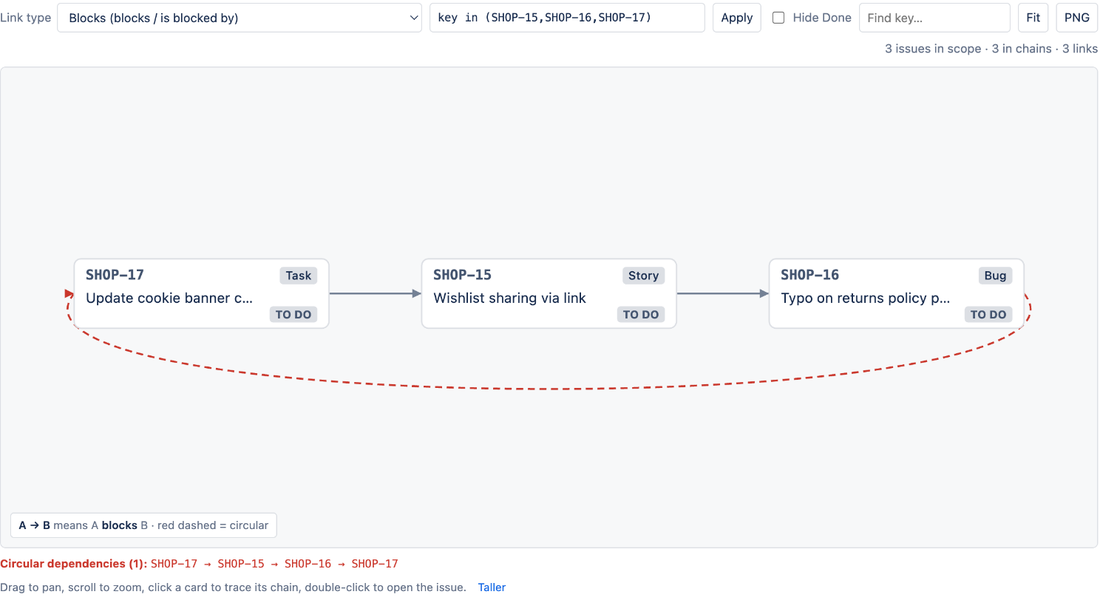
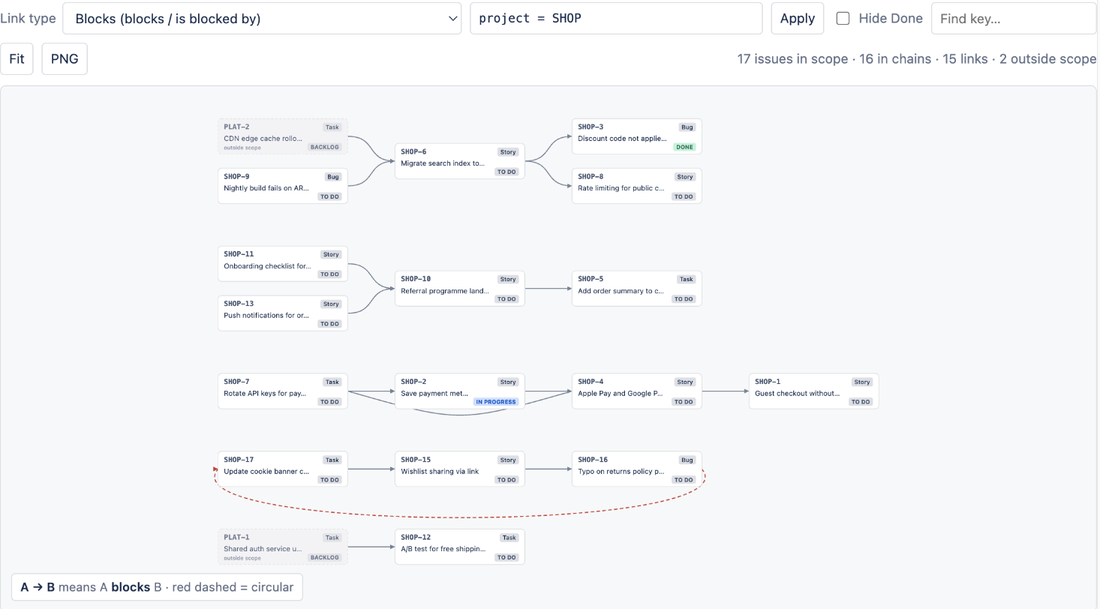
We make one of the focused ones, so read this paragraph as a vendor's description. LinkLens for Jira adds a Dependencies page to every project: pick a link type (Blocks is preselected) and every chain of that type in the project, or in any JQL scope you type, is drawn on one canvas, blockers on the left and blocked work on the right. Issues in other projects appear as dimmed cards so a cross-project blocker is visible without leaving the page; circular dependencies are drawn as red dashed arrows; Hide Done removes finished issues and their links so only live blockers remain; a Team filter narrows the graph to one Atlassian Team's work; clicking a card pins its whole upstream and downstream chain. An issue panel shows the same chain for one issue up to five hops out. It is read-only, runs on Atlassian with no external servers, and is free for sites with up to 10 users and about USD 0.20 per user per month above that.
The honest limits: it draws one link type at a time, does not draw parent-child relationships as edges, caps a project graph at 2,000 issues, and adds no JQL function, so it does not give you a saved filter. For the full walkthrough see See the whole blocker chain in Jira, and for what the red arrows mean, Circular dependencies in Jira.
Which option for which team
| Situation | Use | Why |
|---|---|---|
| One team, one project, a few blockers a sprint | Linked work items panel + issueLinkType JQL | Included; one hop is enough when chains are short |
| You need a saved filter or queue of blocked work, not a picture | Automation label + JQL | Included; survives as a board quick filter and a gadget |
| A one-off map for a planning meeting | CSV export of Linked Issues, drawn in a diagram tool | Free; out of date the next day |
| Several teams, cross-project chains, site already on Premium | Plans dependencies view | Native, maintained by Atlassian, covers every project in the plan |
| Several teams, Standard or Free plan, no appetite for a site-wide upgrade | A focused dependency app such as LinkLens | Draws whole chains and loops from existing links; priced per user for the app only |
| Portfolio planning (capacity, scenarios, releases) as well as dependencies | Plans, or a portfolio suite app | The dependency view is one feature of many you would also use |
FAQ
Can I see a dependency map in Jira Free?
Not a whole-project one. Jira Free shows each issue's links in its Linked work items panel and lets you query links with JQL, one hop at a time. A project-wide map needs Plans (Premium or Enterprise) or a Marketplace app; apps that are free for small sites, LinkLens among them, work on Jira Free.
Does the Jira Timeline show dependencies?
Yes, within limits: the Timeline draws dependency lines for work items linked with the Blocks link type inside one project (one "space"), and turns a line red when the dates overlap. It does not show other link types or cross-project links; cross-project dependency lines are a Plans (Premium) feature.
Is there a "dependency report" in Jira?
Not as a built-in report on Free or Standard. Plans provides a dependencies view in a map layout. Without Plans, the closest native result is a JQL filter on issueLinkType = "is blocked by", which lists blocked issues but cannot check whether the blocker is still open.
Do I have to upgrade the whole site to Premium for a dependency map?
Premium is priced per user for the site, so yes if you go the Plans route. A focused app is priced per user for the app alone, which is why apps are the usual middle option for Standard sites that need the map but not the rest of Premium.
Sources
- Link work items, Atlassian Support - link types have outward and inward descriptions; links exist to surface and manage dependencies.
- How to retrieve linked work items of a particular link type, Atlassian Support knowledge base -
linkedIssues()takes one key per clause, joined with OR. - JRACLOUD-95782, JQL function to determine the status of linked work items - the open request for status-of-linked-issue queries.
- JRASERVER-2544, Graph link dependency map - the 2003 request for a project-wide dependency map, closed won't fix.
- View and manage dependencies in your plans, Atlassian Support - dependency lines on the plan timeline and the dependencies view "in a map layout".
- Jira Premium, Atlassian - Advanced Roadmaps (Plans) is "available in Jira Premium" for planning across teams and projects and mapping dependencies.
- Jira pricing, Atlassian - current per-user prices and the Free plan limits; check this page rather than any figure quoted elsewhere.
- What are dependencies on the timeline?, Atlassian Support - Blocks link type only, single project, red line on overlapping dates.