Mortise Apps
LinkLens for Jira
See the whole blocker chain in Jira: from a flat list of issue links to a dependency graph
A blocker chain in Jira is a sequence of issues joined by blocks / is blocked by links: F1 blocks F2, F2 blocks F3, F3 blocks F4. Jira records every link faithfully but shows them as a flat list inside one issue at a time, so the fact that F4 is ultimately waiting on F1 is never visible anywhere. A dependency graph draws the whole chain as cards and arrows on one canvas, blockers on the left and blocked work on the right. LinkLens for Jira draws that graph for a whole project or for the issue you are looking at.
What Jira gives you today
Atlassian's documentation is clear that linked work items exist "to surface, understand, and manage dependencies". Each link type has two labels, one per direction: blocks seen from the blocker, is blocked by seen from the blocked issue. It is one link, one type, read from two sides.
The issue view lists those links under Linked work items, grouped by label. Boards can show a small linked-items icon on cards. Plans (Advanced Roadmaps) draws dependency lines on a timeline for the issues in a plan. All three show what is directly attached to the issue in front of you. None of them follows the chain.
The request for a project-wide picture is not new. JRASERVER-2544, "Graph link dependency map", was filed in 2003 and eventually closed as won't fix. Twenty years later the flat list is still the default, which is why a whole category of Marketplace apps exists to draw the graph.
A real example: the payments feature and the infrastructure ticket
A storefront team is shipping "Apple Pay and Google Pay in checkout" this sprint. On the issue view it shows one link: is blocked by "Save payment method for next purchase", which is in progress. Looks fine.
Open that blocker and it has its own link: is blocked by "Rotate API keys for payment gateway", a task in the platform team's project, still in the backlog. Open that one and there is a fourth hop: the key rotation waits on "Shared auth service upgrade" in a third project, owned by a team that is not in the sprint review.
Nobody lied and nobody forgot to link anything. The chain is four issues long, spans three projects and two teams, and the only way to discover it is to click through issue after issue. The sprint review is where it gets discovered, three hops too late.
How to do it with LinkLens
LinkLens adds two views and one rule: pick one link type, and both of its directions are used automatically.
The Dependencies page (whole project)
- Open the project and select Dependencies in the project sidebar.
- In Link type, pick Blocks (blocks / is blocked by). It is preselected on most sites.
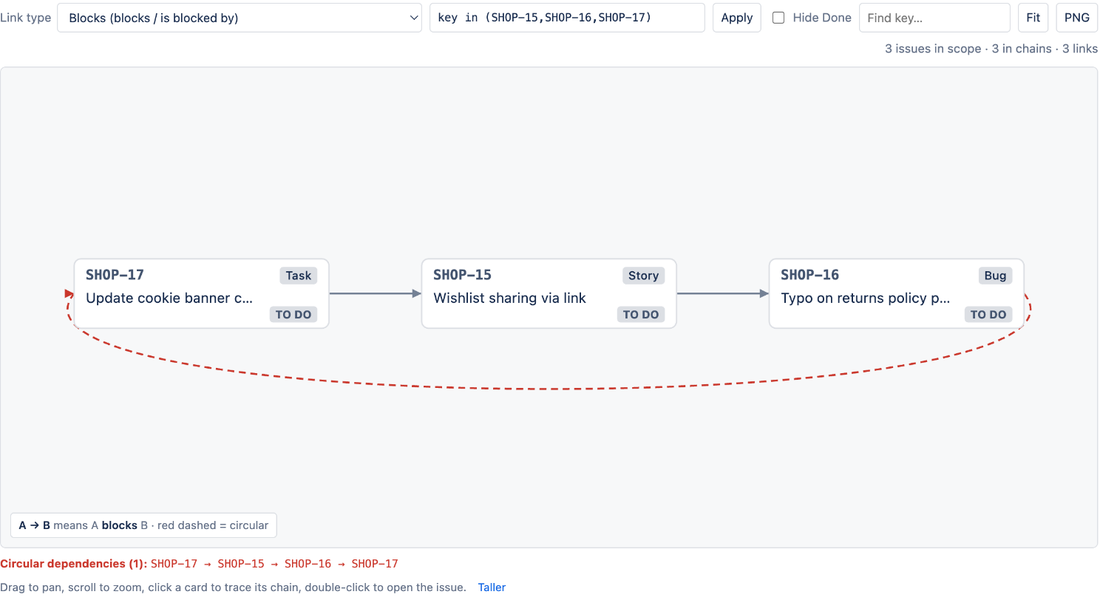
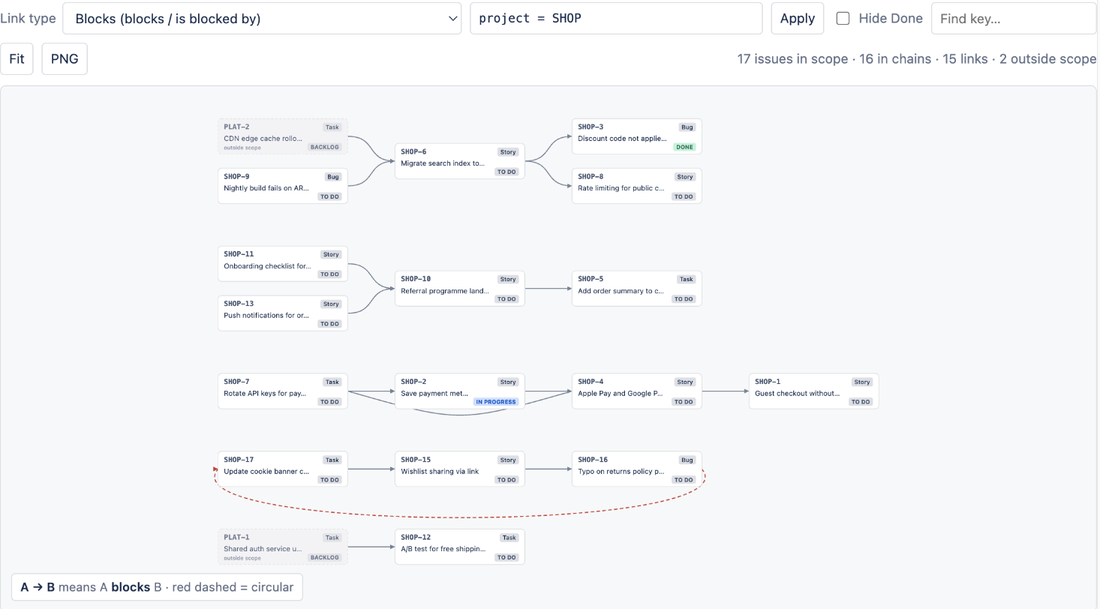
- Read the canvas left to right. An arrow from A to B means A blocks B. The legend under the canvas restates the rule for whatever type you picked.
For the storefront project the payments chain appears as one row: key rotation, then save-payment-method, then Apple Pay, then the guest checkout story it blocks in turn. The "Shared auth service upgrade" issue from the other project shows as a dimmed, dashed card labelled outside scope, so the cross-project blocker is visible without leaving the page. Widen the JQL scope to project in (SHOP, PLAT) and its own chain is drawn too.
Only issues that have at least one link of the chosen type are drawn; the rest are counted in the stats line ("17 issues in scope, 16 in chains") so the picture stays readable. Hide Done removes finished issues and their links. Click a card to pin its whole upstream and downstream chain while everything else fades; double-click to open the issue. PNG exports the graph with a legend for a Confluence page or a slide.
The Dependency chain panel (one issue)
- Open any issue. Select the apps button under the title and choose Dependency chain.
- Set Depth to 3 to 5 hops.
The current issue sits highlighted in the middle. Everything to its left blocks it directly or indirectly; everything to its right waits on it. For the Apple Pay story that is the whole four-issue chain on one small canvas, including the other projects.
Choosing the link type
Choose the type whose outward label means "must happen first". Blocks is the usual one. If your admins created a custom type such as Depends on, check which side is the outward label; if the arrows look reversed, the type's labels are defined the other way round.
What LinkLens cannot do
It is read-only in this version: it draws links and does not create or delete them, so use Jira's Link work item action to fix a chain. It draws one link type at a time by design; a chain that mixes blocks and depends on has to be viewed twice. Parent and child relationships (epic to story, story to sub-task) are not drawn as edges yet. The project page caps at 2,000 issues per graph and the issue panel at 300 issues and 5 hops. Links to issues on a different Atlassian site are not followed, and it is Jira Cloud only.
FAQ
Does it work across projects?
Yes. Linked issues outside the current scope are shown as dimmed cards so cross-project blockers never hide. Set the JQL scope to several projects to draw their chains in full. The issue panel follows cross-project links by default.
Does it show issues I am not allowed to see?
No. Every read runs as the person viewing the graph, so Jira's permissions apply and hidden issues are absent, including as external ends.
What does it cost?
Free for sites with up to 10 users. Above that about USD 0.20 per user per month, roughly USD 10 a month for a 50-user site, billed by Atlassian with a 30-day trial. It is on the Atlassian Marketplace; details are on the LinkLens page.
Sources
- Link work items, Atlassian Support - link types have outward and inward descriptions; where links are shown.
- JRASERVER-2544, Graph link dependency map - the 2003 request for a project-wide dependency map, closed won't fix.
- Dependencies in Advanced Roadmaps, Atlassian Documentation - incoming and outgoing dependencies as blocks / is blocked by.