Mortise Apps
LinkLens for Jira
Circular dependencies in Jira: how loops of blocked-by links form, how to find them, and how to break them
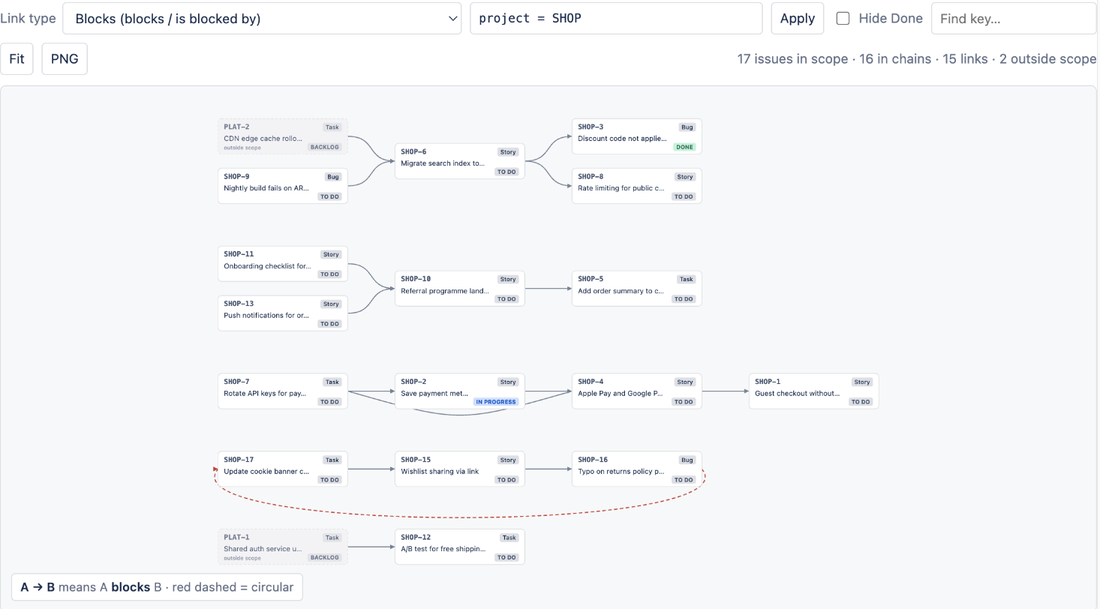
A circular dependency in Jira is a chain of blocks links that returns to its starting issue: ABC-1 blocks ABC-2, ABC-2 blocks ABC-3, ABC-3 blocks ABC-1. Nothing in the loop can start, because each issue is waiting on another member of the same loop. Jira Cloud does not prevent you from creating one and does not warn you afterwards; Plans (Advanced Roadmaps) refuses to schedule the issues involved, and Atlassian's knowledge base method for finding loops requires database access that Cloud customers do not have. LinkLens for Jira detects loops on the chosen link type, draws the closing link as a red dashed arrow, and lists each loop as issue keys.
How loops form
Nobody creates a circular dependency on purpose. They form in three ordinary ways:
- Two teams link the same pair from both ends. Team A records "our API story blocks their mobile story". A week later Team B, planning from their side, records "our mobile story blocks their API story" because they need a contract first. Two links, same pair, opposite directions.
- A long chain closes on itself. Five issues across three projects, each linked to the next by a different person. The last person links back to the first without knowing what is upstream.
- The wrong direction. Someone picks is blocked by when they meant blocks. On a two-issue pair this is just a reversed arrow; inside a longer chain it can close a loop.
Because the issue view shows links one issue at a time, none of these is visible at the moment it happens. Atlassian's cyclic-links knowledge base article notes that loops can also break tools that walk links recursively, which is a second reason to keep them out of your data.
What Jira does about it
Nothing at creation time. Jira's link editor accepts any pair of issues and any type.
Plans notices later. When a plan tries to schedule work whose dependencies form a loop, the affected issues are flagged as unschedulable and you are left to find the offending link yourself, which several Atlassian Community threads about "cyclic dependency" errors in Portfolio and Advanced Roadmaps describe.
For finding loops directly, Atlassian's knowledge base article "How to identify cyclic Issue links or loops in Jira" gives a method, but it is a Data Center article: run a SQL query against the Jira database to export linked issues, then parse the result on the command line. Cloud customers have no database access, so the article does not apply to them.
A real example: the three-issue loop that stalled a release
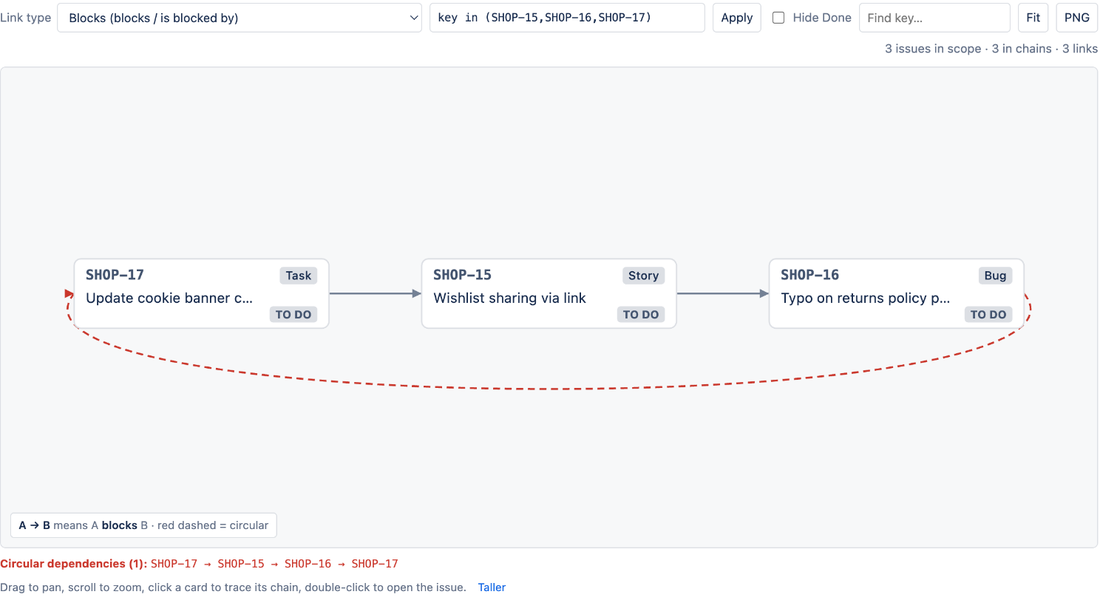
A web team has three small tickets for a returns-page fix: update the cookie banner copy, wishlist sharing via link, and a typo on the returns policy page. Over two weeks they get linked: the banner copy blocks the wishlist change (shared component), the wishlist change blocks the typo fix (same page, avoid merge conflicts), and then someone links the typo fix as blocking the banner copy because legal wants the policy text right before anything ships.
Each link made sense to the person who added it. Together they say that none of the three can start. The tickets sit in To Do for a sprint until someone asks why.
How to do it with LinkLens
- Open the project and select Dependencies in the sidebar, with Link type set to Blocks (blocks / is blocked by).
- Look for a red dashed arrow. That is the link that closes a loop; the other links in the loop keep their normal colour so you can still read the intended order.
- Read the Circular dependencies line under the canvas. It lists each loop as keys, for example
SHOP-17 → SHOP-15 → SHOP-16 → SHOP-17. Up to ten loops are listed. - Click each card in the loop to pin its chain and read the tooltip, which shows how many issues it blocks and is blocked by.
- Decide which link is wrong, open that issue (double-click the card) and remove or reverse the link with Jira's link editor.
- Reload. The red arrow disappears.
To narrow the view to just the loop, put the keys in the JQL scope box: key in (SHOP-15, SHOP-16, SHOP-17).
Deciding which link to cut
The link drawn in red is the one the layout met last, not necessarily the wrong one. Read the whole loop and ask, for each link, "must this really finish before that starts?" Usually one link is a preference rather than a dependency, and that is the one to delete. If two links are genuine, the work has to be split: one of the issues gets a smaller first slice that can ship without the other, and the link moves to the second slice. In the example above, the legal requirement is real but it applies to the typo fix shipping, not to the banner copy starting, so the third link is the one to remove.
What LinkLens cannot do
Loops are detected on the chosen link type only; a loop that runs through mixed types (a blocks then a relates to) is not a dependency loop and is not flagged. With Hide Done on, a loop that passes through a finished issue is not reported. LinkLens does not prevent a loop being created, because it is read-only in this version, and it does not edit links for you. It is Jira Cloud only.
FAQ
Will Jira ever block circular links itself?
Not in the link editor today. Plans flags loops at scheduling time. The Data Center knowledge base method is the only Atlassian-provided detection, and it needs SQL access.
Can I be alerted when a loop appears?
Not automatically in version 1. A weekly look at the Dependencies page for each active project takes a minute per project; the Circular dependencies line is either empty or it is not.
What does it cost?
Free for sites with up to 10 users, then about USD 0.20 per user per month, billed by Atlassian with a 30-day trial. See the Atlassian Marketplace listing and the LinkLens page.
Sources
- How to identify cyclic Issue links or loops in Jira, Atlassian KB - definition of a loop, Data Center only, SQL plus command-line method.
- Link work items, Atlassian Support - link types have two directions; how links are added.
- Dependencies in Advanced Roadmaps, Atlassian Documentation - incoming and outgoing dependency semantics used by Plans.
- JRASERVER-2544, Graph link dependency map - long-standing absence of a project-wide link map in Jira.