 Mortise Apps
 ConfluenceTeamLens for Confluence
How do you show which teams are blocking each other on a Confluence page?
To show which teams are blocking each other on a Confluence page, natively you can list the blockers of one work item at a time: insert the Jira work items macro with JQL that uses the linkedWorkItems() function and the link type "is blocked by". JQL has no way to compare the Team field at the two ends of a link, so a "team A waits on team B" summary is not something one native query can return.
Short answer: for a key item, insert the Jira work items macro with issue in linkedWorkItems(ABC-123, "is blocked by") AND statusCategory != Done and add the columns you need. Repeat it for each item that matters. For one live table of every team pair, use a report macro that reads the links and both teams.
Checked 4 Nov 2026: Atlassian Support pages "JQL functions" (the linkedWorkItems() function) and "Display Jira work items in a list" (JQL search, columns, count view), read 4 Nov 2026, plus the Atlassian Developer page on the Team field (read 3 Nov 2026). We have not built the pages below on a live site for this article; the steps follow those pages.
What JQL can find about links
Atlassian's JQL functions page lists linkedWorkItems(): it "searches for work items that are linked to a work item", and you can restrict it to one or more link types. The examples on that page are linkedWorkItems(ABC-123) and linkedWorkItems(ABC-123, "is duplicated by"), and the link type is case sensitive.
Older filters and guides spell it linkedIssues(). We have not tested which spelling every site accepts; the JQL editor's autocomplete shows the names your site knows.
The function always starts from one work item key. There is no JQL that says "work items blocked by any item owned by another team": the query cannot read the Team field of the item on the other side of the link. That is the gap behind every manual dependency table.
A per-item blocker list on the page
The Jira work items macro (type /jira in the editor) can run a JQL search and show the results as a list, a single work item or a count. In list view you can choose and reorder the columns.
- For each item that matters (a release epic, a launch task), insert the macro and switch the search to JQL: ``
issue in linkedWorkItems(ABC-123, "is blocked by") AND statusCategory != Done`` - Pick list view and add the columns your readers need, such as status, assignee and due date.
- Put a short heading above each list ("ABC-123 waits on") so readers know which item it belongs to.
- To show only blockers owned by one team, add the team by id:
AND "Team[Team]" = <team id>. The id is the last part of the team's profile URL; the Team field does not match display names.
Each list reruns when the page opens, so it stays current. The cost is upkeep: one macro per item, and the page never adds up the totals by team. With ten key items and four teams you are reading ten lists and counting by hand.
A live who-waits-on-whom table by team
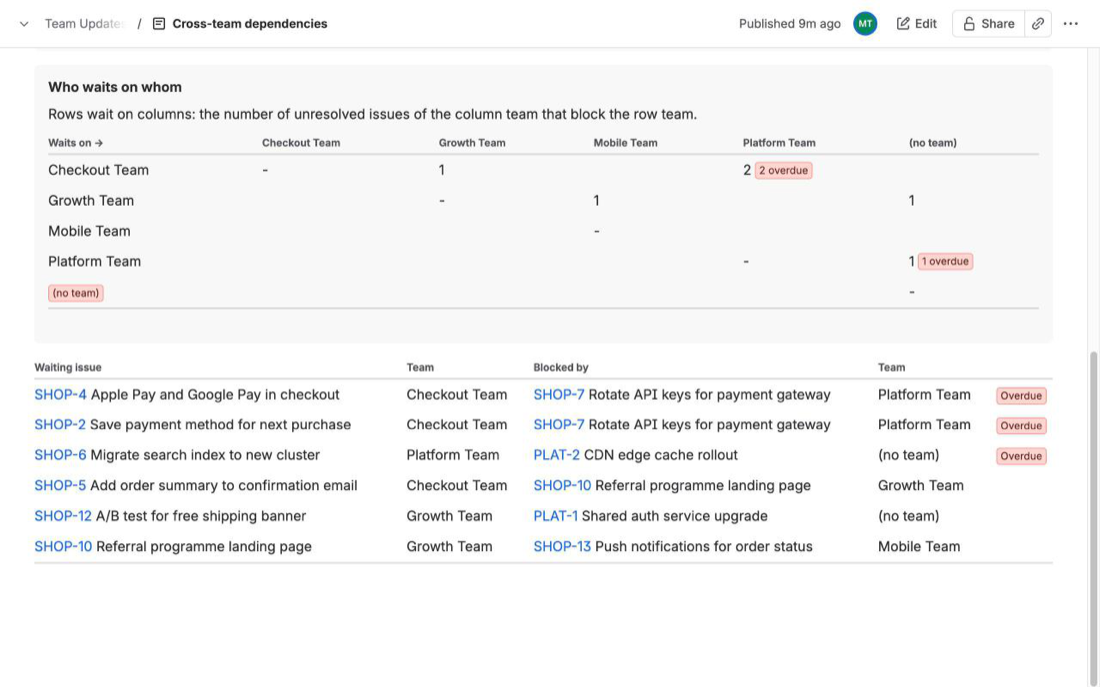
We make TeamLens for Confluence, a macro whose Dependencies report reads the issue links in a scope (Jira projects or a JQL query) and keeps only links between open work items that belong to different teams. Links inside one team, and links where either side is done, are left out. The link type is Blocks by default and can be changed.
- Tiles: cross-team dependencies, overdue ones (the blocker or the waiting item is past its due date) and teams involved.
- Chart: per team, how many items it is waiting on and how many it is blocking.
- Who waits on whom: rows wait on columns; each cell counts the open items of the column team that block the row team, with an overdue count.
- List: up to 100 pairs, overdue first, with the waiting item, the blocking item and both teams.
Its limits, from the docs: up to 3,000 work items per macro, at most 400 linked items outside the scope are looked up to find their team, the Confluence page must be on the same site as Jira, and PDF or Word exports do not include the live report. The full rules are in the dependencies report docs. If only two or three items matter, the native lists above are enough.
FAQ
Can JQL find work blocked by another team?
Not in one query. linkedWorkItems() needs a starting work item key, and JQL cannot filter on the Team field of the linked item. You can filter the results by team, but only one item's links at a time.
Why does my linkedWorkItems query return nothing?
Check the link type text. Atlassian notes the link type is case sensitive; write it the way Jira shows the link on the work item, for example "is blocked by", as in Atlassian's own "is duplicated by" example.
Does the list update by itself?
Yes. The Jira work items macro runs its search when the page loads. A pasted screenshot or a hand-made table does not.
Related reading: Cross-team dependencies in Jira: a who-waits-on-whom matrix, How to put a Jira dependency map in a Confluence page and Show Jira team workload on a Confluence page.
Sources
- JQL functions, Atlassian Support -
linkedWorkItems()syntax, case-sensitive link types, examples;membersOf(id:<teamId>)needs the team id. Read 4 Nov 2026. - Display Jira work items in a list, Atlassian Support - JQL search, list and count views, choosing columns. Read 4 Nov 2026.
- Team field in Jira REST API, Atlassian Developer - team id from the profile URL, JQL on the Team field. Read 3 Nov 2026.
- TeamLens for Confluence: Dependencies report - what counts as a cross-team dependency, tiles, matrix and list.