 Mortise Apps
 ConfluenceTeamLens for Confluence
How do you show Jira work items with no assignee, estimate or due date on a Confluence page?
Planning goes wrong quietly. The work item with no assignee is nobody's job, the one with no estimate is missing from the capacity sum, and the one with no due date never shows up on the release page. A Confluence page can list all three live from Jira with nothing installed: each gap is one IS EMPTY query in the Jira work items macro.
Short answer: add a Jira work items macro per gap, each with a JQL query that keeps only open work and tests one field for no value:assignee IS EMPTY,due IS EMPTYandoriginalEstimate IS EMPTY(or your story points field), each withAND statusCategory != Done. Atlassian's JQL keywords reference describesEMPTYas the way "to search for work items where a given field does not have a value". Switch a second copy of each macro to the count view for a row of headline numbers. What the native macros cannot do is show the gaps side by side per project or per Atlassian team in one table.
One query per gap
| Gap | JQL (add your project scope in front) | Notes |
|---|---|---|
| Nobody owns it | assignee IS EMPTY AND statusCategory != Done | Assignee supports IS and IS NOT |
| No due date | due IS EMPTY AND statusCategory != Done | due has the alias dueDate; Atlassian's own example is duedate is empty |
| No time estimate | originalEstimate IS EMPTY AND statusCategory != Done | Only when time tracking is on; alias timeOriginalEstimate |
| No story points | "Story point estimate" IS EMPTY AND type in (Story, Task, Bug) AND statusCategory != Done | Use the name of your points field; custom number fields support IS and IS NOT |
All four rest on the same rule from the keywords reference: EMPTY "can only be used with fields that support the IS and IS NOT operators", so check a field's entry in the JQL fields reference before you rely on it. EMPTY and NULL mean the same thing, and the operators page gives fixVersion is empty or fixVersion is null as the pattern.
Two details that trip people up:
- Custom fields are named by their name or their ID. The fields reference says you can search "by custom field name or custom field ID", so
cf[10016] IS EMPTYworks where the field name is ambiguous. Find the ID in the field's admin page URL. - The custom-field example on that page reads backwards. On 18 Oct 2026 the reference showed
location != emptyunder the caption "has no value".!= emptymatches work items that do have a value. For "no value", useIS EMPTY.
Leave out the estimate row for epics and sub-tasks if your team only estimates stories, tasks and bugs; that is what the type in (...) clause is for.
Put it on the page
- Edit the Confluence page, type
/jiraand choose the Jira work items macro. - Select JQL instead of the default basic search and paste the first query with a scope, for example:
project in (APP, WEB) AND assignee IS EMPTY AND statusCategory != Done ORDER BY created ASC - Pick the columns. Atlassian's macro page: "Choose the columns you want to appear by selecting the column icon", and you can drag them to reorder. Key, summary, status, created and reporter are enough to chase an owner.
- Insert a copy and select COUNT VIEW, which shows "just the number of work items". Put the count macros side by side in a table row at the top of the page: unassigned, no due date, no estimate.
- Repeat for each gap, then publish. Each macro is a live query, so the list shrinks as people fix the work items.
If the page is for one team, put the team scope in front of every query (a filter, a project or a component). A page with three gaps for four teams is twelve macros, and each one is edited by hand when a team changes.
What the native macros do not show
- The gaps side by side. Each macro answers one question. There is no single table with a row per project and a column per gap.
- Percentages. The count view gives "14", not "14 of 120 open work items, 12%". Readers need a second count macro for the total and do the division.
- A chart of the gaps. Atlassian's chart macro page lists the pie chart's segment fields as status, fix version, assignee name, priority, component and issue type. "Has a due date" is not one of them.
- No team. The JQL fields reference has no entry for the Atlassian Team field, and we did not test a no-team query for this article, so it is not in the table above. Atlassian's own tracker shows the Team field's JQL support is still partial: JRACLOUD-87808, "Team field not supported for sorting on gadgets, JQL or boards", was Gathering Interest with 651 votes on 18 Oct 2026.
For a one-project page that only needs "who owns this?", stop here: one assignee IS EMPTY macro does the job and costs nothing.
How TeamLens for Confluence fits
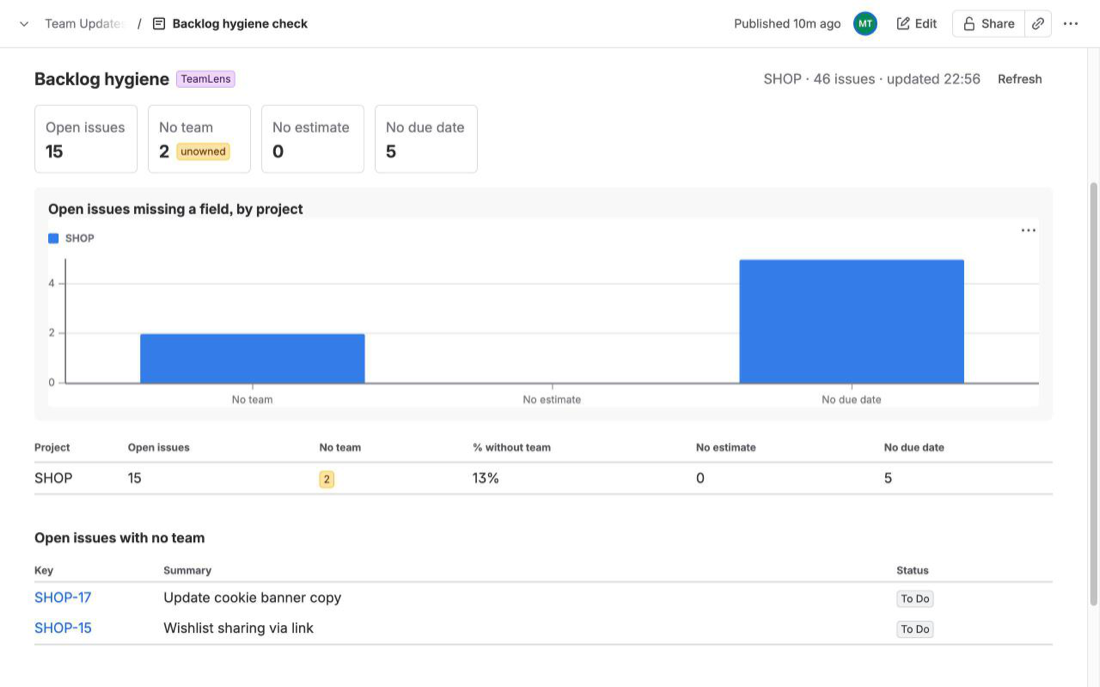
We make TeamLens for Confluence, a Confluence macro on the Atlassian Marketplace that reads Jira work from the same site. One of its five reports is Hygiene: open work that is missing ownership or planning data, per project. Its tiles show open work items, work with no team, stories, tasks and bugs with no estimate (when a story points field exists) and work with no due date; the table has a row per project with the no-team count and percentage, no estimate and no due date, and below it up to 50 open work items with no team. You insert it with /TeamLens, pick Hygiene and choose a scope (Jira projects or any JQL).
Its limits: it reads only the Jira on the same Atlassian site, counts up to 3,000 work items per macro, shows a placeholder in PDF and Word exports, and viewers without Jira access see a "No access to Jira" message. Each viewer loads the report with their own Jira permissions through one read-only scope (read:jira-work); there is no backend and no storage. It is free for sites with up to 10 users. Details: the TeamLens for Confluence page. For work that is assigned but not moving, see stale Jira work items on a Confluence page; for team grouping, Jira work by team on a Confluence status page.
FAQ
What JQL finds unassigned Jira work items?
assignee IS EMPTY. Add AND statusCategory != Done to leave out finished work. assignee IS NULL returns the same result.
What JQL finds Jira work items with no due date?
due IS EMPTY or duedate is empty, the example in Atlassian's JQL keywords reference.
How do I find Jira work items with no estimate?
For time estimates, originalEstimate IS EMPTY (only when time tracking is enabled). For story points, "Story point estimate" IS EMPTY or cf[<field id>] IS EMPTY, using the name or ID of the points field on your site.
Does != empty find fields with no value?
No. != empty matches work items where the field has a value. Use IS EMPTY for no value and IS NOT EMPTY for any value.
Can a Confluence page show these counts without an app?
Yes: the Jira work items macro has a count view. You need one macro per gap and per scope, and there is no built-in percentage or side-by-side table.
Sources
- JQL keywords, Atlassian Support -
EMPTYandNULL, the IS / IS NOT rule, theduedate is emptyexample. Read 18 Oct 2026. - JQL operators, Atlassian Support -
ISandIS NOTwith EMPTY or NULL, the fixVersion example. Read 18 Oct 2026. - JQL fields, Atlassian Support - Assignee, Due (alias dueDate), Original estimate (time tracking, alias timeOriginalEstimate), Custom field (name or
cf[ID], thelocation != emptyexample); no Team entry. Read 18 Oct 2026. - Display Jira work items in a list, Atlassian Support - JQL search, COUNT VIEW, choosing and reordering columns. Read 18 Oct 2026.
- Insert the Jira chart macro, Atlassian Support - pie chart segment fields. Read 18 Oct 2026.
- JRACLOUD-87808, Team field not supported for sorting on gadgets, JQL or boards - Gathering Interest, 651 votes on 18 Oct 2026.