Mortise Apps
TeamLens for Jira
Cross-team dependencies in Jira: a who-waits-on-whom matrix from issue links
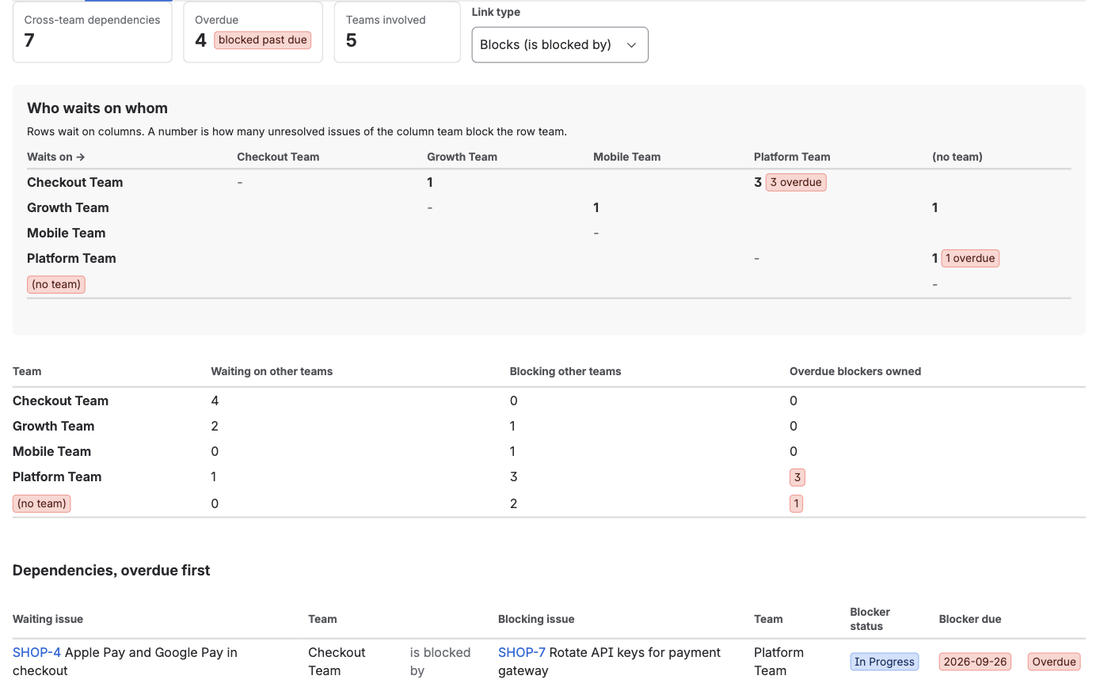
A cross-team dependency in Jira is an issue link, usually blocks / is blocked by, whose two ends belong to different teams. Jira stores these links faithfully and shows them one issue at a time, so the question program managers actually ask, "which teams are waiting on which teams, and which of those blockers are overdue?", has no native answer. TeamLens for Jira adds a Dependencies report that reads the links in any set of projects, keeps only the cross-team ones, and lays them out as a who-waits-on-whom matrix with the overdue blockers on top.
Why the issue view is the wrong place to look
Open a story and the Linked work items section says "is blocked by PLAT-12". Helpful for that story. Useless for the release: you cannot see that PLAT-12 also blocks four other stories in two other teams, that it is owned by a team whose sprint ended last week, or that it is one of nine items Checkout is waiting on from Platform this quarter.
Native Jira offers some help:
- JQL can list one hop:
issue in linkedIssues("PLAT-12", "blocks"). It cannot group the result by the team on either end, and it needs an issue key to start from. - Board cards show a link icon and the linked keys on hover. Still one card at a time.
- Plans (Advanced Roadmaps) draws dependency lines on the timeline and has a dependencies report for issues in a plan. It is Premium only, per plan, and it shows lines between issues, not totals between teams.
- The Dependencies tab on a Jira Software project lists linked issues in the current sprint, one row per link, with no team grouping.
Community threads asking to "visualize dependencies" or "visualize blocked issues" have collected answers for over a decade, most of them pointing to a spreadsheet or an app.
A real example: the sprint review surprise
An e-commerce company runs four teams in one storefront project. At the sprint review, Checkout reports that Apple Pay and saved payment methods both slipped. Why? Both were blocked by "Rotate API keys for the payment gateway", a Platform task that was due six days earlier and was still in progress. A third Checkout bug was blocked by a Platform search migration, also overdue. Platform, in turn, was waiting on a CDN rollout in a different project that nobody had assigned to a team.
Three Checkout items slipped for one reason: Platform owned four overdue blockers. That fact existed in the links the whole sprint. Nobody had a page that showed it.
Building the matrix by hand
You can get there without an app, at a cost:
- Export every open issue in the scope with the Team field and the issue links.
- For each "is blocked by" link, look up the team of the blocking issue (a second export, because the export only gives you the key).
- Drop the pairs where both teams are the same.
- Pivot: waiting team on the rows, blocking team on the columns, count in the cell. Add the due date of the blocker and mark the cell if it is past.
That is an hour the first time and twenty minutes every week after, and it is stale the moment a link changes.
How TeamLens builds it
Open Team reports (the tab in a project, or Apps, TeamLens Team reports for several projects), pick the projects and select the Dependencies tab.
TeamLens reads every issue link in the scope and keeps the ones that are unresolved and whose two issues belong to different teams. Links inside one team are ignored, because they are that team's own business; resolved blockers are dropped. Issues outside the scope that are linked into it are looked up so their team is known. The report shows:
- Who waits on whom. Rows wait on columns. A cell holds the number of unresolved issues of the column team that block the row team, and an overdue lozenge when any of them is past due.
- Per team. Waiting on other teams, blocking other teams, and overdue blockers the team owns. The last column is the one to read in a leadership meeting.
- Dependencies, overdue first. One row per pair: waiting issue and team, the relationship, blocking issue and team, the blocker's status and due date. Overdue means the blocker or the waiting issue is past its due date. Due soon means the waiting issue is due within seven days while its blocker is still open.
The link type is selectable. Blocks is the default when it exists on the site; All link types includes every directional link if your teams use custom types such as "depends on".
For the sprint review above, the matrix shows Checkout waiting on Platform for three items, all overdue, and Platform waiting on one unowned issue in the other project. That is the whole story in two cells, a week before the review.
Everything is read live as the viewer, nothing is stored, and Jira permissions apply. The dependency list is capped at 300 rows and 400 external lookups; narrow the scope with JQL if you hit either.
Where it stops, and what to pair it with
The report counts direct links. It does not follow a chain three hops deep, and it does not draw the graph. That is the job of LinkLens for Jira, the companion app from the same studio, which draws every blocker chain in a project on one canvas and flags circular dependencies. TeamLens tells you which teams are waiting; LinkLens shows you the chain they are waiting on.
FAQ
Do links have to be "Blocks"?
No. Any directional link type works; pick it from the Link type selector. Non-directional types such as Relates are treated by their inward side, which is rarely what you want, so Blocks stays the default.
What if an issue has no team?
It appears as (no team) on whichever side of the link it sits, so an unowned blocker is visible rather than hidden. The Hygiene tab lists every open issue with no team, with a paste-ready noTeam() query.
What does it cost?
TeamLens is free for sites with up to 10 users and USD 1 per user per month above that, billed by Atlassian with a 30-day trial. It is on the Atlassian Marketplace; definitions are in the Team reports documentation.
Sources
- Link work items, Atlassian Support - how issue links and their inward and outward names work.
- Dependencies in Advanced Roadmaps, Atlassian documentation - what the Plans dependency view covers.
- Visualize dependencies, Atlassian Community - a recent request with the standard answers.
- Visualize blocked issues, Atlassian Community - the same request, years earlier.
- Teams in Jira projects, Atlassian Support - the Team field the report groups by.
- JRACLOUD-87808, Team field not supported for sorting on gadgets, JQL or boards - why grouping by team needs an app.