 Mortise Apps
 ConfluenceTeamLens for Confluence
How do you show overdue Jira work items by team on a Confluence page?
To show overdue Jira work items on a Confluence page, insert the Jira work items macro with a JQL search on the due field, for example due < startOfDay() AND statusCategory != Done. To split it by team, natively you add one macro per team with the team's id in the query; neither the work items macro nor the Jira chart macro groups the results by the Atlassian Team field for you.
Short answer: one Jira work items macro per team with due < startOfDay() AND statusCategory != Done AND "Team[Team]" = <team id>, list view, columns for assignee and due date. For one live table with an overdue count per team, use a report macro that reads the Team field.
Checked 9 Nov 2026: Atlassian Support pages "JQL fields" (the Due field) and "Insert the Jira chart macro", read 9 Nov 2026, plus "Display Jira work items in a list" and the Atlassian Developer page on the Team field (read 3-4 Nov 2026). We have not built these pages on a live site for this article; the steps follow those pages.
The JQL for overdue work
Atlassian's JQL fields page describes Due (alias dueDate) as a date field that "relates to the date only (not to the time)". It accepts =, !=, >, >=, <, <=, IS, IS NOT, IN and NOT IN, dates written as "yyyy/MM/dd" or "yyyy-MM-dd", relative dates such as "1d" or "-1w", and functions such as now(), startOfDay() and endOfWeek().
Because the due date has no time, due < startOfDay() reads as "the due date was before today", which is what most teams mean by overdue. Add statusCategory != Done so finished work drops out:
due < startOfDay() AND statusCategory != Done ORDER BY due ASCTwo useful variants from the same operators:
- Due this week and still open:
due >= startOfDay() AND due <= endOfWeek() AND statusCategory != Done - No due date at all:
due IS EMPTY AND statusCategory != Done(these never show up as overdue, so check them too)
One overdue list per team on the page
- Type
/jirain the Confluence editor to insert the Jira work items macro and switch the search to JQL. - Paste the overdue query and add the team by id:
AND "Team[Team]" = <team id>. The id is the last part of the team's profile URL; the Team field does not match display names. - Pick list view and add the columns your readers need: assignee, due date, status. The count view shows only the number, which works well in a small summary row.
- Repeat for each team, with a heading above each list.
Each macro runs its search when the page opens, so the lists stay current. The cost is upkeep: a new team means a new macro, and work with no team is easy to miss unless you add one more list with AND "Team[Team]" IS EMPTY.
Why the Jira chart macro does not solve it
The Jira chart macro offers a pie chart, a created vs resolved chart and a two-dimensional chart. On Atlassian's page the pie chart's "Chart by" choices are fields such as status, priority, assignee, component and issue type, and the two-dimensional chart's axes come from status, priority, assignee, fix version, component and issue type. Team is not in those lists, and we have not checked whether a site shows the Team field there. You can still point a pie chart at the overdue JQL and chart it by assignee, which tells you who holds the late work, not which team.
A live overdue count per team
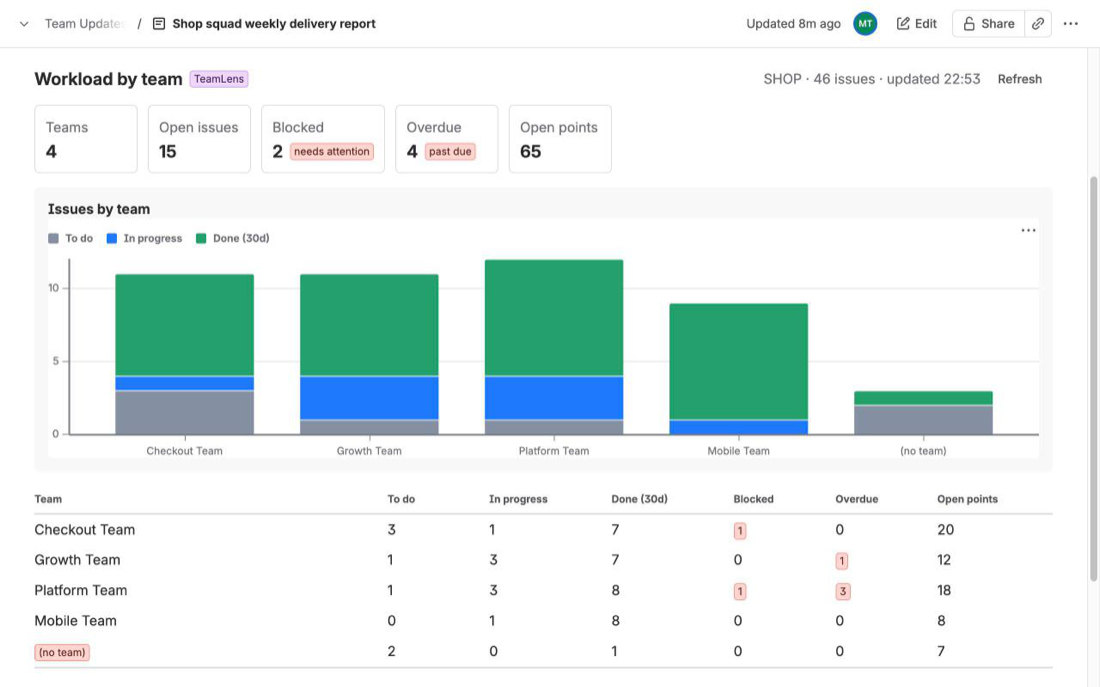
We make TeamLens for Confluence, a macro whose Workload report counts, per Atlassian Team, the open work in To do and In progress, the blocked work and the overdue work: open work items whose due date has passed. Work items with no team land in a "(no team)" row at the bottom, so nothing silently drops out. The tiles show teams, open, blocked and overdue totals for the scope (Jira projects or a JQL query), and the page refreshes the numbers when it opens.
Its limits, from the docs: up to 3,000 work items per macro, the Confluence page must be on the same site as Jira, and PDF or Word exports do not include the live report. Details are in the workload report docs. If you only track two or three teams, the native lists above do the job.
FAQ
Is a work item due today overdue in JQL?
Not with due < startOfDay(). The due field holds a date only, so an item due today is not before the start of today. Use due <= startOfDay() or due < endOfDay() if your team counts today as late.
Why does my overdue list include finished work?
The due filter alone does not look at status. Add statusCategory != Done, or resolution IS EMPTY if your workflows set a resolution.
Can I show only overdue work for my own team?
Yes, add AND "Team[Team]" = <team id> to the query. JQL needs the team's id, not its name.
Related reading: Show Jira team workload on a Confluence page, Show Jira work items with no assignee, estimate or due date on a Confluence page and Show which teams are blocking each other on a Confluence page.
Sources
- JQL fields, Atlassian Support - Due field: date only, supported operators, date formats, relative dates and functions. Read 9 Nov 2026.
- Insert the Jira chart macro, Atlassian Support - pie, created vs resolved and two-dimensional charts and their fields. Read 9 Nov 2026.
- Display Jira work items in a list, Atlassian Support - JQL search, list and count views, columns. Read 4 Nov 2026.
- Team field in Jira REST API, Atlassian Developer - team id from the profile URL, JQL on the Team field. Read 3 Nov 2026.
- TeamLens for Confluence: Workload report - per-team open, blocked and overdue counts.