 Mortise Apps
TeamLens for Confluence
How to show Jira work by team in a Confluence status page
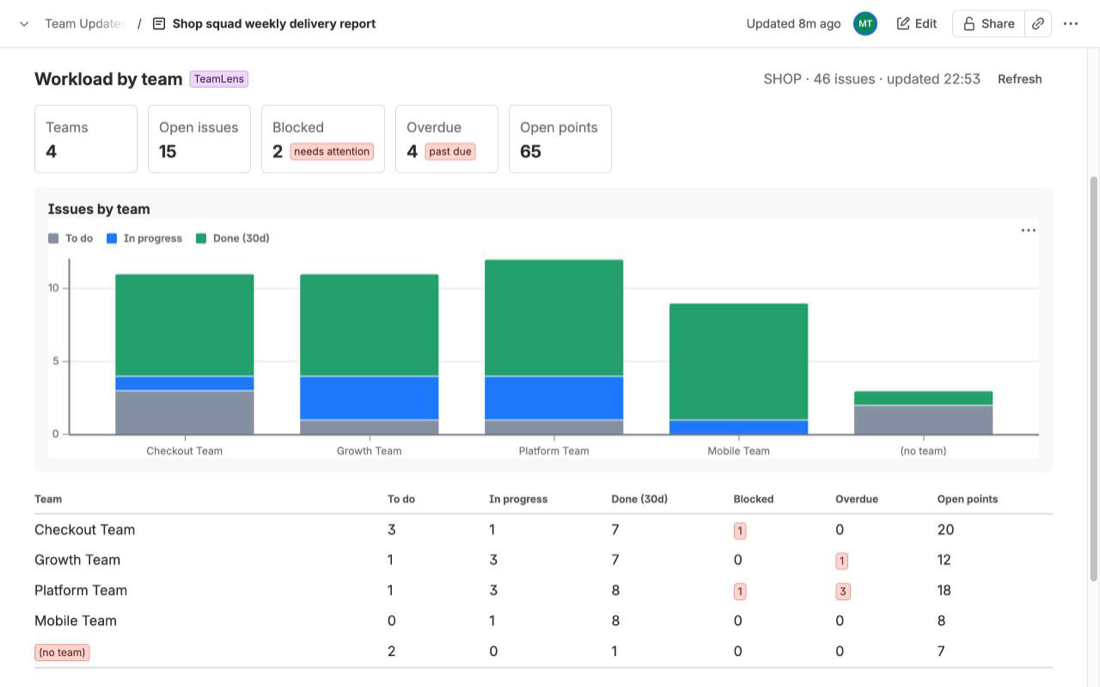
To show Jira work by team in a Confluence status page, you need a macro that groups issues by the Atlassian Team field. Confluence Cloud's two native options cannot do that: the Jira Issues macro shows a list or a count for one JQL query, and the Jira Chart macro groups by a short list of standard fields (status, priority, assignee, fix version, component, issue type) that does not include Team. The native workaround is one macro per team, each filtered on that team's id, or a select-list field that mirrors the Team. TeamLens for Confluence adds a macro that groups by the real Team field and shows workload, aging, hygiene, velocity and cross-team dependencies, read live from Jira every time the page opens.
What a team status page needs
A weekly delivery page usually answers the same four questions for each team: how much is open, what is blocked or overdue, what finished recently, and who is waiting on whom. The data is already in Jira. The Team field on each issue says who owns it, the status category says where it is, the flag and due date say whether it is in trouble, and issue links say what it waits on.
What the page needs is one table with a row per team that is current when a stakeholder opens it on Thursday, not when someone pasted it in on Monday.
What the native Confluence macros can do
Confluence Cloud ships two macros for Jira data, both part of the built-in Jira Macros app.
Jira Issues macro (Atlassian now calls it "Display Jira work items in a list"). You give it a JQL query, a filter or a Jira URL, and it renders a table of issues with columns you choose, a single issue, or just a count. It is live: the list reflects Jira when the page is viewed. It is the right tool for "the open bugs in this release" or "everything in sprint 42".
What it does not do is group or total. Atlassian's documentation describes a list, a single-item view and a count view, with no option to break the list into sections by a field or to sum a column per value. A table of 60 issues with a Team column is still 60 rows; the reader has to count Checkout's rows themselves.
Jira Chart macro. It draws three chart types from a JQL query: a pie chart, a created-vs-resolved trend and a two-dimensional table. The pie chart's "Chart by" option and the two-dimensional chart's X and Y axes are the grouping you want, but the documented fields are Status, Priority, Assignee, Fix version, Component and Issue type. Team is not in the list.
That matches Jira itself. On Jira dashboards, the Team field cannot be used as a statistic type in the Pie Chart, Issue Statistics or Two Dimensional gadgets. Atlassian tracks the gap as JRACLOUD-87808, "Team field not supported for sorting on gadgets, JQL or boards", open since October 2020 and still "Gathering Interest" with 648 votes when we checked on 30 September 2026. The Confluence chart macro builds on the same statistic types, so the limitation carries over.
Workaround 1: one macro per team
The most reliable native approach is to give each team its own macro:
- Find each team's id. The Team field stores a UUID, not a name, and JQL matches on the id:
"Team[Team]" = 36885b3c-1bf0-4f85-a357-c5b858c31de4. The id is the last part of the URL on the team's profile page. - On the status page, add a heading per team and under it a Jira Issues macro with a query such as
project = SHOP AND "Team[Team]" = <id> AND statusCategory != Done. - Switch to the count view if you only need the number, or keep the table for the detail.
- Add a second macro per team for blocked work (
flagged is not EMPTY) or overdue work (due < now() AND resolution is EMPTY) if you want those numbers too.
It works and it is live. The costs appear later. Six teams and three numbers each is eighteen macros holding eighteen hand-written queries full of UUIDs. A new team means editing the page; a renamed or merged team means finding its id again. Issues with no team at all never appear, because there is no macro for "nobody", unless you add one more with "Team[Team]" is EMPTY.
Workaround 2: mirror the Team into a select-list field
The other common answer on the Atlassian Community is to copy the Team into an ordinary single-select custom field with an Automation rule, then chart the mirror. Atlassian's knowledge base shows how to write the Team field from Automation using its custom field id and the team's UUID; the reverse rule copies it into the mirror.
The Confluence documentation lists only standard fields for the two-dimensional chart axes, so check that your mirror field is offered in the chart picker on your site before you build a process on it. Where it is, a pie chart by the mirror gives you open work per team in one macro.
The bill is the same as on Jira dashboards: two fields for one fact, an option list that must be edited by hand whenever a team is created or renamed, rules that can drift, and older issues with an empty mirror that quietly undercount. And a pie chart still shows only one number per team. Blocked, overdue, aging and velocity each need their own chart or table.
How to do it with TeamLens for Confluence
TeamLens for Confluence is a Confluence macro that reads Jira issues from the same Atlassian site and groups them by the Team field directly, so there is nothing to mirror and no UUIDs to paste.
- Install and connect. Install the app on Confluence, then a site admin connects it to Jira once from Manage apps. There is no separate Jira app to install. Until it is connected, the macro shows "Connect TeamLens to Jira" instead of a report.
- Insert the macro. Edit the status page, type
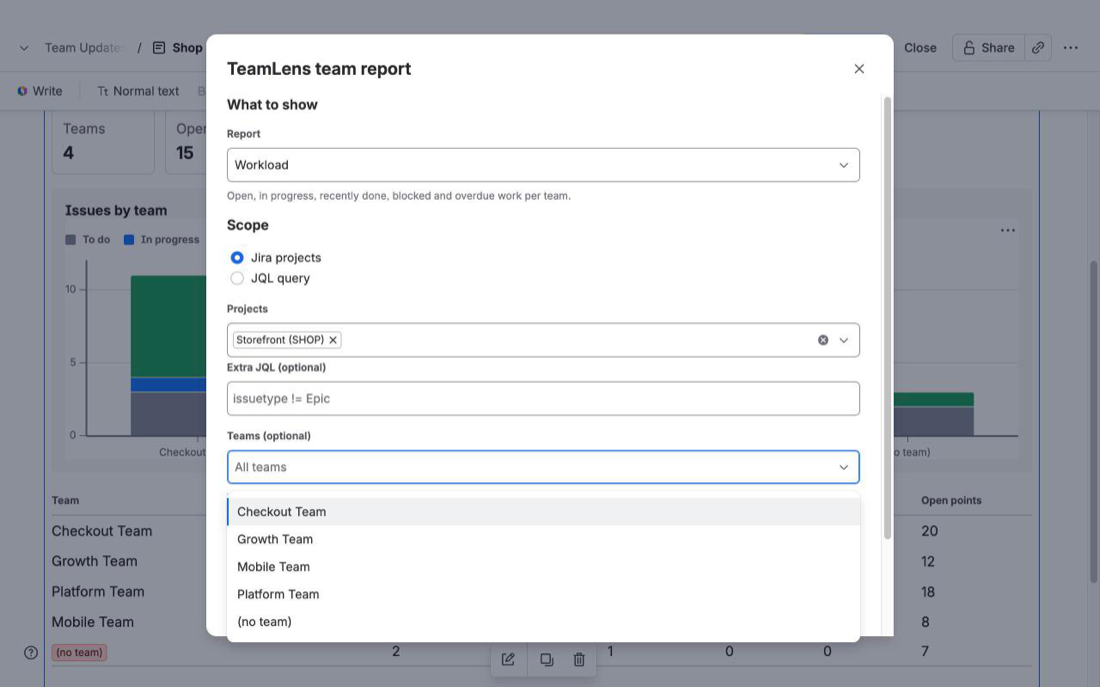
/TeamLensand pick TeamLens team report. - Configure it. Choose a Report, a Scope (one or more Jira projects with optional extra JQL, or any JQL query such as
filter = 12345), and optionally some Teams. Pick Chart and table or Table only, add a title, and select Save. - Publish. The report loads live each time someone opens the page. Refresh reloads it.
Five reports are available, each grouped by Atlassian Team:
- Workload. To do, In progress, Done in the last 30 days, Blocked, Overdue and open story points per team, with a stacked chart. Blocked means flagged in Jira or in a status whose name contains "block". Issues with no team get an explicit (no team) row at the bottom, so unowned work is visible rather than missing.
- Aging. In-progress work bucketed by days in the current status, with a "stale work, oldest first" list. The stale threshold is 7, 14, 21 or 30 days (14 by default).
- Hygiene. Per project: open issues with no team, no estimate or no due date, plus a list of the unowned issues.
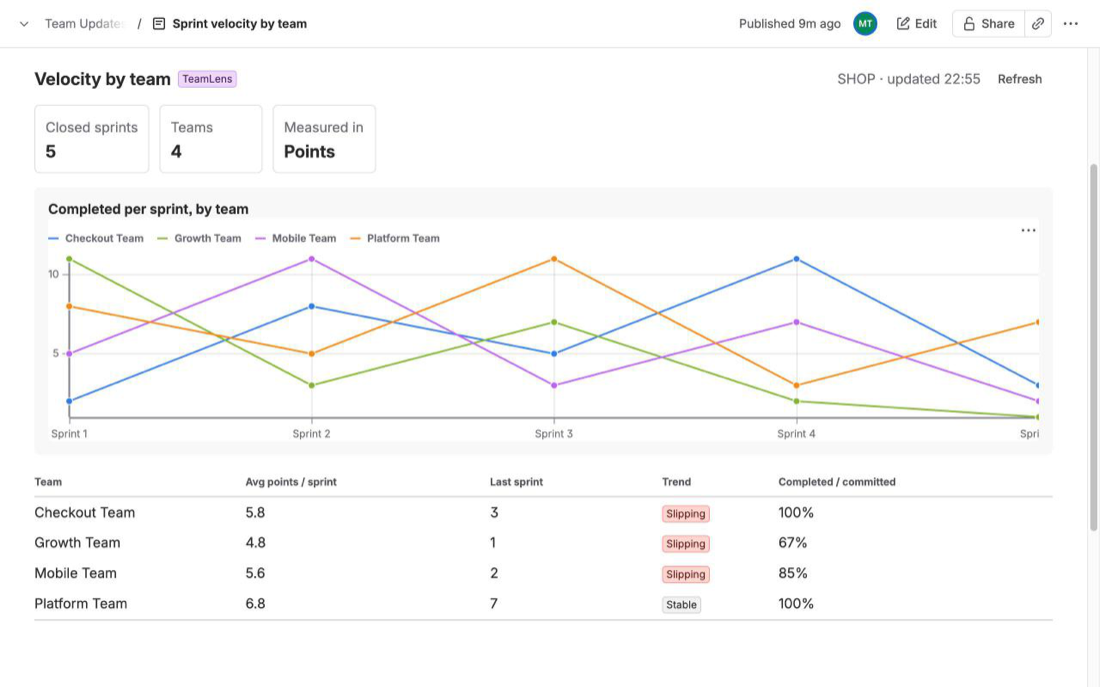
- Velocity. Completed versus committed per team over the last 4 to 12 closed sprints, across every board in the scope, with the average, the last sprint and a trend of Improving, Stable or Slipping.
- Dependencies. Unresolved links of a chosen type (Blocks by default) between issues owned by different teams, as a who-waits-on-whom matrix. Rows wait on columns, and the list below it puts overdue pairs first.
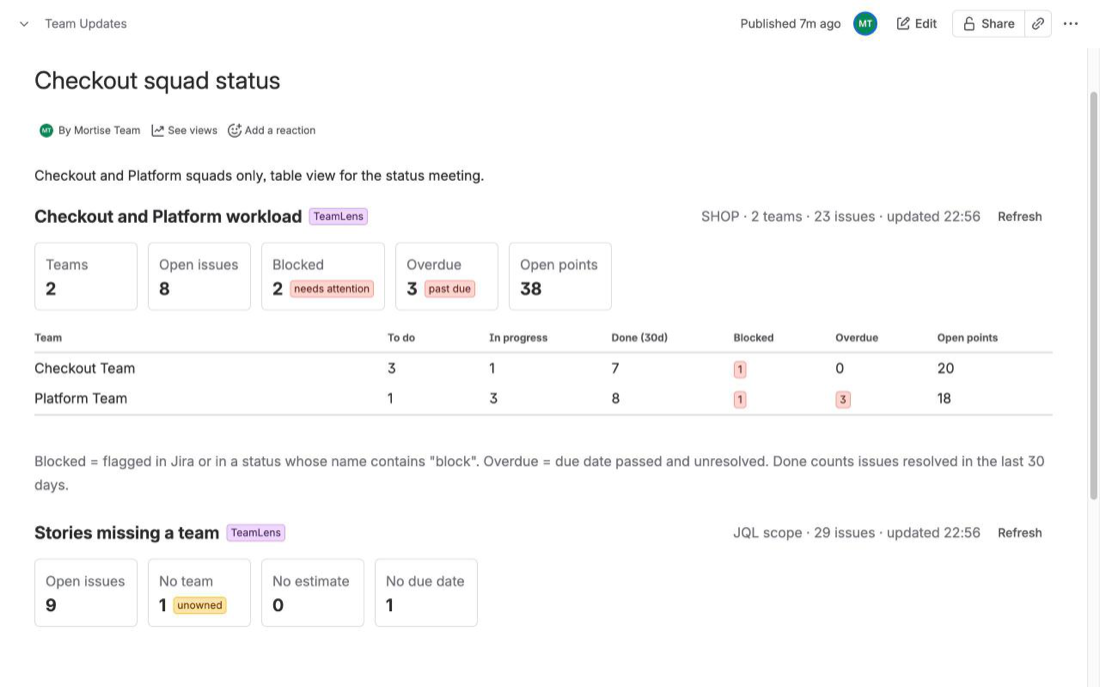
Several macros can sit on the same page, each with its own scope and team filter. A typical delivery page has Workload for the whole project at the top, Dependencies under it, and a table-only Hygiene check at the bottom. For a page about two squads, filter the macro to those teams instead of writing a query per team.
Every viewer loads the report as themselves, with their own Jira permissions, so two readers can see different counts if they can browse different projects, and nobody sees an issue they could not open in Jira. The app has one read-only scope (read:jira-work), no backend and no storage; the macro settings live in the page like any other macro parameter.
What it cannot do
Being specific about the limits saves an evaluation:
- Same site only. It reads the Jira on the same Atlassian site as the Confluence page.
- 3,000 issues per macro. The issue count shows
+when the cap is reached; narrow the scope with JQL. The Dependencies report looks up at most 400 linked issues outside the scope. - Velocity needs Jira Software sprints and considers sprints closed in the last 12 months. Scope removed mid-sprint is not modelled.
- The team picker lists teams found on issues in the scope (open, or resolved in the last 90 days). A team with no issues there cannot be selected.
- No team sizes. Member counts are not shown, because they need extra Atlassian Teams API scopes the app does not request.
- Exports. PDF and Word exports of the page show a placeholder, not the live report.
- No Jira access, no report. Viewers without Jira access see a "No access to Jira" message instead of partial data.
FAQ
Is the report a snapshot or live?
Live. Nothing is cached or stored; the report is computed from Jira when the page opens, and Refresh recomputes it. For a frozen copy, take a screenshot.
Do I need TeamLens for Jira as well?
No. TeamLens for Confluence connects to Jira by itself. TeamLens for Jira is a separate app that adds dashboard gadgets, teamIn() and noTeam() JQL functions and an issue panel inside Jira. The two work independently and can be used together.
Can I use an existing saved filter?
Yes. Choose the JQL scope and enter filter = 12345 or the filter name in quotes. ORDER BY clauses are ignored.
What does it cost?
TeamLens for Confluence is free for sites with up to 10 users, with paid tiers above that billed by Atlassian. The Marketplace listing is pending Atlassian's approval; the TeamLens for Confluence page and the getting-started guide have the current details.
Sources
- Display Jira work items in a list, Atlassian Support - the Jira Issues macro: list, single item and count views from JQL, filters or URLs.
- Insert the Jira chart macro, Atlassian Support - pie, created-vs-resolved and two-dimensional charts and the fields they group by.
- JRACLOUD-87808, Team field not supported for sorting on gadgets, JQL or boards - open since October 2020, Gathering Interest, 648 votes on 30 September 2026.
- Team field in Jira REST API, Atlassian Developer - the Team field stores a team UUID; the
"Team[Team]" = uuidJQL form. - Automation: Update the Team field based on the Assignee field, Atlassian KB - writing the Team field from Automation, the basis of the mirror-field workaround.
- Teams in Jira projects, Atlassian Support - adding the Team field to project layouts.