 Mortise Apps
 ConfluenceTeamLens for Confluence
How do you show stale Jira work items on a Confluence page?
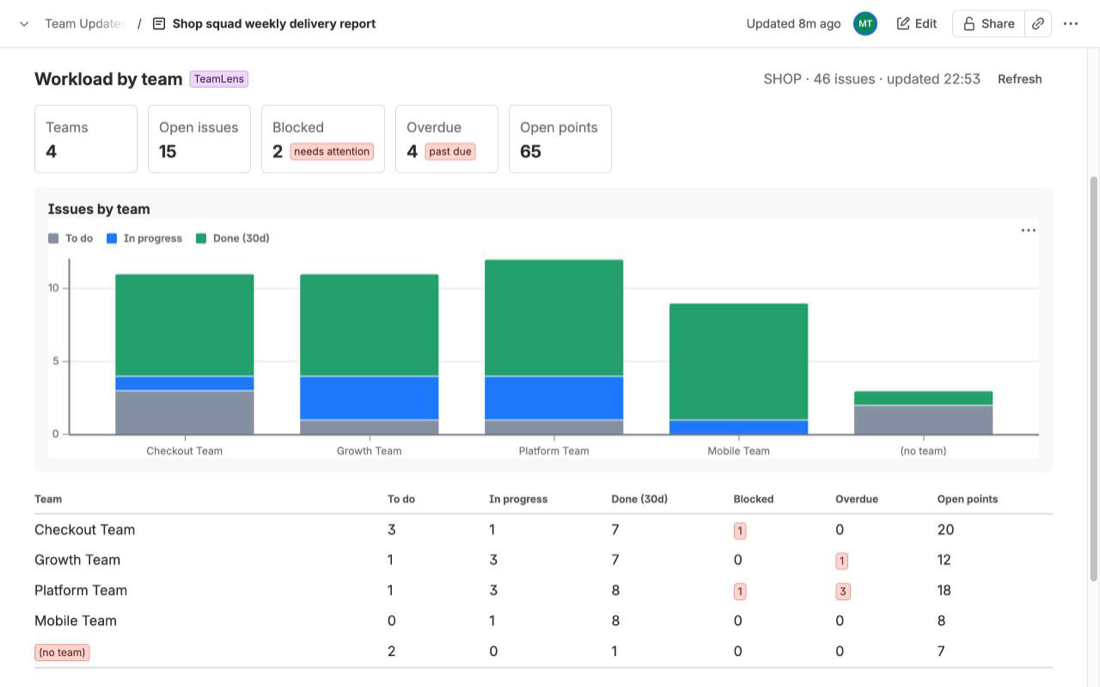
A status page that only counts open work hides the item that has sat in "In Review" for five weeks. The question a delivery lead actually asks on Monday is "what has not moved?", and Confluence can answer it live from Jira with nothing installed, as long as you accept a flat list.
Short answer: put a Jira work items macro on the page with a JQL query for work that is in progress and has not been touched:statusCategory = "In Progress" AND updated < "-2w" ORDER BY updated ASC. Atlassian's JQL reference givesupdated < "-2w"as the way to "find work items that were last updated more than two weeks ago". For "has not changed status in two weeks" (a comment does not reset it), use theCHANGEDoperator:statusCategory = "In Progress" AND NOT status CHANGED AFTER startOfDay("-14d"). Add a second macro in count mode for the headline number. What the native macros cannot do is bucket the list by age or total it per Atlassian team.
Two meanings of "stale", two queries
| What you mean | JQL | What resets the clock |
|---|---|---|
| Nobody touched it | updated < "-2w" | Any edit: a comment, a field change, a link, a transition |
| It has not moved on the board | NOT status CHANGED AFTER startOfDay("-14d") | Only a status change |
Both are documented. The updated field accepts a date or a relative value: "use "w" (weeks), "d" (days), "h" (hours) or "m" (minutes) to specify a date relative to the current time", and the quote marks matter, because without them "the number you supply will be interpreted as milliseconds after epoch". The CHANGED operator "is used to find work items that have a value that had changed for the specified field", takes the optional predicates AFTER, BEFORE, BY, DURING, ON, FROM and TO, and works "with the Assignee, Fix Version, Priority, Reporter, Resolution, and Status fields only".
The first query is the looser one. A bot comment or a bulk label edit makes an item look fresh, so a list built on updated shrinks whenever someone tidies the backlog. The second query ignores that noise, which is why it is the better one for a "stuck in review" list.
One documented limit on history searches: "if a work item has more than 10,000 changes, JQL queries using the WAS operator will only search the most recent changes." That will not matter for ordinary work items, but it is the reason very old, very busy tickets can behave oddly.
Put it on the page
- Edit the Confluence page, type
/jiraand choose the Jira work items macro (it was called the Jira Issues macro; Atlassian now says "work items"). - Paste the JQL. Start with a scope, then the stale test, then the order:
project in (APP, WEB) AND statusCategory = "In Progress" AND NOT status CHANGED AFTER startOfDay("-14d") ORDER BY updated ASC - Choose the columns. Atlassian's macro page: "choose the columns you want to appear by selecting the column icon", and you can drag columns to reorder them. Key, summary, status, assignee and updated are enough for a stale list.
- Insert a second macro with the same JQL and choose Total work item count next to "Display options" in the macro browser, so the page opens with the number above the list.
- Publish. The list is a live query, so it is right on Wednesday as well as Monday.
Change -14d to the threshold your team agreed on. A common ladder is 7 days for a warning list and 30 days for an escalation list, as two macros.
What the native macros do not show
- How old each item is. The list shows the updated date, not "23 days in In Review". Readers do the subtraction.
- Age buckets. There is no 0-7 / 8-14 / 15-30 / 30+ breakdown. The Jira chart macro offers three chart types (pie, created vs resolved, two-dimensional), and Atlassian lists the fields for the pie and the two-dimensional axes as status, priority, assignee, fix version, component and issue type. None of them is an age.
- Totals per team. The Atlassian Team field is not one of those six chart fields either, so "which team has the most stuck work" means one macro per team with the team in the JQL, and a page edit whenever a team is added or renamed. The step-by-step version of that workaround is in Jira work by team on a Confluence status page.
If a flat list for one or two projects is all you need, stop here: the native macro is the right tool and it is free.
How TeamLens for Confluence fits
We make TeamLens for Confluence, a Confluence macro on the Atlassian Marketplace that reads Jira work from the same site and groups it by the Atlassian Team field. One of its five reports is Aging: in-progress work bucketed by days in the current status, per team, with a "stale work, oldest first" list underneath. The stale threshold is 7, 14, 21 or 30 days (14 by default). You insert it with /TeamLens, pick Aging, choose a scope (Jira projects or any JQL, such as filter = 12345) and optionally some teams.
Its limits, so you can rule it in or out quickly: it reads only the Jira on the same Atlassian site, counts up to 3,000 work items per macro, shows a placeholder in PDF and Word exports, and viewers without Jira access see a "No access to Jira" message instead of partial data. Each viewer loads the report with their own Jira permissions; the app has one read-only scope (read:jira-work), no backend and no storage. It is free for sites with up to 10 users. Details: the TeamLens for Confluence page. The other four native ways to show Jira data in a page are compared in Jira reports in Confluence: four native ways.
FAQ
What JQL finds Jira work items not updated in 14 days?
updated < "-14d", or updated < "-2w", which is the example in Atlassian's JQL fields reference. Add statusCategory = "In Progress" to leave out the backlog and finished work, and ORDER BY updated ASC to put the oldest first.
How do I find work items stuck in the same status?
Use the CHANGED operator on the status field with the AFTER predicate, negated: NOT status CHANGED AFTER startOfDay("-14d"). Unlike updated, a comment or a label edit does not reset it.
Can the Jira chart macro in Confluence show an aging chart?
No. Its three chart types are pie, created vs resolved and two-dimensional, and the fields Atlassian lists for them do not include an age or a time in status.
Does a comment make a stale work item look fresh?
With updated, yes: any edit moves the updated date. With status CHANGED, no: only a transition counts.
Sources
- JQL fields, Atlassian Support - the
updatedfield, relative dates with w, d, h and m, the quote-marks note, the "more than two weeks ago" example. Read 12 Oct 2026. - JQL operators, Atlassian Support -
CHANGEDand its predicates, the fields it supports, the 10,000-changes note. Read 12 Oct 2026. - Display Jira work items in a list, Atlassian Support - JQL search, list and count views, choosing and reordering columns. Read 12 Oct 2026.
- Insert the Jira chart macro, Atlassian Support - the three chart types and the six fields for pie and two-dimensional charts. Read 12 Oct 2026.