 Mortise Apps
TeamLens for Jira: complete user guide
Use this as the "Documentation" page linked from the Marketplace listing, and paste sections into the listing's "More details" as needed. Screenshot file names refer to brand/screenshots/.
1. What TeamLens does
TeamLens makes the native Atlassian Team field usable in the places Jira leaves it out:
| Gap in Jira Cloud | TeamLens answer |
|---|---|
| Dashboard gadgets cannot group by Team | Team Statistics gadget: any JQL grouped by team, issue count or story points |
| JQL needs the team UUID and cannot search by name | teamIn() JQL function: search by team name, wildcard, not in |
| No way to list work nobody owns | noTeam() JQL function |
| Team info is one hover away, not on the issue | Team details panel on every issue |
It runs entirely on Atlassian (Forge), stores nothing, and reads data as the person using it.
2. Install (Jira admin, one minute)
- Open the TeamLens listing on the Atlassian Marketplace and select Get it now (or Try it free).
- Choose your Jira Cloud site and confirm.
- Done. There is no configuration page.
Free for sites with up to 10 users. Above that, a 30-day trial starts automatically, then USD 1 per user per month billed by Atlassian.
Prerequisite: the native Team field must be on your issue screens and you need at least one Atlassian Team (top navigation, Teams) with issues assigned to it.
3. Team Statistics gadget
!01-team-statistics-gadget.png
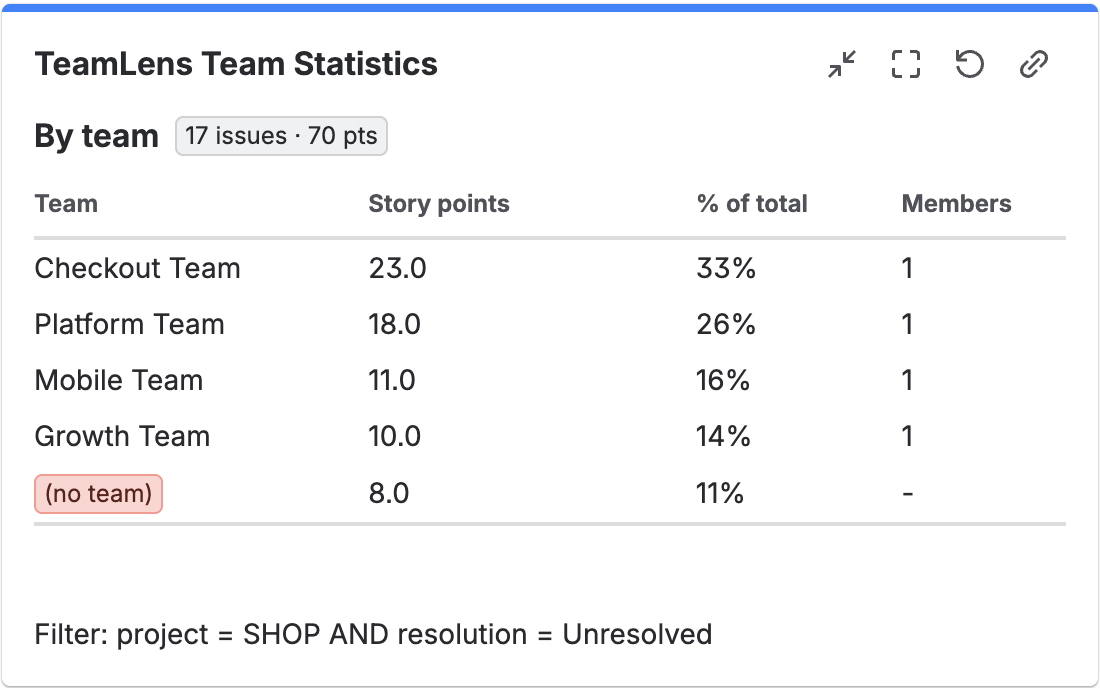
Add it: open a dashboard, Edit, Add gadget, search "TeamLens", Add. The settings form opens.
Settings
| Field | What to enter |
|---|---|
| JQL filter | Any JQL. Leave empty for resolution = Unresolved. Examples below. |
| Metric | Issue count, or Story points (sums Story point estimate or Story Points, detected automatically). |
Select Save, then Done on the dashboard. The gadget refreshes every 15 minutes and on page load.
Reading it
- Team: the team name. Issues with no Team appear as a red (no team) row so nothing is hidden.
- Issues / Story points: the chosen metric. Rows are sorted largest first. Both columns are sortable.
- % of total: share of the whole filter.
- Members: current team size from Atlassian Teams (
-when the team cannot be looked up). - Header lozenge: total issues and total points in the filter.
Useful filters
project = SHOP AND sprint in openSprints()
project in (SHOP, PAY) AND statusCategory != Done
issue in teamIn("Checkout Team", "Platform Team") AND fixVersion = "2026.10"
project = SHOP AND issue in noTeam()            -- hygiene gadget for the RTE
Limits: 5,000 issues per gadget. Narrow the JQL if you exceed it; the gadget tells you.
4. JQL functions
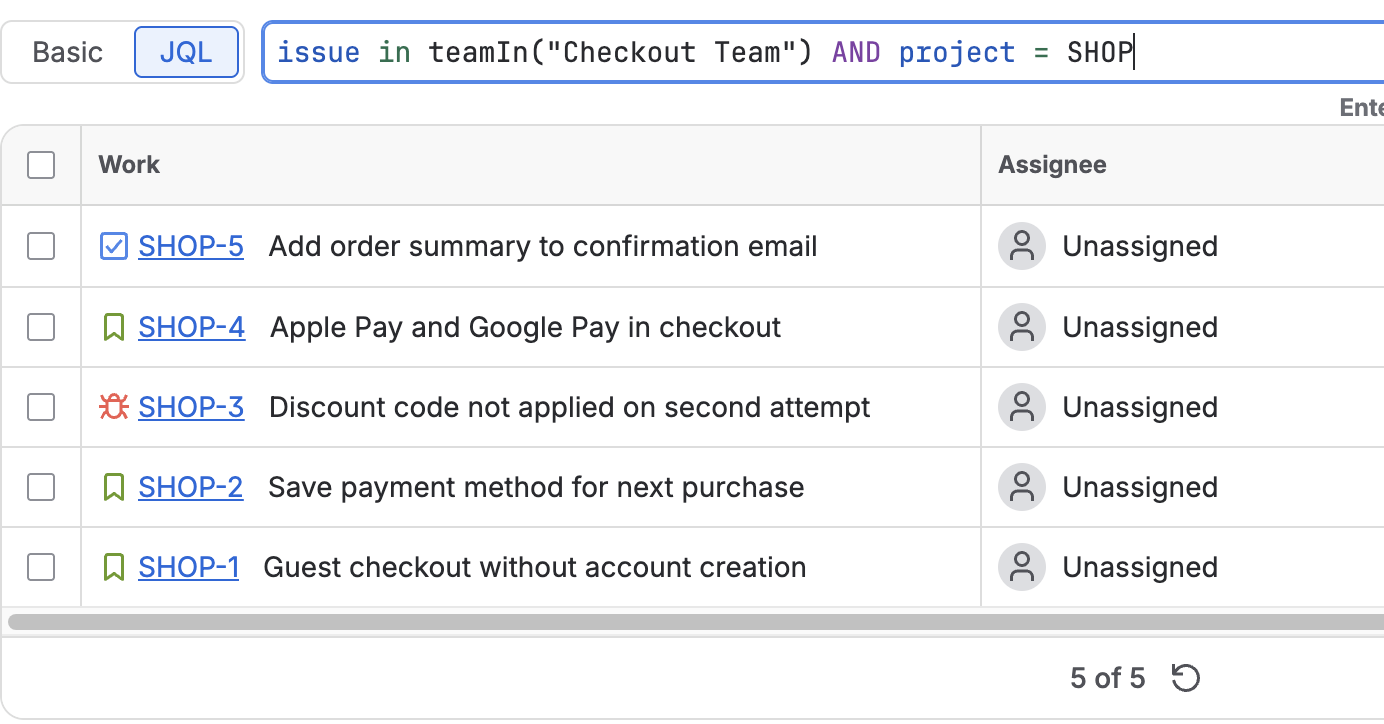
App functions in Jira Cloud are written as issue in functionName(...). They work in the issue navigator, saved filters, boards, dashboards, JSM queues and Automation.
teamIn()
issue in teamIn("Checkout Team")                 -- one team, by display name, case-insensitive
issue in teamIn("Checkout Team", "Mobile Team")  -- several teams
issue in teamIn("Platform*")                     -- every team whose name starts with Platform
issue not in teamIn("Checkout Team") -- everything except that team- Team ids (the UUID from the team's URL) are accepted in place of names.
- An unknown name produces a JQL error naming the value, so typos are obvious.
- The team list is cached for ten minutes; a brand-new team may take a few minutes to resolve.
noTeam()
issue in noTeam()
issue in noTeam() AND statusCategory != Done
issue not in noTeam()
Where to use them
- Board filter:
project = SHOP AND issue in teamIn("Checkout Team") - JSM queue:
issue in teamIn("Tier 2 Support") AND status = Open - Automation: scheduled rule with JQL
issue in noTeam() AND created <= -7dthat comments or flags the issue - Saved filter feeding a gadget: any of the above
5. Team details panel
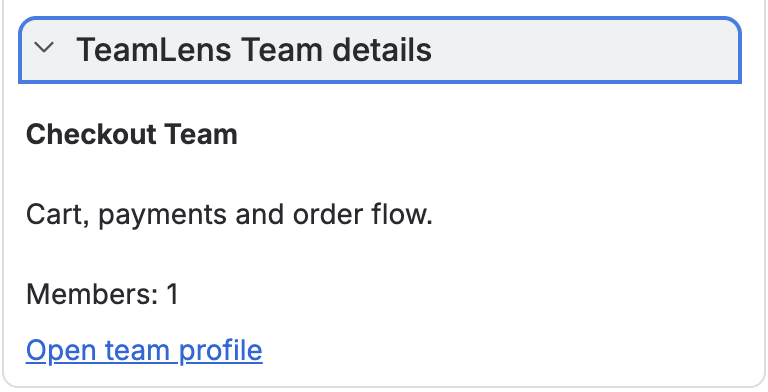
Open any issue that has a Team. In the right column, under Details, expand TeamLens Team details to see the team's description, member count and a link to the team profile. Issues without a Team show a one-line message. The panel is read-only.
6. Permissions and data
- Scopes: read Jira work and users, view Atlassian Teams. No write scopes.
- No external network access, no storage. Eligible for Atlassian's Runs on Atlassian programme.
- Results always respect the viewer's Jira permissions because issue data is read as that user.
7. Known limitations (platform, not app)
- Atlassian does not allow Marketplace apps to read team member lists. TeamLens shows team size but not names, cannot notify a whole team, and does not yet offer
myTeams(). Tracked by Atlassian as JRACLOUD-92072. - The native Two Dimensional Filter Statistics and Pie Chart gadgets are unchanged; use the TeamLens gadget instead.
- Team colours and icons cannot be changed by any app.
- Cloud only; not available for Data Center.
8. Troubleshooting
| Symptom | Fix |
|---|---|
| "Atlassian Team field not found on this site" | Ask an admin to add the Team field to your screens (Settings, Issues, Custom fields). |
| Only a "(no team)" row | The filtered issues have no Team set. |
| "No story points field found" | Switch metric to Issue count or add a story points field. |
teamIn(): no team matched ... | Check the exact name under Teams; wait a few minutes after creating a team. |
Members shows - | The team could not be looked up. Counts are still correct. |
| Functions missing from autocomplete right after install | Reload the page. |
9. Support
Email the address on the Marketplace listing with your site URL, the JQL or gadget settings, and a screenshot. We reply within one business day. If TeamLens saves you time, a Marketplace review helps other admins find it.
10. Roadmap
Team pivot gadget (Team x status, assignee, sprint), team workload gadget, Team Picker custom field (single and multi-select), myTeams(), Team hygiene report. Member-level features arrive when Atlassian opens the Teams API to apps.
Was this page helpful? Email support@mortiseapps.com.