 Mortise Apps
Reading the graph
Last updated 2026-09-30
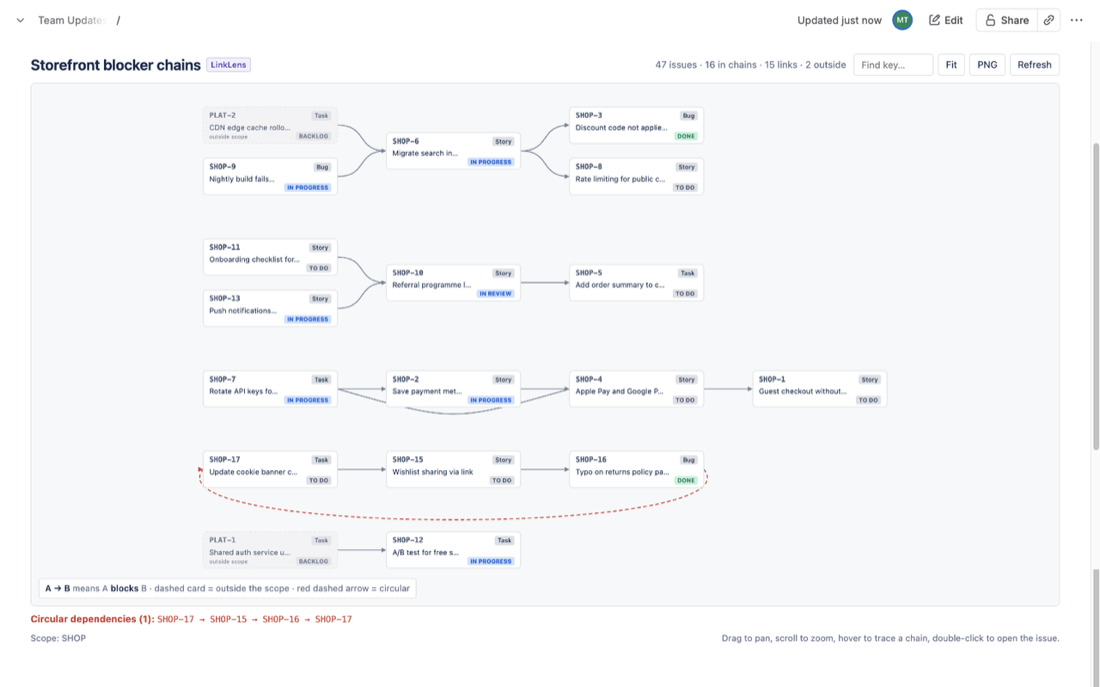
- Cards are issues: key, type, summary and a status lozenge (grey to do, blue in progress, green done).
- Arrows run from the outward side of the link type to the inward side. For Blocks,
A → Bmeans A blocks B, so blockers sit on the left and blocked work on the right. The legend restates the rule. - Whole chains. Every chain of the chosen link type in the scope is drawn, from the first blocker to the last blocked issue. Separate chains are stacked, largest first. Issues in the scope that have no link of that type are counted but not drawn, so the picture stays readable.
- Outside the scope. When an issue in the scope is linked to an issue outside it (for example another project), that other issue appears as a dimmed, dashed card marked "outside scope". Widen the scope to see its own links.
- Circular dependencies are drawn with a red dashed arrow and listed under the graph. See Circular dependencies.
Interacting
- Drag to pan, scroll to zoom, Fit to reset.
- Hover a card to light up its full upstream and downstream chain; everything else fades.
- Click a card to pin its details; the tooltip has an Open link. Double-click opens the issue in Jira.
- Find key accepts a full key (
SHOP-7) or just the number (7).
Was this page helpful? Email support@mortiseapps.com.