 Mortise Apps
Configure the macro
Last updated 2026-09-30
Open the panel when you insert the macro, or later by selecting the macro in the editor and choosing Edit (pencil).
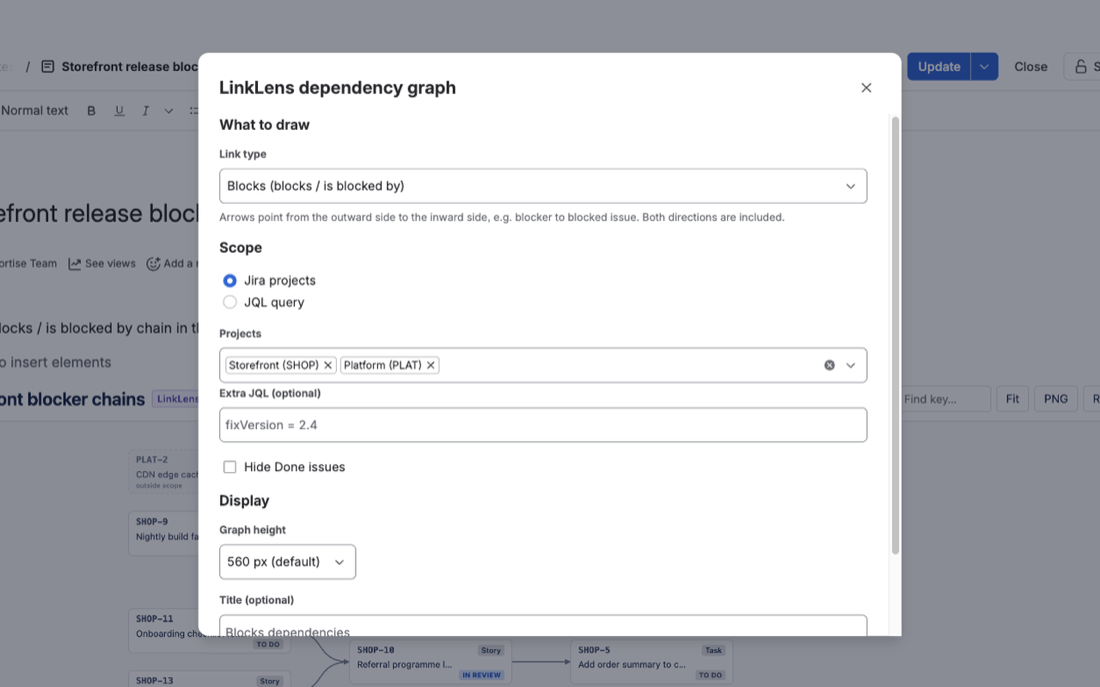
| Setting | What it does |
|---|---|
| Link type | Any issue link type on your Jira site, shown as Name (outward / inward). Blocks is the default. Both directions are included automatically. |
| Scope: Jira projects | One or more projects you can browse, plus optional Extra JQL ANDed with them, e.g. fixVersion = 2.4. |
| Scope: JQL query | Any JQL, e.g. project in (SHOP, PLAT) AND issuetype != Sub-task. ORDER BY is ignored. |
| Hide Done issues | Leaves out issues in a Done status category, so only live blockers remain. |
| Graph height | 420, 560 (default), 720 or 900 pixels. |
| Title (optional) | Heading above the graph. Defaults to "<link type> dependencies". |
In the page
The macro shows its title, the number of issues in scope, how many are in chains, the number of links and how many linked issues are outside the scope. Tools: Find key (centre on an issue), Fit, PNG and Refresh. Under the graph: the scope used and, when there are loops, a list of circular dependencies.
Several graphs can sit on one page, for example one per link type or one per release.
Was this page helpful? Email support@mortiseapps.com.