Mortise Apps
 JiraTeamLens for Jira
How do I set the Jira Team field automatically from the assignee?
A question that keeps coming up on the Atlassian Community: when someone is assigned a work item, can Jira fill in the Team field with that person's team? Yes, with an Automation rule, and since September 2026 without the JSON that Atlassian's own knowledge base article still shows. What Jira does not have is a single step that looks up "the assignee's team": the rule needs one branch per team, and a person who belongs to several teams has no obvious answer.
Short answer: Build a Jira Automation rule with the trigger Field value changed on Assignee, an If/else block with one branch per team ("is the assignee in team A?"), and in each branch an Edit work item action that sets Team to that team. Atlassian's knowledge base shows the action as advanced JSON ({"fields": {"customfield_10001": "<team id>"}}); the native team picker that Atlassian started rolling out in the week of 21 September 2026 removes the JSON and the team ID lookups. There is no documented smart value that returns the assignee's team, so the rule cannot be written once for every team. Afterwards, check for assigned work the rule missed.
The 60-second video version: Set the Jira Team field from the assignee (YouTube). In 20 seconds: membersOf() works with teams, not by name.
Checked 5 Oct 2026: Atlassian's knowledge base article on updating the Team field from the Assignee, the Atlassian Cloud changelog for 21 to 28 September 2026, Atlassian's Community article on Teams in Automation, and the JQL functions documentation. We have not built this rule on a test site yet; where the documentation is silent, the article says so.
The question
On 6 September 2026 an Atlassian Community member asked whether automation could "find the first team of the user and assign the issue to this team", adding: "not hard coded I have many users." A month later the thread has no accepted answer. The two halves of that request get very different answers.
What Jira Automation can do
Atlassian's knowledge base article "Automation: Update the Team field based on the Assignee field" describes the rule:
- Trigger: "Field value changed", to run when the Assignee field changes.
- Condition: "an If/else block to check the assignee field and set the Team field accordingly".
- Action: "Edit issue" with advanced field editing in JSON:
{ "fields": { "customfield_10001": "PUT TEAM ID HERE" } }customfield_10001 is the Team field's ID on many sites, but the article warns to "check the Team Custom field ID on your instance", and the value is the team's ID, not its name.
Two newer changes make this easier:
- Atlassian's Community article on Teams in Automation lists Edit work item setting a team, Field value changed triggering on the Team field, and a Work item fields condition that tests it ("If team field is Team Mobile...").
- The Atlassian Cloud changelog for 21 to 28 September 2026, under "Native Teams support in Jira automation" (marked ROLLING OUT), says admins can "select teams directly in the Assign work item action and the User condition, removing the need for manual JSON workarounds or team ID lookups".
With the User condition taking a team, each branch reads naturally: if the Assignee is in team Payments, set Team to Payments. Because the change is rolling out, your site may not have the team picker yet; the JSON version works in the meantime.
What it cannot do
There is no "assignee's team" value. We found no documented smart value that returns the team a user belongs to, so the rule cannot say "set Team to whatever team the assignee is in". Every team needs its own branch. For a handful of delivery teams that is manageable; for dozens it is a rule to maintain whenever teams change.
People in several teams. Atlassian Teams are not exclusive: one person can be a member of several. "The first team" is not something Jira defines. Put the branches in the order you want to win (If/else stops at the first match), or keep people who sit in several teams out of the rule and set their work by hand.
Changes to teams do not re-run it. The rule fires when the assignee changes. If someone moves to another team, work already assigned to them keeps the old team until the assignee changes again or you bulk-edit it.
Check what the rule missed
Two JQL searches tell you whether the rule is doing its job:
assignee in membersOf("id:<teamId>") AND "Team[Team]" is EMPTYWork assigned to a member of the team but with no team set. The JQL functions documentation says teams "don't currently work with team names" in membersOf(): use the ID from the team's profile URL, with the id: prefix.
assignee is not EMPTY AND issue in noTeam() AND statusCategory != DoneWith TeamLens for Jira installed, noTeam() lists every work item with an empty Team field, across teams, without IDs. Saved as a filter on a dashboard, it should fall towards zero once the rule is running. TeamLens does not set the Team field itself; it shows where it is missing.
A rule that holds up
- List the teams that own work, with their IDs from the team profile URLs.
- Build the rule in one project first: Field value changed (Assignee), If/else with one branch per team, Edit work item setting Team.
- Leave out a catch-all branch that clears the field: when no branch matches, the rule changes nothing, which is what you want for people outside the listed teams.
- Run it for a week, then compare the
noTeam()count before and after. - Note the rule in your team clean-up checklist: merging, archiving or deleting a team changes what each branch points at.
How TeamLens fits
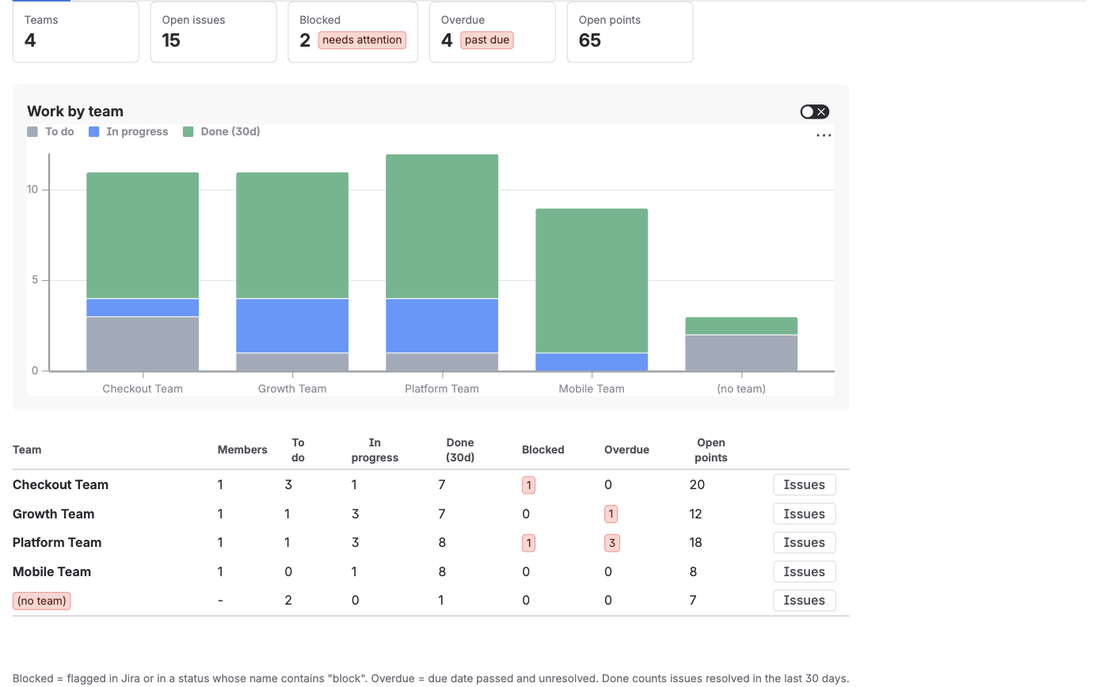
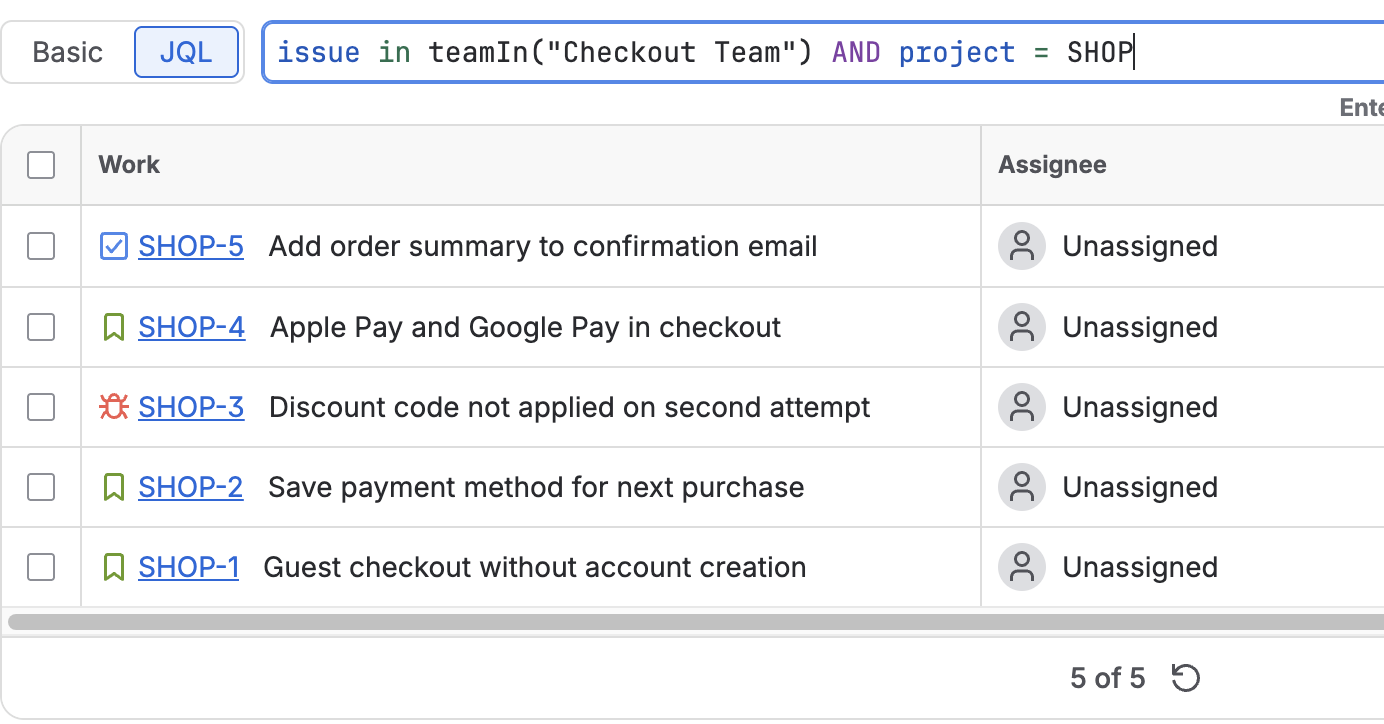
TeamLens for Jira adds teamIn() and noTeam() to JQL, so the follow-up searches use team names instead of IDs (how they work). Its Team Statistics gadget has a "(no team)" row, which is the quickest way to see whether automation is keeping the Team field filled. It reads teams and work items; it does not change them.
FAQ
Can Jira set the Team field automatically?
Yes, with Jira Automation: trigger on the Assignee changing, check which team the assignee is in, and set the Team field with Edit work item. There is one branch per team.
Is there a smart value for the assignee's team?
Not that we could find in Atlassian's documentation on 5 Oct 2026. The rule has to check each team in its own branch.
Do I still need JSON and team IDs?
Not once the native team support reaches your site: Atlassian's changelog for the week of 21 September 2026 adds a team picker to the User condition and the Assign work item action. Until then, the knowledge base's JSON action with the team ID works.
What if a user is in more than one team?
Jira does not pick one. In an If/else block the first matching branch wins, so order the branches deliberately, or leave those users out of the rule.
How do I find work with no team?
"Team[Team]" is EMPTY in plain JQL, or issue in noTeam() with TeamLens for Jira. Combine it with assignee is not EMPTY to see assigned work the rule missed.
Sources
- Can I auto populate team field based on assignee field?, Atlassian Community - the question, 6 Sep 2026.
- Automation: Update the Team field based on the Assignee field, Atlassian knowledge base - trigger, If/else block, Edit issue with
customfield_10001JSON. - Atlassian Cloud changes Sep 21 to Sep 28, 2026 - "Native Teams support in Jira automation", rolling out.
- Automate your workflows with Atlassian Teams in automations, Atlassian Community - Edit work item, Field value changed and Work item fields condition with teams.
- JQL functions, Atlassian Support -
membersOf()with teams needs the team ID; IN, NOT IN, WAS IN, WAS NOT IN.