 Mortise Apps
 JiraLinkLens for Jira
Jira "blocks", "is blocked by" or a custom "depends on": which link type should you use for dependencies?
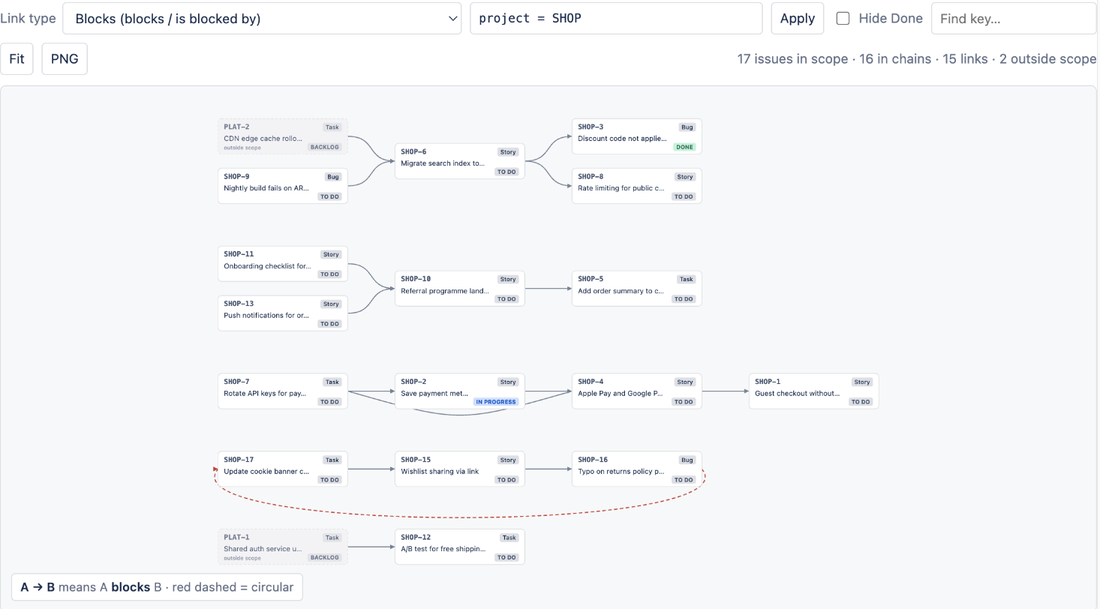
For dependencies in Jira Cloud, use the built-in Blocks link type, and read it as "A blocks B: B cannot finish (or start) until A is done". "Blocks" and "is blocked by" are not two link types; they are the two directions of the same one. A custom "Depends on" type works for people reading the work item, but Jira's own planning views will not see it unless an admin adds it: the timeline in a software space shows only Blocks links, and Plans treats all links as Blocks unless the Dependencies settings say otherwise. One JQL quirk to know before you build filters: issueLinkType = blocks cannot tell the blocking side from the blocked side.
The 90-second video version: Jira Blocks vs Is Blocked By vs Depends On (YouTube).
One link type, two directions
Every Jira link type has three properties: a name, an outward description (how a work item affects others) and an inward description (how it is affected). The default Blocks type has the outward description "blocks" and the inward description "is blocked by". When you link ABC-1 to ABC-2 with "blocks", Jira stores one link; ABC-1 shows "blocks ABC-2" and ABC-2 shows "is blocked by ABC-1".
So the choice between "blocks" and "is blocked by" is only about which work item you are standing on when you add the link. The meaning to keep straight is the direction: the blocker is the one that has to happen first.
What each part of Jira does with link types
| Where | What it reads | What that means for a custom "Depends on" type |
|---|---|---|
| Timeline in a software space | Only the Blocks link type, and only links between work items in the same space | Not drawn on the timeline |
| Plans (Premium and Enterprise) | By default, all work item links are treated as Blocks; a Jira admin can add other link types under Jira admin settings, Jira apps, Dependencies, with a Swap button to invert the direction | Counted, but possibly in the wrong direction until an admin maps it |
JQL issueLinkType | Matches the link type's name and both descriptions | Searchable; give it a name different from its descriptions (below) |
| The work item view and board cards | Any link type, with its own wording | Readable by people |
The timeline and Plans facts come from Atlassian's own pages, read on 8 Oct 2026 (sources below). The practical rule that follows: if a dependency should show up on the timeline, it has to be a Blocks link. If your site already uses a custom type for dependencies, ask your Jira admin to add it in the Plans Dependencies settings and check the direction with Swap, or your plans will read your dependencies differently from your team.
The JQL catch with "blocks"
Atlassian's documentation on link types says that JQL searches all three properties, the name and both descriptions, and that this makes it impossible to isolate one direction when the name equals one of the descriptions. That is exactly the case for the default Blocks type: its name is "Blocks" and its outward description is "blocks".
| Query | What it returns on a default site |
|---|---|
issueLinkType = "is blocked by" | Work items that are blocked by something (the inward side only) |
issueLinkType = blocks | Work items with any Blocks link, in either direction, because "blocks" also matches the type's name |
If you need a filter of blockers only, Atlassian's documented fix is to rename the link type (for example to "Blocking") so its name no longer equals the outward description. Their page warns that renaming can change what existing JQL filters return, so check saved filters, board filters and Automation rules that use the old name before you rename it.
A custom "Depends on" type has the same trap if you name it "depends on" and use "depends on" as the outward description. Give the type a neutral name such as "Dependency", with "depends on" and "is a dependency of" as its two descriptions, and each direction stays searchable on its own.
Which should you use?
- Use Blocks for anything that must finish before something else can, if you want it on the timeline and in Plans without extra configuration. This covers most teams.
- Use Relates for "worth knowing about" connections with no ordering. Keeping them out of Blocks keeps your dependency views honest.
- Use a custom type only when you need a different meaning that Blocks would blur, for example a "Requires sign-off from" link for approvals. Name it so the name differs from both descriptions, and have your admin decide whether Plans should treat it as a dependency.
- Be consistent about direction. Write it down in your team's working agreement: "the blocker gets the blocks link". A link added from the wrong side reads backwards to everyone who opens the work item.
Seeing the chain once the links are right
The work item view lists links one hop at a time, and the timeline shows only Blocks links inside one space. To read a whole chain across projects, LinkLens for Jira draws every link of the type you pick as a graph: choose Blocks, or your site's own custom type, from the Link type list (it lists your site's link types with both their directions). Loops show up as red dashed arrows, and Hide Done drops finished work so only live blockers remain. Our earlier posts show the whole blocker chain in a graph and how to find circular blocks links.
FAQ
Is "is blocked by" a different link type from "blocks"?
No. They are the inward and outward descriptions of the one default Blocks link type. A single link shows "blocks" on one work item and "is blocked by" on the other.
Does Jira have a "depends on" link type?
The default types described in Atlassian's link-type documentation include Blocks, Relates, Duplicates and the clone link types; "depends on" is something an admin adds as a custom type. If you add one, the timeline will not draw it and Plans needs to be told about it.
Why does issueLinkType = blocks return blocked work too?
JQL matches the link type's name as well as its descriptions, and the default type is named "Blocks" with the outward description "blocks". Atlassian's documented workaround is renaming the link type, for example to "Blocking".
Can the timeline show dependencies between projects?
Not the timeline in a software space: Atlassian's page says it shows only Blocks links between work items in a single space.
Which link type does LinkLens use?
The one you choose. LinkLens lists every link type on your site, Blocks by default, and draws the chain for that type. It is read-only and does not change your links.
Sources
- Configure work item linking, Atlassian Support - name, outward and inward descriptions; JQL searches all three, so "blocks" cannot be isolated on the default Blocks type; renaming workaround and its warning. Read 8 Oct 2026.
- Create or remove dependencies on your timeline, Atlassian Support - the timeline shows only the Blocks link type, between work items of a single space. Read 8 Oct 2026.
- Configure Dependencies in Jira for your plan, Atlassian Support - Plans treats all links as Blocks by default; admins add link types under Dependencies, with Swap to invert. Read 8 Oct 2026.
- Link work items, Atlassian Support - how links are added and shown on cards. Read 8 Oct 2026.