 Mortise Apps
 monday.comLinkLens Dependency Map
Does monday.com have a critical path, and how do you show it on the Gantt chart?
monday.com does have a critical path. It lives in the Gantt chart, as a setting, and it is easy to miss because the column view never shows it.
Short answer: Open the Gantt view (or the Gantt widget on a dashboard), click the cogwheel for Settings, scroll to Critical Path and press Show critical path. monday's support article says the project's timeline is then "highlighted in red to show its critical path". Two conditions: the Gantt article says the critical path feature is "only available to Pro and Enterprise account holders", and the critical path article still says it "is open as a trial feature" that "may require payment" in the future. The path is only as good as your Dependency column: without dependencies between items there is no chain for it to follow.
Checked 16 Oct 2026: monday's support articles "Critical Path for the Gantt Chart" (updated 30 Jul 2026), "The Gantt Chart View and Widget" (updated 23 Sep 2026) and "The Gantt Baseline" (updated 2 Jul 2025). We have not turned the setting on in a paid account for this article; everything below is quoted or summarised from monday's documentation.
What monday means by critical path
monday's article defines it the usual project-management way: "A critical path is the longest duration of tasks in your project." It is the set of tasks "that must be completed to finish a project on time". A delay on any task on that path moves the end date; a delay on a task off the path may not.
In the Gantt chart the critical tasks are drawn in red. The rest of the Gantt works as before: bars per item, and arrows for dependencies, "with the arrow pointing to the dependent task".
How to turn it on, step by step
- Make sure the board has a Timeline or Date column. monday's Gantt article lists it as the column the Gantt needs; People, Status and the Dependency column are optional extras.
- Fill the Dependency column so the Gantt "knows which items must be finished before other tasks can get started". This is what turns separate bars into a path.
- Add the Gantt view to the board (the + next to the board views), or add the Gantt widget to a dashboard.
- Open Settings (the cogwheel, or the three-dot menu > Settings in the newer layout), scroll to Critical Path, press Show critical path.
Plans and limits at a glance
| What monday's articles say | |
|---|---|
| Gantt view and widget | "available on the Standard plan and up" |
| Critical path and milestones | "only available to Pro and Enterprise account holders" |
| Status of the feature | "open as a trial feature. In the future, this feature may require payment." |
| Dependencies | Set with the Dependency column; the Gantt draws them as arrows and shifts dependent tasks when you drag a delayed one |
| Several boards | On a dashboard Gantt widget with several boards connected, "it is possible to show all any or all Timeline Columns from the selected boards as part of your critical path" |
| Several date columns | "supports multiple Date & Timeline Columns and the path will be calculated over all viewed items" |
| Baseline (separate feature) | Pro and Enterprise; a locked grey snapshot, with late items "red along with any dependent items" |
Note the last row: red in baseline mode means "later than the snapshot", not "on the critical path". If both are on, check which one you are reading.
Critical path vs baseline
They answer different questions. The critical path asks "which tasks set the end date right now?". The baseline asks "how far have we drifted from the plan we froze?". monday's baseline article explains that taking a snapshot duplicates the board's time column, locks the copy, and adds a Formula column with the difference in days; deleting those two columns deletes the baseline. Use the baseline at kickoff, and the critical path every time the plan changes.
What the critical path does not show
- Why a task is blocked. The path follows dates and dependencies; it does not list which open items are holding up a given task, or how deep that chain goes.
- Circular dependencies. monday's articles on the Gantt and critical path do not describe what happens with a loop of dependencies.
- Items without dates. The Gantt plots Timeline and Date columns, so items with no dates have no bar to colour.
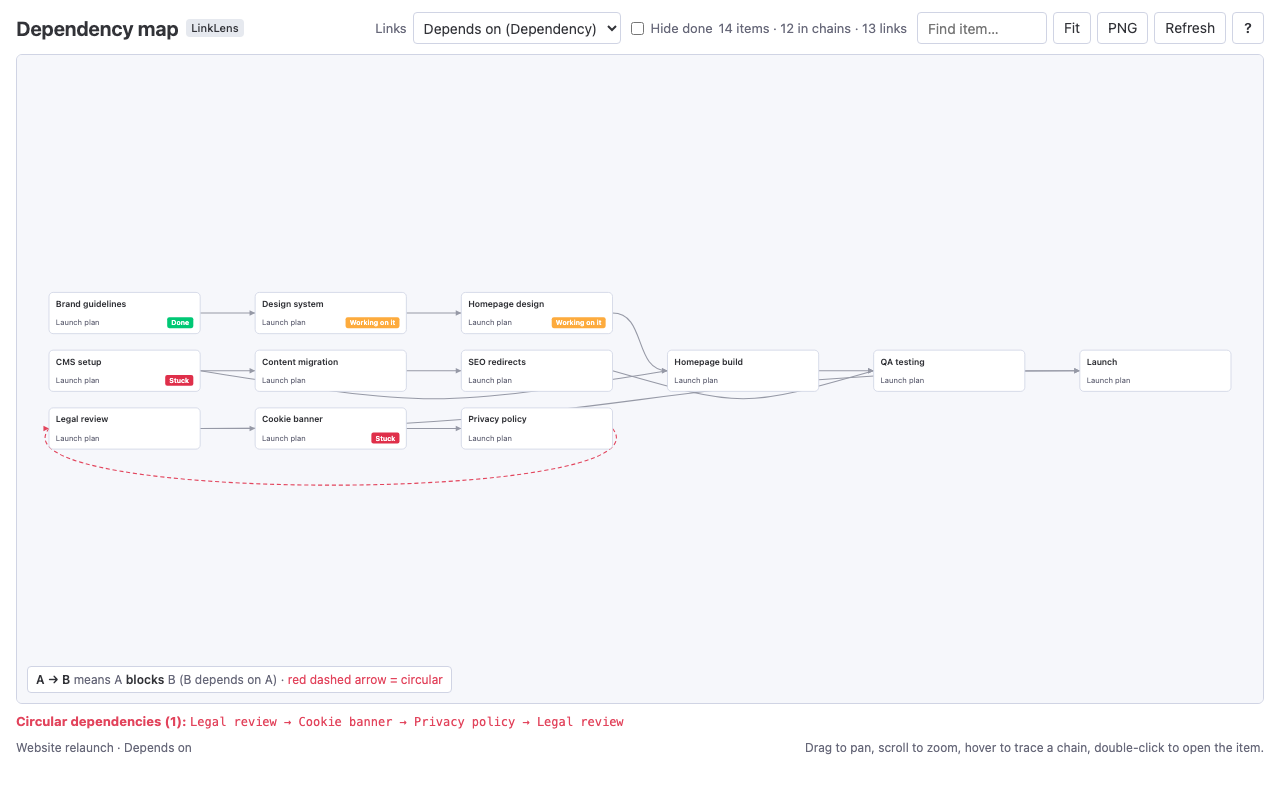
For the "what is waiting on what" view, we make LinkLens Dependency Map, a monday.com board view that reads a board's Dependency column (or a Connect boards column) and draws every chain as one graph, blockers on the left and circular dependencies in red (walkthrough). It does not calculate a critical path or use dates for the layout, so it complements the Gantt rather than replacing it. The app is in monday's marketplace review.
FAQ
Does monday.com have a critical path?
Yes. The Gantt board view and the Gantt dashboard widget have a "Show critical path" setting that highlights the critical path in red. monday's Gantt article says it is available on the Pro and Enterprise plans, and the critical path article calls it a trial feature.
Why can't I see the critical path option in my Gantt?
The Gantt view is on Standard and up, but monday's Gantt article says the critical path and milestones are "only available to Pro and Enterprise account holders". On Standard you get the Gantt without that setting.
Does the monday.com critical path work across several boards?
Yes, through a dashboard. monday's article says that with a Gantt widget connected to several boards, you can include any or all of their Timeline columns in the critical path.
Do I need the Dependency column for the critical path?
monday's Gantt article says to set up the Dependency column so the Gantt "knows which items must be finished before other tasks can get started". Without dependencies, each task stands alone and there is no chain for a path to follow.
Is the monday.com critical path free?
It is not on every plan: it needs Pro or Enterprise. monday's critical path article also says it is a trial feature that "may require payment" in the future.
Sources
- Critical Path for the Gantt Chart, monday support (updated 30 Jul 2026, read 16 Oct 2026) - definition, how to turn it on, red highlight, trial status, multiple boards and date columns.
- The Gantt Chart View and Widget, monday support (updated 23 Sep 2026, read 16 Oct 2026) - plans (Standard and up; critical path and milestones Pro and Enterprise), required columns, dependency arrows, baseline summary.
- The Gantt Baseline, monday support (updated 2 Jul 2025, read 16 Oct 2026) - Pro and Enterprise, snapshot columns, red for late items.