 Mortise Apps
 monday.comLinkLens Dependency Map
Can monday.com change a task's status automatically when the tasks it depends on are done?
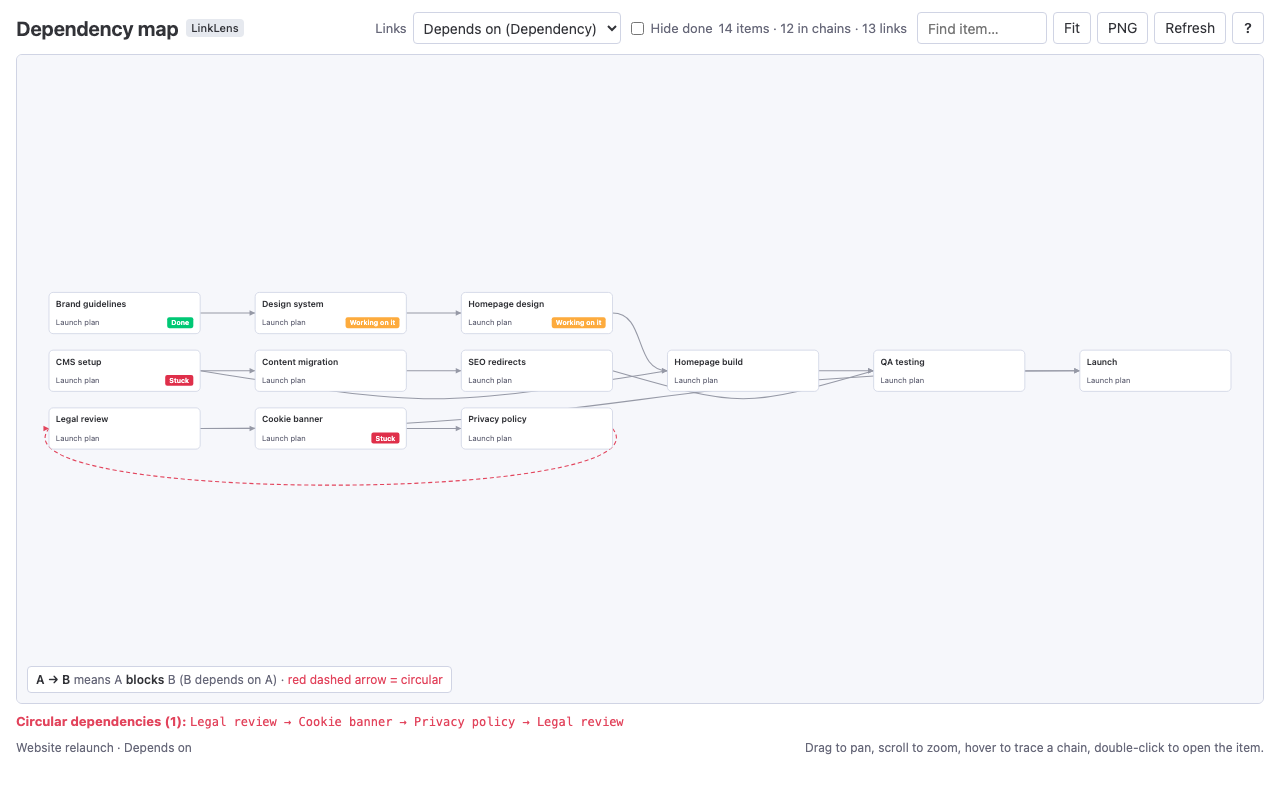
A question that comes up on the monday.com community: when a task's predecessors are finished, can monday move the next task to "Working on it" and tell its owner? There is one pre-built recipe for this. You can't build your own version, because monday's automation builder doesn't support the Dependency column. Whether the recipe waits for all predecessors is not documented.
Short answer: Yes, partly. In the automations center, searching "dependency" finds one pre-built template: "When a status changes to something, change the status of its dependency to something." It has four blanks (the status column, the trigger value, the Dependency column and the new value) and no "only if" condition. You can't build anything else from scratch: monday's own automations guide lists the Dependency column among the column types "not supported in any automations, including in the mapping of an item". The Dependency column itself only moves dates, never statuses. Nothing in monday's documentation says whether the recipe waits until every predecessor is done, so test it on a copy of your board before you rely on it.
The 60-second video version: Change status when dependencies are done (YouTube). In 20 seconds each: dependencies move dates, not statuses and hide done: what is ready to start.
Checked 6 Oct 2026: monday's support articles "Dependencies on monday.com" (updated 22 Sep 2026) and "Get started with monday automations" (updated 29 Sep 2026), and the automations center on a test board in our monday developer account. There we found the template and set it up. We did not run it on items yet, so this article says nothing about how it behaves with several predecessors.
The question
On the monday community, a user asked for an automation where, "when the status of a task (Predecessors) changes to 'Completed,' its (Successors) changes to 'Working on it' and notifies the assignee." An older thread ("Automations for Dependent Tasks") reached the same wall: the pre-built recipe "doesn't allow customization", and "you can't set up dependent column automations from scratch."
What the Dependency column does on its own
It moves dates. monday's support article describes the three dependency modes only in terms of dates:
- Flexible: "Ensures no overlap between the dates of items that are dependent on one another."
- Strict: "Adjusts an item's dates to reflect the exact time changes made based on the item it depends on."
- No action: "Items will not shift automatically; they will solely display dependency relationships."
None of the three touches a Status column. A task whose predecessors are all done looks exactly as it did before, apart from its dates. Dependencies are "Available on Pro and Enterprise plans", and "You can only add one Dependency Column per board." (Our dependency modes article compares the three modes in detail.)
The one recipe that changes a status
In a board's automations center, a search for "dependency" returned one template on 6 Oct 2026, filed under "Connected & mirror columns":
When a status changes to something, change the status of its dependency to something
Filled in on our test board, it read: "When Status changes to Done, change the status of its Depends on to Working on it." The editor labels it "This is a pre-built template", and it has exactly those four blanks. There is no "and only if" condition and no notify step to fill in.
What that means in practice:
- You can set the status, not who hears about it. monday's automations guide lists Dependency among the columns "not supported in the 'notify' field of a notification automation". To tell the next task's owner, use a separate status-change automation on that task ("When Status changes to Working on it, notify Person"). The notification then follows from the status change.
- You can't add conditions. That rules out "only for this group" or "only if the date has arrived", and in particular "only if all predecessors are done".
- You can't build it yourself. The same guide lists Dependency among the column types "not supported in any automations, including in the mapping of an item".
The part monday doesn't document: several predecessors
The question asked for the next task to start "when all dependencies are done". The template's wording doesn't say what happens when a task depends on two items and only one of them is finished. Neither of monday's support articles we read covers it. Before you rely on the recipe, test it on a copy of your board in two minutes:
- Give one task two predecessors in the Dependency column.
- Mark one predecessor Done and look at the task. Then mark the second one Done and look again.
- Also check which way it goes. Did the recipe change the task that waits (the successor), or the task it waits on?
If the first Done already moves the task, the recipe answers "something finished", not "everything finished". Treat its status as a hint.
Two more limits come up in monday community threads and feature requests: the recipe reportedly doesn't work on multi-level boards (there is an open feature request for it), and it can't be customised. We have not tested either.
How to see which tasks are really ready
When the automation can't express "all predecessors done", look at the dependencies instead. That is what we built LinkLens Dependency Map for: a board view that reads the Dependency column and draws every chain on the board in one graph. Turn on hide done and every item whose status label counts as done drops out of the graph. A task with no blocker arrows left pointing at it is ready to start, however many predecessors it had. LinkLens doesn't change statuses itself; it shows you which ones are safe to change, and it is the quickest way to check what the recipe did. The app is in monday's marketplace review.
FAQ
Can monday.com automatically change status when a dependency is done?
There is one pre-built template, "When a status changes to something, change the status of its dependency to something". It has no extra conditions, and the custom automation builder doesn't support the Dependency column.
Can the monday.com automation wait until all predecessors are done?
monday's documentation doesn't say, and the template has no condition you could add. Test it on a copy of your board with a task that has two predecessors.
Can I notify someone through the Dependency column?
Not directly. monday's automations guide lists Dependency among the columns not supported in the "notify" field. Notify on the status change of the next task instead.
Do monday.com dependencies change statuses on their own?
No. Flexible and Strict modes move dates, and No action changes nothing. Statuses only change through an automation or by hand.
Does the Dependency column work in custom automations?
No. As of 29 Sep 2026, monday's automations guide lists it among the column types "not supported in any automations, including in the mapping of an item".
Sources
- Set up an automation: When all dependencies are done, change status to something, monday community - the question.
- Automations for Dependent Tasks, monday community - the recipe "doesn't allow customization".
- Dependencies on monday.com, monday support - the three modes move dates; plans; one Dependency column per board.
- Get started with monday automations, monday support - Dependency not supported in the "notify" field, nor in any automations.
- Dependency automation for multi-level boards, monday feature request - the recipe on multi-level boards.