 Mortise Apps
 monday.comLinkLens Dependency Map
Flexible, strict or no action: what do monday.com dependency modes actually do?
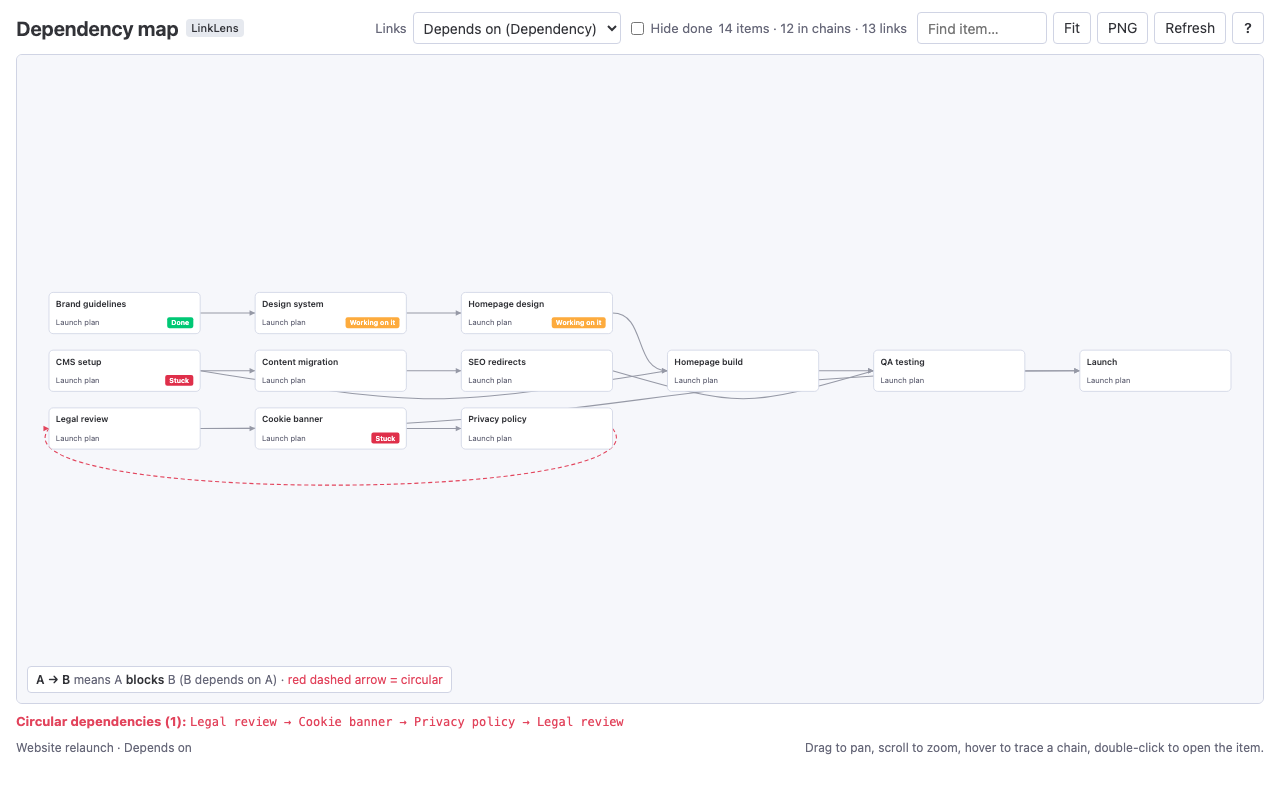
When you add a Dependency column to a monday.com board, monday asks you to pick a dependency mode: Flexible, Strict or No action. The mode decides what happens to an item's dates when the item it depends on moves. monday's support article and its developer documentation both describe the three modes, but not in the same way, so this article quotes both and says where they differ.
Short answer: According to monday's support article, Flexible only moves a dependent item when its dates would otherwise overlap with the item it depends on, Strict moves dependent items "in the exact same way" whenever the earlier item's date changes, and No action never moves dates and only shows the links. monday's API guide describes Flexible as allowing "some overlap" and Strict as enforcing that the dependent item "cannot start until its predecessor is fully complete". Dependencies only shift dates that already exist, there is one Dependency column per board, and the feature is on the Pro and Enterprise plans.
The 73-second video version: monday.com Dependency Modes Explained (YouTube). In 25 seconds each: two docs, two meanings of Flexible and the dependency type monday never labels.
Checked 4 Oct 2026: monday's support article "Dependencies on monday.com" and the monday API documentation for the dependency column (pages updated 6 Sep 2026). We have not tested the modes on a board; where the two documents disagree, both are quoted.
Where the setting lives
The dependency mode is a setting of the Dependency column. monday's support article lists the basics:
- Dependencies are "Available on Pro and Enterprise plans".
- "You can only add one Dependency Column per board."
- The mode is a choice between "Flexible", "Strict", or "No action".
- "Dependencies will only shift dates that already exist in your Date Column or Timeline Column. They will not automatically create timelines for your items."
The API guide adds the same condition from the other side: "The dependency_mode only affects boards that also have a Date or Timeline column. Without one, the mode has no functional impact."
The three modes, side by side
| Mode | monday support article | monday API guide |
|---|---|---|
| Flexible | "Ensures no overlap between the dates of items that are dependent on another." A dependent item's date changes only if the change would create an overlap. | "The linked date or timeline shifts automatically, but allows some overlap between predecessor and successor items." |
| Strict | "when changing the date of an item, the date of its dependent item(s) will automatically change in the exact same way." | "Strict sequencing is enforced — the dependent item cannot start until its predecessor is fully complete." |
| No action | "The items on your board will not shift automatically according to the dependency relations that you set." They only show the relationships, "even if there is a dependency clash". | "No automatic adjustment is made to dates or timelines when a dependency's status changes." |
No action reads the same in both documents: links are shown, dates are never touched.
Flexible does not. The support article says Flexible prevents overlap and leaves a dependent item alone while there is no overlap. The API guide says Flexible "allows some overlap". Those are different behaviours, and we have not tested which one your account shows.
Strict is described in two ways too. The support article describes moving dependent items by the same amount, which keeps the gaps between items as they are ("either with predefined gaps or no gaps at all"). The API guide describes a rule: the dependent item cannot start before its predecessor is finished. On a board where items already follow each other, both can describe the same result; on a board with overlaps, they would not.
What to do with that: before you rely on a mode for a real plan, try it on a copy of the board. Move one predecessor by a few days and look at what happens to the items behind it. That takes two minutes and tells you which description matches your account.
Dependency types, and the one that is never labelled
A link between two items can be one of "four dependency types: Finish-to-start, Start-to-start, Finish-to-finish, Start-to-finish". The support article adds: ""Finish to start" is the default dependency type, and therefore, there will be no visual indication of it within the Dependency Column." So a link with no label is Finish-to-start; only the other three are marked.
The API does not return the type at all: "The dependency relationship type (Finish-to-start, Start-to-start, Finish-to-finish, Start-to-finish) is configurable per dependency in the monday.com UI but is not currently exposed by the API." Any app or report built on the API sees which items are linked, not how.
Lead and lag (Strict only)
Strict mode can carry a gap or an overlap between two items: "when using the strict dependency type, you can utilize the "lead and lag" feature". Two limits from the same article:
- "Lead and Lag are available only on monday AI work platform, and are not included within the monday CRM or monday dev products."
- "The "Lead and Lag" dependency feature is gradually being released to monday AI work platform users."
If you do not see it yet, it may not have reached your account.
Limits worth knowing before you set it up
- One board. The API guide: "The dependency column lets you define relationships between items on the same board." For links across projects the support article points to Cross-Project Dependencies, which "is being gradually released to the Enterprise plan customers".
- Batch edits. "Batch action changes to Date or Timeline Columns with dependencies are also not supported, with the exception of "No action mode" where you can use batch actions."
- Subitems. "Subitem summary columns are not supported in the dependency settings."
- Weekends. "You are able to skip weekends on the Timeline Column, but not on Date Columns when using dependency automation recipes."
- Writing links through the API. "Setting dependencies replaces the entire list", so a script that adds one predecessor has to send the existing ones too.
Seeing the whole chain, whatever the mode
The mode changes dates; it does not show you the shape of the plan. The Dependency column and the Gantt view show links one item at a time, which is why we built LinkLens Dependency Map: a board view that reads the Dependency column (or a Connect boards column for links across boards) and draws every chain on the board in one graph, blockers on the left, with circular dependencies in red. The walkthrough is in how to see every dependency chain on a monday.com board. Because the API does not return dependency types, LinkLens shows which item blocks which, not whether a link is Finish-to-start or Start-to-start. The app is in monday's marketplace review.
FAQ
Which dependency mode should I use on monday.com?
Use No action if you only want to see links and keep full control of dates; it is also the only mode that allows batch date changes. Flexible and Strict both move dates for you, but monday's support article and API guide describe them differently, so test the mode on a copy of the board first.
Can a monday.com board have two Dependency columns?
No. monday's support article says you can only add one Dependency column per board. For links to items on other boards, use a Connect boards column or, on Enterprise, Cross-Project Dependencies.
Do monday.com dependencies create dates for items that have none?
No. Dependencies only shift dates that already exist in a Date or Timeline column. Without one of those columns the mode has no effect.
Does the monday.com API return the dependency type?
No. The API returns which items are linked, but not whether the link is Finish-to-start, Start-to-start, Finish-to-finish or Start-to-finish. The type is only visible and editable in the monday.com interface.
Sources
- Dependencies on monday.com, monday support - plans, one column per board, the three modes, dependency types, lead and lag, batch and subitem limits.
- Working with the dependency column, monday API documentation - mode descriptions, Date or Timeline column requirement, same-board limit, replace-the-list behaviour.
- Dependency, monday API reference - "within the same board"; the relationship type is not exposed by the API.
- Connect Boards, monday API reference - cross-board links between items.