 Mortise Apps
 monday.comLinkLens Dependency Map
Can monday.com dependencies link tasks in different projects?
Your launch project cannot start testing until the platform project finishes an API change, and both live on separate monday.com project boards. Can one task depend on a task in the other project, and what happens when the other project slips?
Short answer: yes, with cross-project dependencies, which monday lists as available on the monday AI work platform on the Enterprise plan. You open a task's pre-built "Dependent On" column, tick "See all projects", pick the task and the dependency type (FS, SS, FF or SF). Conflicts show in red in the project's Gantt view, and a Cross-Project Dependencies widget lists them by board. It works between main projects only: not private or shareable projects, and not projects in closed workspaces. On other plans the Dependency column stays on one board; use a Connect boards column instead.
Checked 7 Nov 2026: monday's support article "Cross-Project Dependencies" (last updated 12 Aug 2026 according to the page) and "Dependencies on monday.com". We did not test this on an Enterprise account for this post; everything below is quoted or summarised from those two articles.
Who can use it
The article's "Who can use this feature" box names two conditions: available on the monday AI work platform, and available on the Enterprise plan. It also works inside project boards: the "Dependent On" column it uses is "pre-built in your project board". If you are on Pro or Standard, or your boards are regular boards rather than projects, the feature is not there, and the regular Dependency column only links items on the same board (see whether monday.com dependencies can link items on different boards).
How to set one up
- Open the task in your project board and click its Dependent On cell.
- By default the list shows tasks from the current project. Tick See all projects to search the others.
- Choose the task, then the dependency type: finish-to-start (FS), start-to-start (SS), finish-to-finish (FF) or start-to-finish (SF).
- Give every dependent task a timeline. monday's tip: "Be sure to set timelines for all dependent tasks across projects, as this will determine any potential scheduling conflicts."
Searching for a task by its ID (from the Item ID column) is also described in the main dependencies article, but only "on Enterprise plan for project boards", and it is marked Beta with a gradual release.
What it does not cover
The article is short on limits, and the ones it gives matter:
| Case | Cross-project dependency? |
|---|---|
| Two main projects in open workspaces | Yes |
| A private project | No |
| A shareable project | No |
| A project in a closed workspace | No |
| Regular (non-project) boards | Not described; the Dependency column there is same-board only |
| Pro, Standard or Basic plan | No (Enterprise only) |
Seeing conflicts
Three places show cross-project links:
- Hover over a task in the project board: a card shows each linked task's board name, owner, status, timeline, dependency type and any overlapping schedule.
- The project's Gantt view shows all cross-project dependencies on one timeline. Tasks without conflicts are black; "those with issues will be highlighted in red". The red exclamation point next to a task opens the details, including "the number of overlapping days".
- The Cross-Project Dependencies widget: in the project's Overview, on the Project info tab. It lists every cross-project dependency grouped by board, and its three-dot menu can notify the task owner about a conflict or open the task ("Go to task").
Note what this is: a warning. The article describes conflicts being flagged for you to fix, not dates in the other project moving on their own. How dates shift inside one board depends on the dependency mode (flexible, strict or no action), covered in flexible, strict or no action.
If you are not on Enterprise
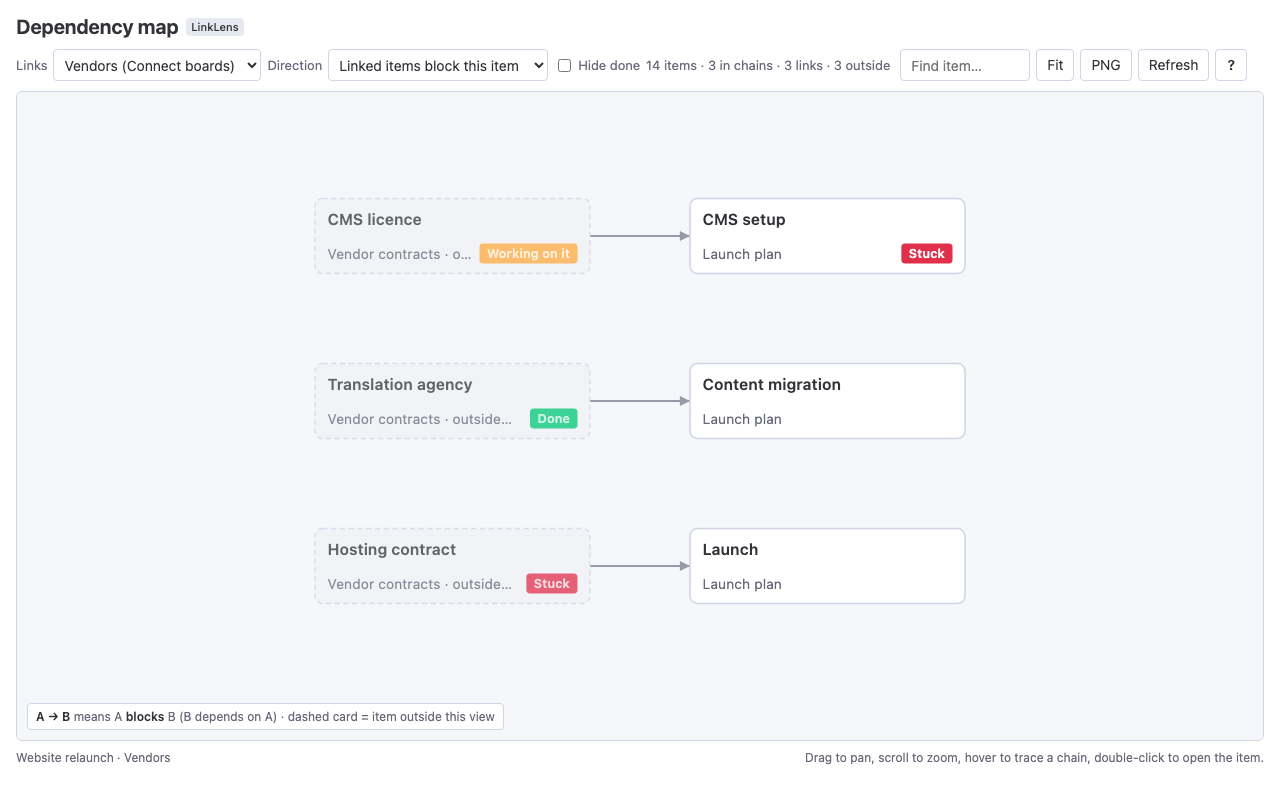
The common pattern is a Connect boards column: it links an item to items on another board, and the API reads it the same way as a dependency (linked_item_ids). It does not move dates and has no dependency type. To see how far a delay spreads across those links, we make LinkLens Dependency Map, a monday.com board view that reads the Dependency column or a Connect boards column and draws every chain as one graph; items on other boards appear as outside cards with their board name and status. It is read-only and does not change dates or flag Gantt conflicts the way the Enterprise feature does.
FAQ
Are monday.com cross-project dependencies available on the Pro plan?
No. monday's article lists the feature as available on the Enterprise plan (monday AI work platform).
Which dependency types can a cross-project dependency use?
The four standard ones: finish-to-start, start-to-start, finish-to-finish and start-to-finish, chosen when you pick the task.
Why does a project not show up in the "See all projects" list?
Only main projects appear. Private and shareable projects, and projects in closed workspaces, cannot use cross-project dependencies.
Where do I see which tasks conflict?
In the project's Gantt view, conflicting tasks are red; click the red exclamation point for the overlap in days. The Cross-Project Dependencies widget on the Project info tab lists them by board.
Can I do this between two regular boards?
The article only describes project boards. On regular boards the Dependency column links items on the same board; for another board use a Connect boards column.
Sources
- Cross-Project Dependencies, monday support (read 7 Nov 2026; page last updated 12 Aug 2026) - plans, the Dependent On column, "See all projects", FS/SS/FF/SF, main projects only, hover card, Gantt conflicts in red, overlap days, the widget.
- Dependencies on monday.com, monday support (read 7 Nov 2026) - search by task ID on Enterprise project boards (Beta), dependency modes, link to cross-project dependencies.