 Mortise Apps
 JiraLinkLens for Jira
LinkLens for Jira is live on the Atlassian Marketplace
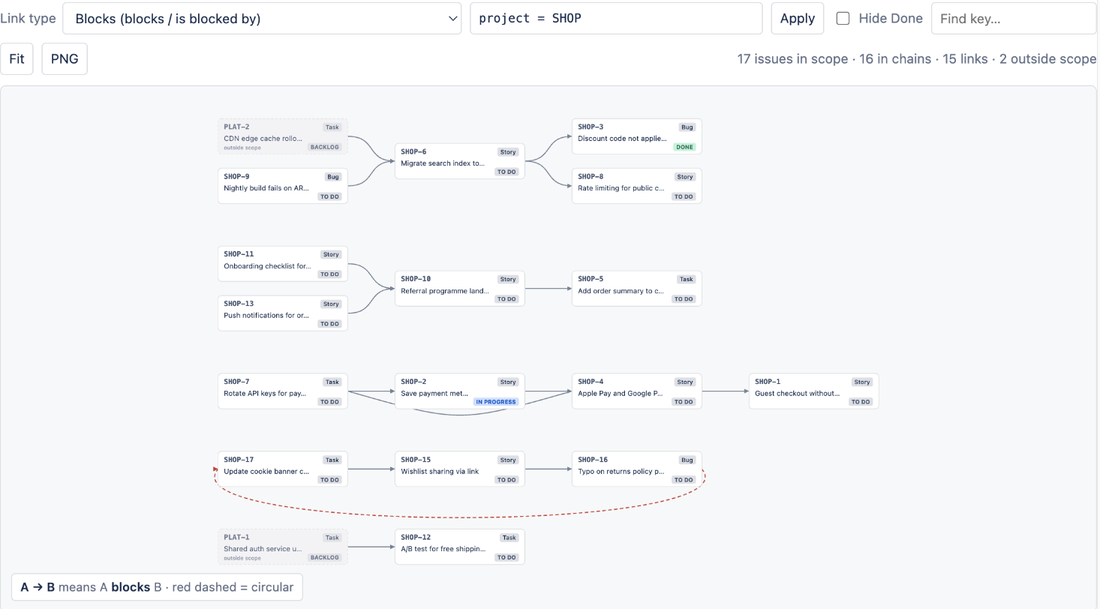
LinkLens for Jira is now public on the Atlassian Marketplace (checked 15 Oct 2026). It is a Jira Cloud app that draws your issue links as a dependency graph: pick a link type such as blocks / is blocked by, and every chain of that type in the project appears on one canvas, left to right, with circular dependencies flagged in red. The same chain also shows on each issue, so you can see what blocks a ticket and what it blocks without opening links one by one. It is free for sites with up to 10 users and installs from the LinkLens listing in under a minute, with nothing to configure.
What LinkLens for Jira does
Jira stores dependencies as issue links, but it shows them one issue at a time. A three-step chain (A blocks B, B blocks C) means opening three issues to follow it. LinkLens reads the links you already have and draws them:
- Dependencies page in the project sidebar: every chain of one link type across the project, or across any JQL scope you type in. Blockers in other projects appear as dashed "outside scope" cards.
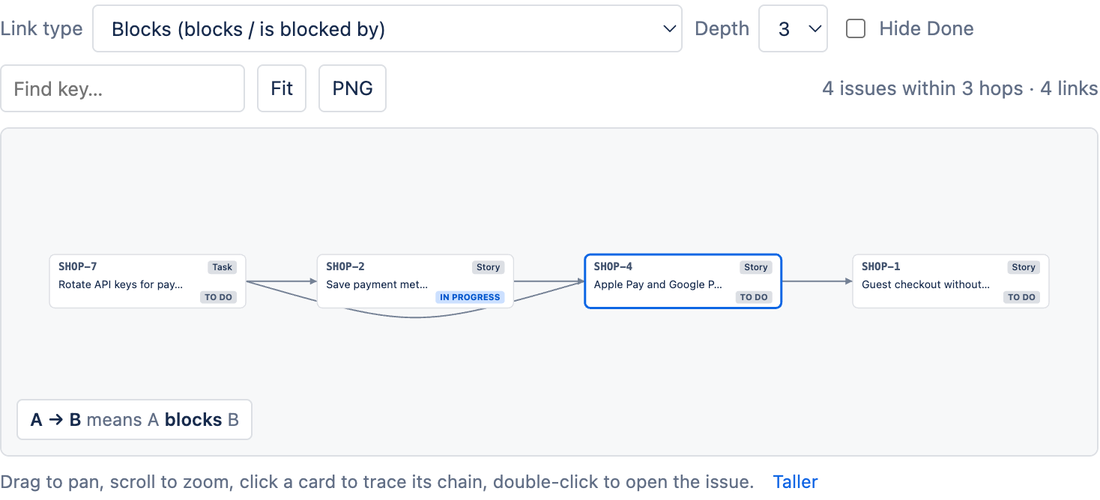
- Dependency chain panel on every issue: what blocks it and what it blocks, 1 to 5 hops out, with the current issue outlined.
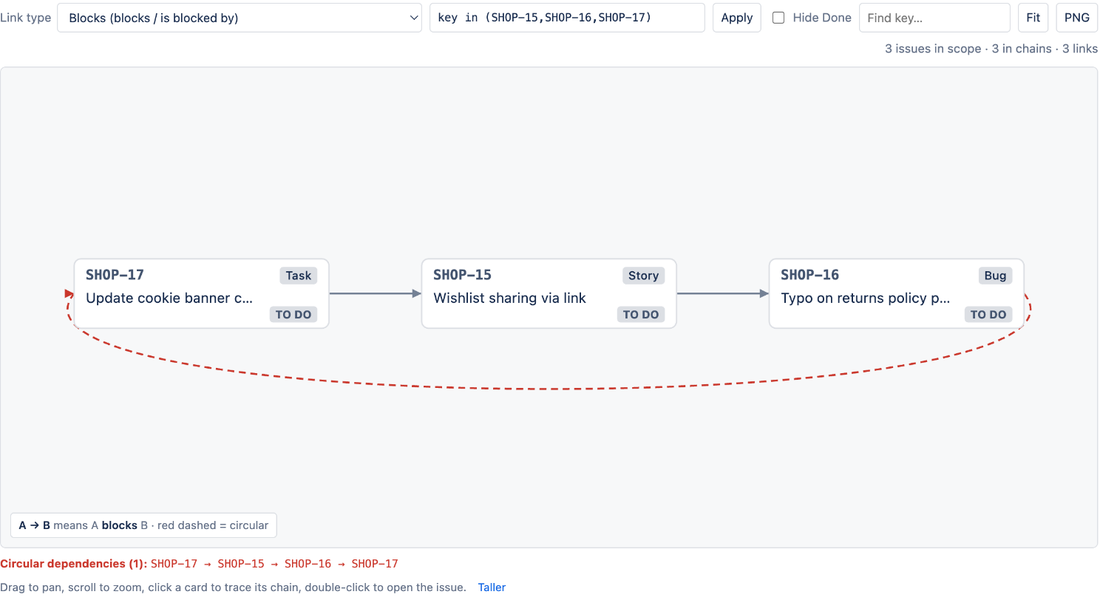
- Circular dependencies: a loop (A blocks B, B blocks A) is drawn with a red dashed closing link and listed by key under the canvas.
- Trace and find: Hide Done, a Find key box, and a click on any card lights up its whole upstream and downstream chain.
- PNG export with a caption line, for a status update or a planning doc. The app follows Jira dark mode.
Who it is for
LinkLens is for teams that already link issues with "blocks" or a custom link type and want to see the whole chain before a release or a sprint review. It does not need Advanced Roadmaps or Jira Premium: it works on Jira Software, Jira Work Management and Jira Service Management Cloud, with any issue link type.
How to start in three steps
- Select Get it now on the Marketplace listing and choose your Jira Cloud site (Jira admin rights are needed for the install).
- Open Dependencies in the project sidebar and pick a link type. Use the JQL box to widen or narrow the scope.
- Click a card to trace its chain, double-click to open the issue, and select PNG to share the graph.
The full guide is in the LinkLens docs.
Data handling and price
LinkLens is built on Atlassian Forge and runs on Atlassian: it reads issues as the viewing user, it is read-only, and the only thing it stores is per-project display settings inside your own site. No issue data leaves your Jira site.
Price: free for sites with up to 10 users, then about USD 0.20 per user per month, billed by Atlassian. Questions go to support@mortiseapps.com, with a reply within one business day.
What comes next
LinkLens joins LinkLens for Confluence, which puts the same kind of graph on a Confluence page. If you try LinkLens for Jira, a short review on the Marketplace listing helps other teams find it, and feature requests are welcome at the support address.
Sources
- LinkLens: Dependency Graph & Blocker Chains for Jira, Atlassian Marketplace - listing public, checked 15 Oct 2026
- LinkLens for Jira product page, Mortise Apps - features, price and data handling