 Mortise Apps
 ConfluenceLinkLens for Confluence
How do I show the Jira work items blocked by another project on a Confluence page?
Native JQL cannot list "work in project ABC that is blocked by work in another project" in one query. The Jira work items macro on a Confluence page can show every open ABC work item that has an "is blocked by" link (project = ABC AND workItemLinkType = "is blocked by" AND statusCategory != Done), but the link fields take work item keys, not a query, and Atlassian lists no supported functions for them, so the query cannot say which project the blocker sits in. To narrow the list to another team's blockers you either name the blocker keys, or add one linkedWorkItems() macro per blocked item, or use a graph that draws both ends of each link.
Checked 31 Oct 2026: Atlassian Support's "JQL fields" page (Work item link, Work item link type) and "JQL functions" page (linkedWorkItems()), both read 31 Oct 2026, and "Display Jira work items in a list" (the Confluence macro), read 14 Oct 2026. We have not run these queries on a live site for this article; the syntax is quoted from those pages.
What JQL can and cannot say about a link
| You want | JQL that works (per Atlassian's pages) | Limit |
|---|---|---|
| ABC work that is waiting on something | project = ABC AND workItemLinkType = "is blocked by" | Matches the link, not where the blocker lives or whether it is done |
| ABC work blocked by one known work item | workItemLink["is blocked by"] = XYZ-12 (or workItemIsBlockedBy = XYZ-12) | One key or a typed list of keys |
| ABC work blocked by any of several known items | project = ABC AND workItemLink["is blocked by"] in (XYZ-12, XYZ-40) | You keep the key list up to date by hand |
| Everything linked to one item | work item in linkedWorkItems(ABC-123, "is blocked by") | linkedWorkItems() takes a single key; IN and NOT IN only |
| ABC work blocked by "anything in project XYZ" | Not possible natively | The link fields list "Supported functions: None", so no sub-query |
Two more details from the same pages: the link fields accept =, !=, IN and NOT IN only, and links to work items on another Jira site (remote links) are not included. Link types are written as their descriptions, so "is blocked by" finds the waiting work and "blocks" finds the work holding others up.
A workable page with no app
For a team page that answers "what are we waiting on from other teams?":
- Add a Jira work items macro (type
/jirawhile editing), switch to JQL and enterproject = ABC AND workItemLinkType = "is blocked by" AND statusCategory != Done. This is the full waiting list, including blockers inside your own project. - If the other team's blockers are few and known (say a platform epic's stories), add a second macro with
project = ABC AND workItemLink["is blocked by"] in (XYZ-12, XYZ-40). That is the cross-project list, as long as somebody keeps the keys current. - For each blocked item that matters this week, add
work item in linkedWorkItems(ABC-123, "is blocked by")to show its blockers with their status. One macro per item. - For the other side of the conversation, the XYZ team can run
project = XYZ AND workItemLinkType = blocks AND statusCategory != Done: their open work that holds somebody up, though again without saying whose work.
This holds up for a handful of dependencies. It breaks down when the key lists go stale, when there are more than a few blocked items, or when a blocker is itself blocked one project further away.
Related reading: blocked work in the current sprint, work items linked to one item and where linkedWorkItems() stops.
When the page needs both ends of every link
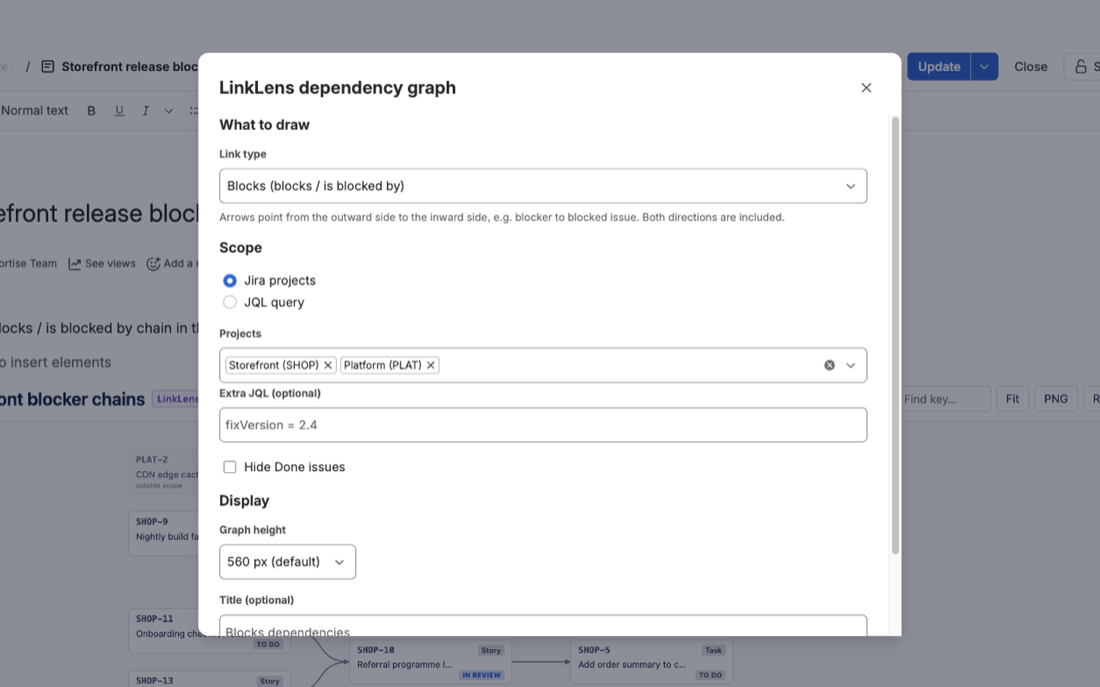
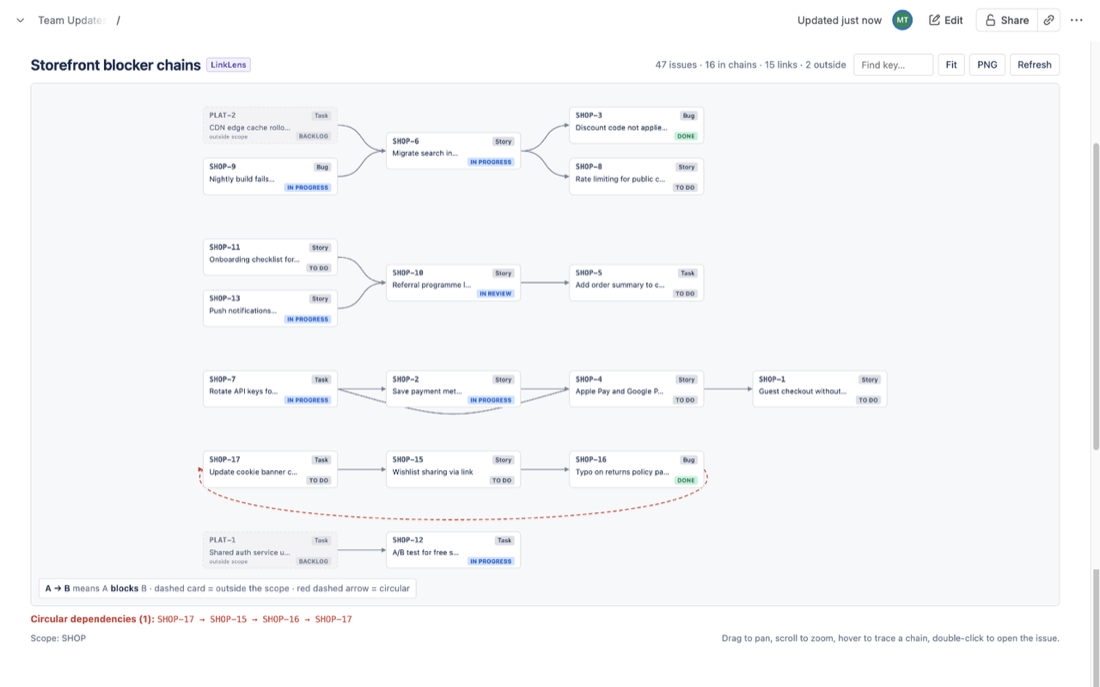
LinkLens for Confluence, which we make, is a macro that draws Jira link chains as a graph on the page. Set the scope to your own project (for example project = ABC AND statusCategory != Done) and the link type to Blocks: every chain in the scope is drawn, and a blocker that lives in another project appears as a dimmed, dashed card marked "outside scope", so the cross-project blockers stand out without a key list. The header counts how many linked items sit outside the scope. Loops are drawn with a red dashed arrow and listed under the graph. It reads Jira as the person viewing the page, so each reader sees only what their own Jira permissions allow.
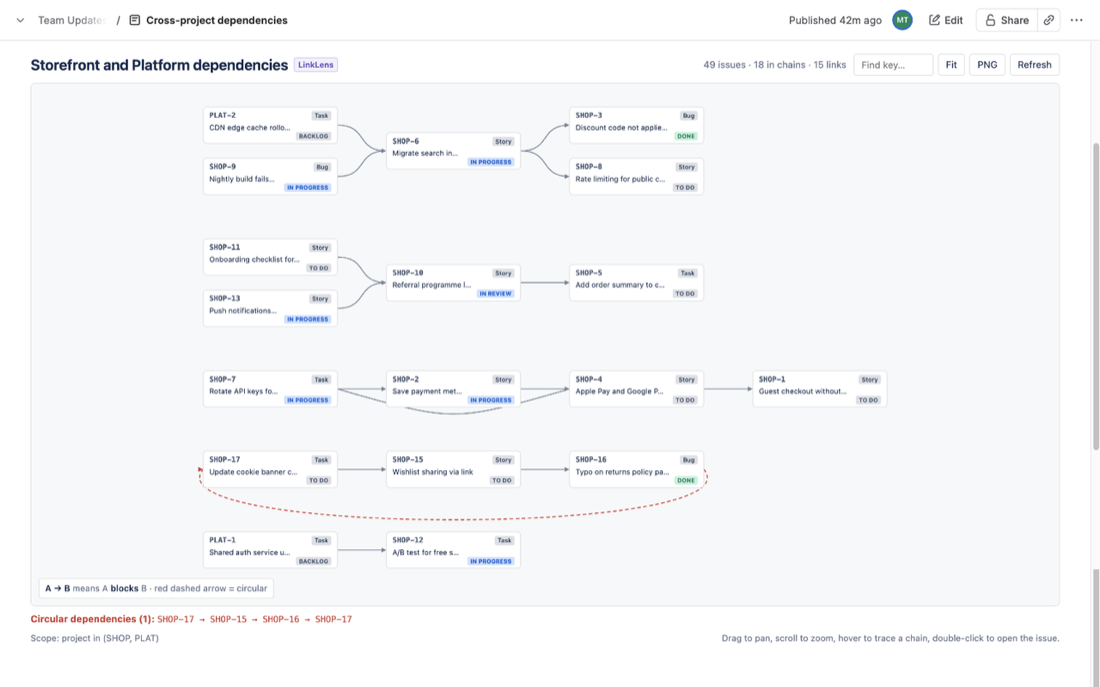
With the scope widened to both projects (project in (SHOP, PLAT) in the demo below), the other team's blockers are drawn as full cards inside the chains, here PLAT-2 and PLAT-1 holding up SHOP work, and a loop is listed under the graph.
Its limits, from our own docs: one link type per macro, up to 2,000 work items per scope, and links are followed one hop outside the scope, so the blocker of an outside blocker is not drawn until you widen the scope (for example project in (ABC, XYZ)). Setup is in the getting-started guide and the app is on the Atlassian Marketplace.
FAQ
Can JQL filter on the project of a linked work item?
Not with the documented fields and functions. workItemLink and workItemLinkType take keys or link type names and list no supported functions, so there is no way to write "linked to any work item in project XYZ" in standard JQL.
Does the macro list show whether the blocker is done?
No. workItemLinkType = "is blocked by" matches the link itself. An item stays on the list until somebody removes the link, even after its blocker is finished. A linkedWorkItems() macro for that item shows the blocker's status.
Are blockers on another Jira site included?
No. Atlassian's JQL fields page says remote links to work items on other Jira instances are not included in link searches.
Sources
- JQL fields, Atlassian Support - Work item link (
workItemLink["link type"],workItemIsBlockedBy), Work item link type (operators, "Supported functions: None", remote links not included). Read 31 Oct 2026. - JQL functions, Atlassian Support - linkedWorkItems() syntax with one work item key and up to two link types, IN and NOT IN only. Read 31 Oct 2026.
- Display Jira work items in a list, Atlassian Support - inserting the macro and searching with JQL. Read 14 Oct 2026.