 Mortise Apps
 ConfluenceLinkLens for Confluence
How do I show the Jira work items linked to one work item on a Confluence page?
To show the work items linked to one Jira work item on a Confluence page, insert the Jira work items macro (type /jira while editing), switch the search to JQL, and enter issue in linkedWorkItems(ABC-123). For one link type only, add it as a second argument: issue in linkedWorkItems(ABC-123, "is blocked by"). The macro shows the result as a list on the page, and because it is a saved search, items linked later appear without editing the page. That works on any Confluence Cloud page connected to Jira, with no app.
Step by step, as Atlassian documents it
Atlassian's page "Display Jira work items in a list", read 14 Oct 2026, gives three ways to insert the macro: from the toolbar, by typing /jira while editing, or by pasting a Jira search or filter URL into the page. Then:
- Pick JQL instead of BASIC (BASIC is the default) and enter the query.
- Select Insert work items. The result appears as a list.
- Choose columns with the column icon and drag them into order. Status and link-relevant fields such as Priority and Assignee are worth adding.
- To change the query later, select the pencil icon at the bottom of the list.
If you already have a saved filter in Jira, paste its URL instead: the same page says Confluence converts a search or filter URL to a JQL search.
Queries that answer common "what is linked" questions
The function and fields come from Atlassian's JQL reference, read 13 Oct 2026 (our post on linkedWorkItems() covers them in more detail). Replace ABC-123 with your key.
| You want on the page | JQL for the macro |
|---|---|
| Everything linked to ABC-123 | issue in linkedWorkItems(ABC-123) |
| Only what blocks it, still open | issue in linkedWorkItems(ABC-123, "is blocked by") AND statusCategory != Done |
| Work items that block ABC-123 (field form) | workItemLink["blocks"] = ABC-123 |
| Work items linked to any of a few keys | workItemLink in (ABC-123, ABC-456) |
| Just the number of open blockers | The blocker query above with COUNT VIEW selected |
The link type argument is case-sensitive and is the link's description ("is blocked by", "blocks"), so the direction matters: if the list shows the opposite side of what you expected, swap the description. Older filters and guides spell the function linkedIssues() and the fields issueLink / issueLinkType; Atlassian's page now uses the work item names. We have not tested which spellings every site accepts, so use the name the JQL autocomplete offers on your site.
The COUNT VIEW option shows only the number of work items your search returns, linked to that search in Jira, which suits a status table row such as "open blockers: 3".
Where the native macro stops
- One hop.
linkedWorkItems()takes a single key and returns the work items linked to it. A blocker's own blockers are not in the list unless you add another macro for each of them. - A list, not links. The macro shows the matching work items, not which one links to which or in which direction. With two link types in one query, you cannot tell from the list which row came through which link.
- One key per query. The function does not take a JQL query as input, so "everything linked to the work in this release" is not one native macro;
workItemLink in (...)needs the keys typed in. - This Jira site only. Atlassian's JQL fields page says remote links to work items on other Jira sites are not included.
For "what is still in the way of this one item", one or two macros with the queries above are enough, and they cost nothing.
When the page needs the whole chain
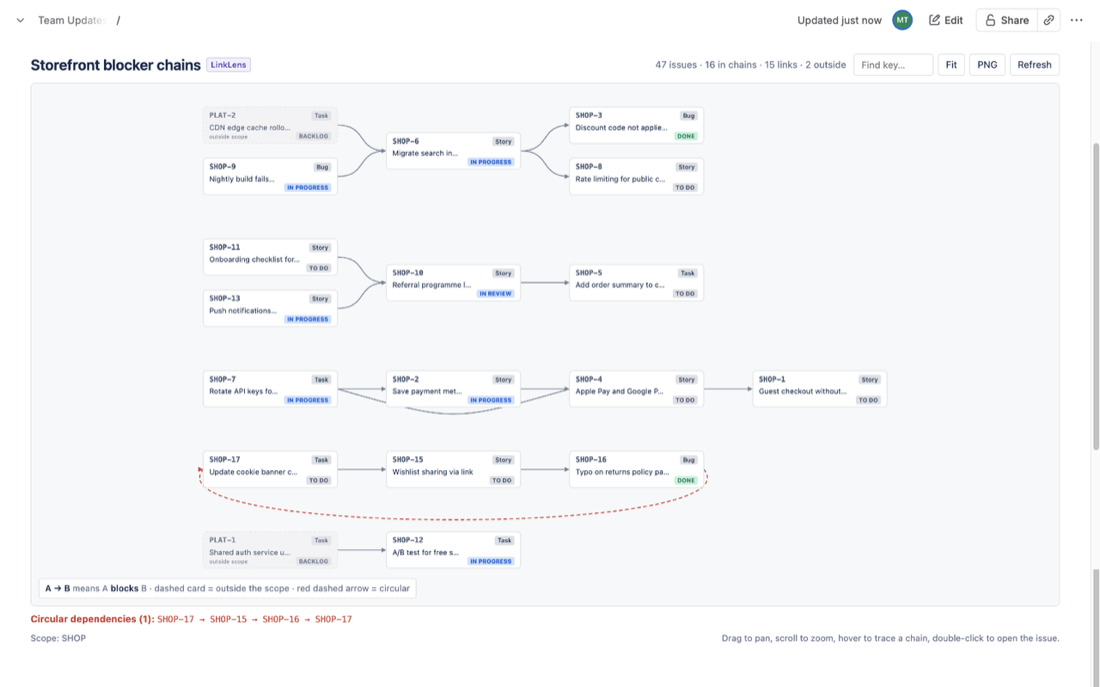
When the page has to answer "what blocks what, across the release", the list form runs out. LinkLens for Confluence, which we make, is a macro that draws Jira link chains as a graph on the page: you pick a link type (Blocks, or any link type on your site) and a project or JQL scope, and chains are laid out left to right. A loop is drawn in red and listed under the graph, linked work items outside the scope appear dimmed, and the graph exports as a PNG. It reads Jira live as the person viewing the page, so each reader sees only what their Jira permissions allow, and it does not change any links.
Its limits: one link type per macro, and it follows links one hop outside the scope, so put the whole release or epic in the JQL scope if you want every chain. Setup steps are in the getting-started guide, and the app is on the Atlassian Marketplace. For a whole project's map, see How to put a Jira dependency map in a Confluence page; for one epic's children and their blockers, see this epic walkthrough.
FAQ
Is the Jira work items macro the same as the old Jira Issues macro?
It is the same feature under Atlassian's newer "work items" naming: the macro that lists Jira results on a Confluence page from a search, a filter URL or a single work item.
Does the list update when someone adds a link in Jira?
The macro stores a search, not a copy of the results, so a newly linked work item matches the query the next time the list is loaded. Atlassian's page does not state a refresh interval.
Can I show only the number of blockers?
Yes. Select COUNT VIEW when you insert the macro and the page shows the number of work items the search returns.
Can one macro show the links of several work items?
Only with a typed list of keys: workItemLink in (ABC-123, ABC-456). A query as input is not supported by linkedWorkItems().
Sources
- Display Jira work items in a list, Atlassian Support - three ways to insert the macro, BASIC and JQL search, COUNT VIEW, columns, pencil icon to edit, pasted Jira URLs converted to a JQL search. Read 14 Oct 2026.
- JQL functions, Atlassian Support -
linkedWorkItems()syntax, case-sensitive link type arguments, IN and NOT IN only. Read 13 Oct 2026. - JQL fields, Atlassian Support -
workItemLinkandworkItemLinkType; remote links to other Jira sites are not included. Read 13 Oct 2026.