 Mortise Apps
 ConfluenceLinkLens for Confluence
How do I show a Jira epic's child issues and their blockers on a Confluence page?
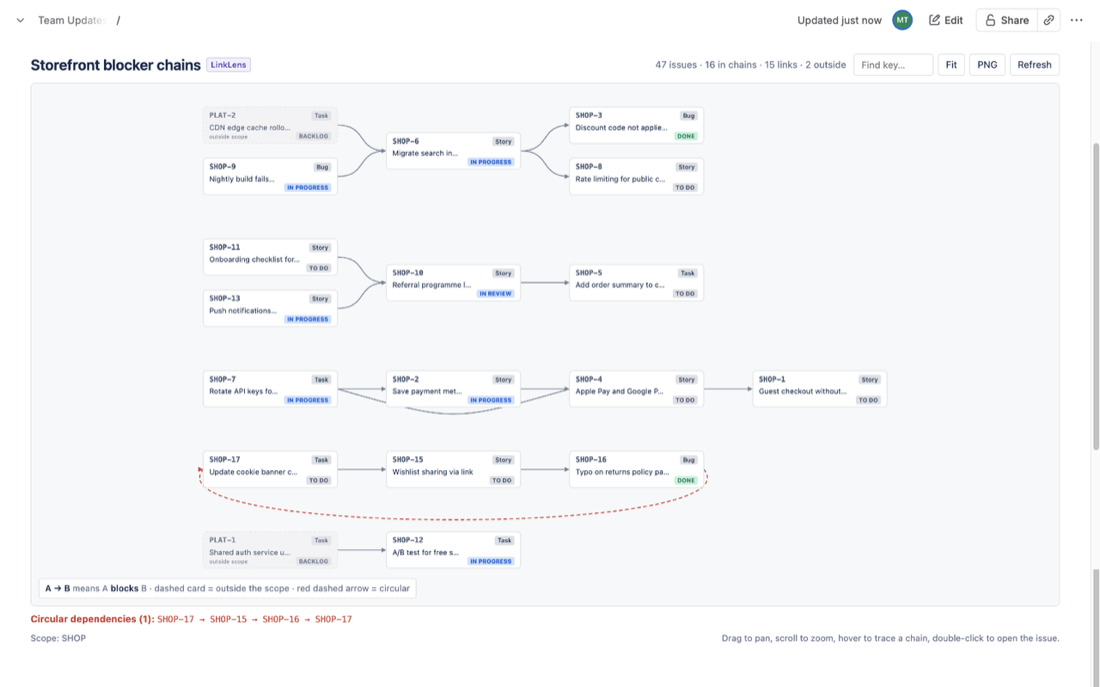
To show a Jira epic's child issues and their blockers on a Confluence page with only the built-in tools, use three Jira Issues macros. The first lists the children with parent = SHOP-100. The second shows the children that are waiting on something, with parent = SHOP-100 AND issueLinkType = "is blocked by" AND statusCategory != Done. The third lists the blockers themselves with issueBlocks in (SHOP-101, SHOP-102, ...) AND statusCategory != Done. That last query needs the child keys typed in by hand, because JQL does not accept a query inside it. It also goes only one hop, so a blocker's own blockers stay hidden. LinkLens for Confluence, which we make, draws the whole chain from a parent = SHOP-100 scope instead.
The 80-second video version: Jira epic blockers on a Confluence page (YouTube).
We ran every query on this page on our own Jira Cloud demo site on 9 October 2026, using the Jira REST search API. The site's demo epic has no linked children, so the link queries ran on demo issues in one project, and parent = ran on an epic in another.
Why an epic page needs blockers, not just children
An epic page in Confluence usually answers two questions for the people who read it: how far along is this, and what is holding it up? The first question is about the epic's own children. The second is often about work outside the epic: a platform task in another team's project, or a bug in a different epic, linked to one of your stories with Blocks.
A list of the children answers the first question. It cannot answer the second, because the blocker is not a child. That is the whole difficulty, and it is why the native recipe has three steps.
Step 1: list the epic's children
Add a Jira Issues macro (Atlassian now calls it "Display Jira work items in a list") and give it this JQL:
parent = SHOP-100 ORDER BY statusUse parent, not "Epic Link". Atlassian's JQL field reference says the Epic link field "has been retired in favor of Parent" as of February 2024. Old filters still run, but new ones should use parent. The parent field works for company-managed and team-managed spaces, and it takes an issue key or an id. On our site, parent in (KAN-1) returned that epic's one child.
The macro can show a table with the columns you pick, a single item, or just a count. If you want a number for the page header, add the same macro again in count view with parent = SHOP-100 AND statusCategory != Done.
Step 2: show which children are blocked
parent = SHOP-100 AND issueLinkType = "is blocked by" AND statusCategory != DoneThis returns the open children that have at least one "is blocked by" link. Two details matter:
- Use "is blocked by", not "blocks". Atlassian's JQL reference says a link type search looks at three properties: the name, the outward description and the inward description. On the default Blocks type, the name and the outward description are both "blocks", so
issueLinkType = blockscannot tell the blocking side from the blocked side. "is blocked by" is only the inward description, so it isolates the blocked side. On our site it did: issues that only block others were not returned. - A finished blocker still counts. The query matches the link, not the blocker's status. On our demo site, SHOP-17 is blocked only by SHOP-16, which is Done, and
issueLinkType = "is blocked by"still returned SHOP-17. Step 3 lets you check which blockers are still open.
Step 3: list the blockers themselves
Atlassian's JQL field reference documents a link field, with examples such as WorkItemBlocks = ABC-123: the issues "that block the work item ABC-123". On our site, the issue-named spelling worked too, and it takes a list:
issueBlocks in (SHOP-101, SHOP-102, SHOP-103) AND statusCategory != DoneWe tested both spellings on 9 October 2026. issueBlocks in (SHOP-6, SHOP-10) and workItemBlocks in (SHOP-6, SHOP-10) each returned the same four blockers. One of them, PLAT-2, is in another project. So blockers outside the epic and outside the project do appear. Adding AND statusCategory != Done dropped SHOP-16, the finished blocker from step 2. The older way, issue in linkedIssues(SHOP-6, "is blocked by"), returned the same blockers for one issue at a time.
Put this query in a third Jira Issues macro with Status, Assignee and Due date columns, and the page shows who the epic is waiting on.
Two things to watch for:
- The function name in Atlassian's docs. The functions page now prints
linkedWorkItems(). On our site that spelling returned no results, with no error, wherelinkedIssues()returned four. UselinkedIssues()until the two agree. - Older advice is out of date. Most answers online say
linkedIssues()takes only one issue key, so you need oneORclause per child. That is still true of the function. Atlassian's own request for a multi-issue version, JRACLOUD-63414, was "Under Consideration" with 34 votes on 9 October 2026. Its suggested workaround is theORchain. TheissueBlocks in (...)field form already takes a list.
What the native recipe cannot do
- No query inside the list. You cannot write
issueBlocks in (parent = SHOP-100). On our site,issueLink in (parent = KAN-1)failed with "Expecting ',' or ')' but got '='". The child keys are typed in by hand, so a story added to the epic next week is missing from step 3 until someone edits the page. - One hop only. On our demo site, SHOP-7 blocks SHOP-2, SHOP-2 blocks SHOP-4, and SHOP-4 blocks SHOP-1.
issueBlocks in (SHOP-1)returns only SHOP-4. To see the whole chain you query again for each blocker. Atlassian closed the request for a recursivelinkedIssues()(JRACLOUD-20104) as "Won't Do". - Lists, not a picture. Three tables tell you which issues are involved, not which one blocks which. A reader has to match keys across the tables to rebuild the chain.
For most epics with a handful of stories, the three macros are enough, and they are free. Edit step 3 when the epic changes.
How to do it with LinkLens for Confluence
LinkLens for Confluence is our Confluence macro. It reads Jira issue links each time the page opens and draws them as a graph, so the epic page cannot drift from Jira.
- Install it and connect it to Jira once from Manage apps (a site admin does this).
- Edit the epic page, type
/LinkLensand pick LinkLens dependency graph. - Set Link type to Blocks and Scope to a JQL query:
parent = SHOP-100. Turn on Hide Done issues if you only care about open work. Select Save.
The scope is a query, so new children appear without editing the page. Blocker chains between the children are drawn left to right, blockers first. A blocker outside the epic appears as a dimmed card marked "outside scope". A loop is drawn in red and listed under the graph.
Its limits are close to the native ones. It follows links one hop outside the scope, so a blocker's own blockers outside the epic are not followed. It draws one link type per macro, and up to 2,000 issues per graph. Each reader sees only what their Jira permissions allow. It is free for up to 10 users (Marketplace listing), and the getting-started guide has the details. For a dependency map of a whole project or release, not one epic, see How to put a Jira dependency map in a Confluence page.
FAQ
Can I still use "Epic Link" in JQL?
Existing filters that use it still run, according to Atlassian's JQL field reference. New filters should use parent = KEY, which works for team-managed and company-managed spaces.
Will the macros show blockers from other projects?
Yes. On our site, issueBlocks in (...) returned a blocker from a second project, PLAT-2. Whether a reader sees it on the page depends on their access to that project in Jira.
Is there a single JQL query for "all open blockers of an epic's children"?
Not natively, as of 9 October 2026. JQL has no subquery, so you have to list the child keys yourself. Marketplace JQL extension apps add functions for this. We have not tested them, so we do not compare them here.
Sources
- JQL fields, Atlassian Support - Parent field (
parent = TEST-1234), Epic link retired in favor of Parent as of February 2024, the work item link field withWorkItemBlocks = ABC-123, and the link type search covering name, outward and inward descriptions. Read 9 Oct 2026. - JQL functions, Atlassian Support -
linkedWorkItems(workItemKey, linkType), documented for one work item key. Read 9 Oct 2026. - Display Jira work items in a list, Atlassian Support - Jira Issues macro list, single item and count views from JQL, filters or URLs. Read 9 Oct 2026.
- JRACLOUD-63414, Enhance Issue Link Type Search JQL queries / more options for linkedIssues() parameters - linkedIssues() takes a single issue key; Under Consideration, 34 votes on 9 Oct 2026; workaround is an OR chain.
- JRACLOUD-20104, Add a third parameter to the linkedIssues() JQL function to support recursively walking a link tree - closed as Won't Do.