Mortise Apps
TeamLens for Jira
Jira dashboard by team: why the Atlassian Team field is missing from gadgets and how to report on it anyway
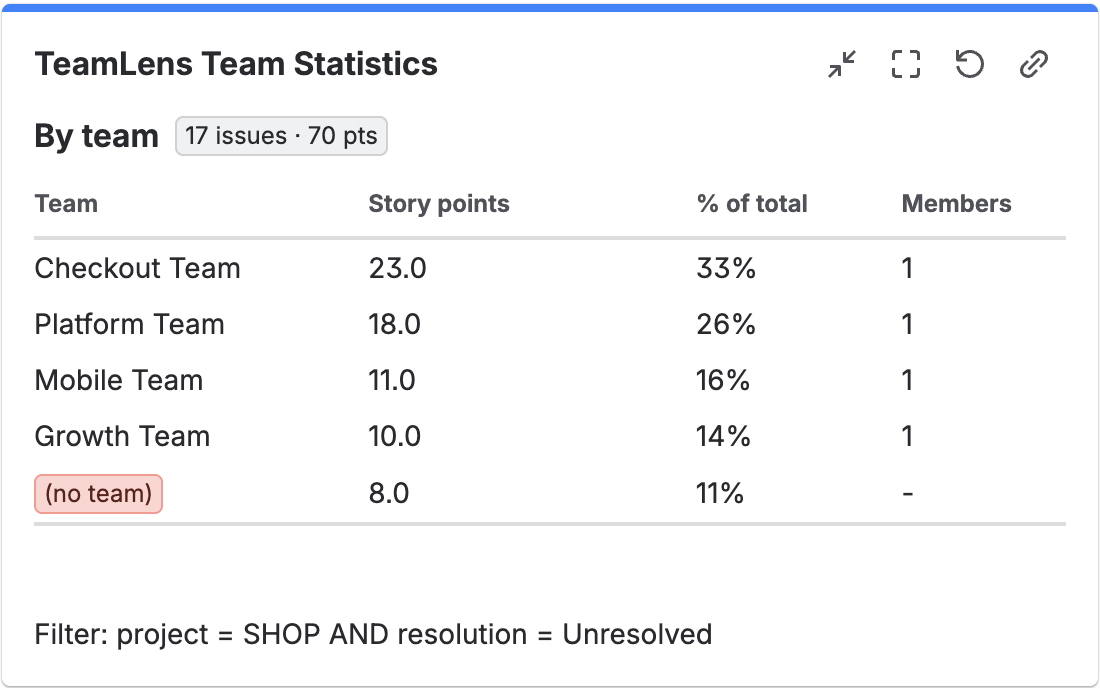
A Jira dashboard grouped by team is a dashboard whose gadgets split issue counts or story points by the Atlassian Team field, the field Jira Plans uses to say which team owns a piece of work. Jira Cloud's built-in statistics gadgets (Pie Chart, Issue Statistics and Two Dimensional Filter Statistics) do not offer Team as a grouping option, so out of the box that dashboard cannot be built. You either mirror the Team into a second custom field with Automation, or you use a gadget that reads the Team field directly. TeamLens for Jira does the latter.
The problem in one screenshot
Open any dashboard, add a Pie Chart gadget, pick a filter, and scroll through the "Statistic type" list. Assignee, Priority, Project, Status, every select-list custom field you own. No Team. The same is true for Issue Statistics and for both axes of Two Dimensional Filter Statistics.
This is not a configuration mistake. The Team field is a special field type owned by the Plans (formerly Advanced Roadmaps) side of Jira, and the dashboard gadgets were never taught to group by it. Atlassian tracks the gap in several public tickets:
- JRACLOUD-87808, "Team field not supported for sorting on gadgets, JQL or boards", open since October 2020 with 648 votes at the time of writing, still in "Gathering Interest".
- JRACLOUD-87800, the request to let Two Dimensional Filter Statistics use Team on an axis, 325 votes, "Gathering Interest".
- JRACLOUD-74627, the same request for the Pie Chart gadget, 116 votes, open since 2020.
Three tickets, a thousand-plus votes, five years. If your reporting depends on it, waiting is not a plan.
A real example: the release train that could not see itself
Take a company running a quarterly planning cycle in Jira Plans. Six delivery teams, one shared backlog per product area, the Team field set on every epic and story because Plans needs it for capacity. The programme lead wants one dashboard: open story points per team, bugs per team, and a "who owns nothing" list so unassigned work does not slip through.
Every one of those is a grouping by Team, and every gadget refuses. The lead ends up exporting a filter to a spreadsheet each Monday and building a pivot table by hand. It takes twenty minutes, it is stale by Tuesday, and nobody trusts it.
The usual workaround and what it costs
The standard advice on the Atlassian Community is to mirror the Team into a normal select-list custom field, keep the two in sync with Automation, and then group the gadgets by the mirror. Atlassian's own knowledge base describes the mechanics of writing the Team field from an Automation rule using the field's custom field id and the team's UUID.
It works, but the bill arrives later:
- Two fields for one fact. Every screen, filter and export now has "Team" and "Team (mirror)", and people pick the wrong one.
- A rule per direction, per project. Team changed in Plans? Rule fires. Mirror edited by hand? Another rule, or drift. Bulk edits and imports hit rule execution limits on busy sites.
- A list to maintain forever. The mirror is a static option list. Rename a team in Atlassian Teams and the mirror still says the old name until an admin edits it. Create a team and it is missing until someone notices.
- Historic data is wrong. Issues touched before the rule existed have an empty mirror, so the dashboard quietly undercounts.
For a site with a dozen teams this is an afternoon of admin work and a permanent maintenance chore. For fifty teams it is a part-time job.
How to do it with TeamLens
TeamLens adds a gadget that groups by the real Team field, so there is nothing to mirror.
- On the dashboard, select Edit, then Add gadget, search for Team Statistics and select Add.
- In the settings form, enter a JQL filter, for example
project = SHOP AND sprint in openSprints(). Leave it empty to useresolution = Unresolved. - Choose the metric: Issue count or Story points. The gadget sums Story point estimate on team-managed projects and Story Points on company-managed ones, detected automatically.
- Select Save.
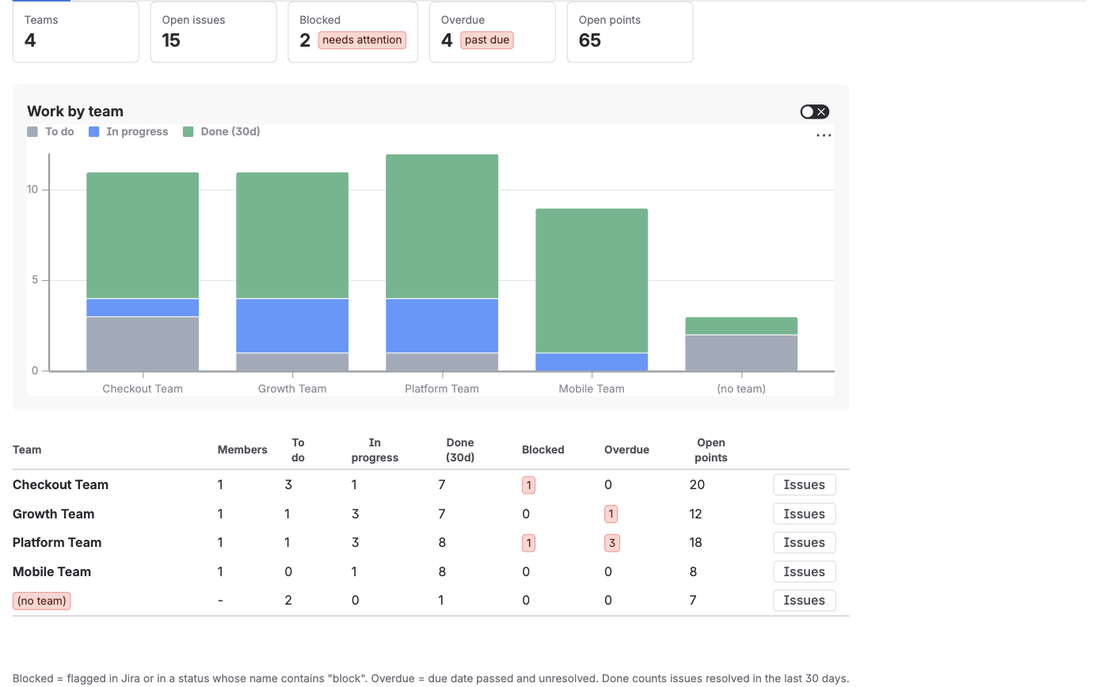
The gadget shows one row per team with the metric, the team's share of the total, and the team's current size from Atlassian Teams. Issues with no Team appear in an explicit (no team) row, so unowned work is the first thing you see rather than the thing that disappears. The gadget refreshes every 15 minutes and on reload, and handles up to 5,000 issues per filter.
For the programme lead above, the Monday spreadsheet becomes three gadgets: open points by team, open bugs by team (filter issuetype = Bug AND statusCategory != Done), and a hygiene gadget with project = SHOP AND issue in noTeam() that lists exactly the work nobody owns.
What TeamLens cannot do
It cannot add Team to Jira's own Pie Chart or Two Dimensional gadgets; no app can change native gadgets. It provides its own instead. It also cannot read team member lists, because Atlassian has not opened that API to apps yet (JRACLOUD-92072), so per-person breakdowns inside a team are not available. The gadget shows team size, not names. And it is Jira Cloud only.
FAQ
Does the Team field have to be on the issue screen for the gadget to work?
Yes. The gadget reads whatever value the Team field holds. Atlassian's documentation on using Teams in Jira projects describes how to add the field to company-managed and team-managed project layouts.
Can I group by team and by status at the same time?
Not in version 1. A pivot gadget with Team on one axis and status, assignee or sprint on the other is the next planned feature. Today you can approximate it with two gadgets and a JQL clause such as statusCategory = "In Progress".
What does it cost?
TeamLens is free for sites with up to 10 users. Above that it is USD 1 per user per month, billed by Atlassian with a 30-day trial. It is listed on the Atlassian Marketplace; product details are on the TeamLens page.
Sources
- JRACLOUD-87808, Team field not supported for sorting on gadgets, JQL or boards - open since 2020, 648 votes, Gathering Interest.
- JRACLOUD-87800, Two Dimensional Filter Statistics gadget to support Team type fields - 325 votes, the two-dimensional gadget gap.
- JRACLOUD-74627, Add Parent Link and Team as a statistic type on Pie Chart gadget - 116 votes, the Pie Chart gap.
- Teams in Jira projects, Atlassian Support - adding the Team field to project layouts.
- Automation: Update the Team field based on the Assignee field, Atlassian KB - how the mirror-field workaround is wired.
- Team field in Jira REST API, Atlassian Developer - the field is a custom field holding a team UUID.